
The first question is Why Are People Switching to AI Presentation Tools?
Now understand in short. It’s 10 PM the night before your investor pitch. You’ve got your ideas, your data, and a blank PowerPoint staring back at you. Sound familiar?
That was the norm not too long ago. But in 2026, millions of people are using AI to turn a simple text prompt into a full, polished presentation — in under 60 seconds.
The AI presentation tools market is exploding. Whether you’re a student preparing a class project, an entrepreneur pitching to investors, or a marketing team working on a client proposal, there’s now a tool built exactly for you.
In this guide, we’ve reviewed the 7 best AI presentation makers of 2026 — covering what they do, how much they cost, who they’re best for, and what the real numbers say.
Let’s Get Started…
Quick Comparison Table – The 7 Best AI Presentation Makers in 2026
| Tool | Best For | Starting Price | Free Plan | Monthly Users |
|---|---|---|---|---|
| Gamma | Fast, visual AI decks | $5/month | ✅ Yes | 70M+ |
| Canva AI | Designers & everyone | $2/month | ✅ Yes | 265M+ |
| Prezent | Enterprise teams | Custom ($39+/mo) | ✅Trial | Tens of thousands (enterprise) |
| Beautiful.ai | Clean business slides | $12/month | ✅ Trial | N/A |
| Pitch | Teams & sales decks | $10/month | ✅ Yes | Millions |
| Prezi | Visual storytelling | $2/month | ✅ Yes | 160M+ |
| Plus AI | Google Slides/PPT users | $10/month | ✅ Trial | 1M+ installs |
Disclaimer: Pricing, features, integrations, and free-plan availability may change over time. We recommend visiting each tool’s official website for the most up-to-date information before purchasing or subscribing.
1. Gamma — Best for Fast, Beautiful AI-Powered Decks
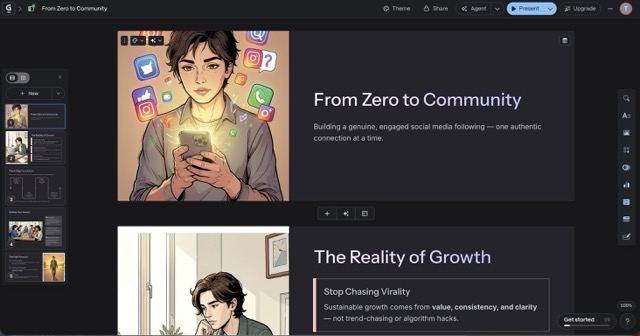
Gamma is an AI-powered presentation, document, and website builder that lets you create professional-looking content from a simple text prompt — sometimes in under a minute. It’s not just slides. You can also create web pages, documents, and social media visuals all in one place.
Founded in 2020 by Grant Lee, James Fox, and Jon Noronha (all former colleagues at Optimizely), Gamma has grown at a staggering pace.
Key Features
- AI Text-to-Presentation: Type a topic and get a complete deck instantly
- Gamma Agent (launched Sept 2025): An AI partner that researches the web, refines your content, and restyles your deck through simple conversation
- Multi-format output: Presentations, docs, websites, and social posts — all in one tool
- Gamma Imagine (March 2026): AI image generator for brand-specific marketing assets
- Card-based scrollable layout — a modern alternative to traditional slides
- SOC 2 Type II certified (October 2025) — your data is safe
- API access for automation via Zapier and Make
- Team features with shared brand kits and workspace templates
Pricing
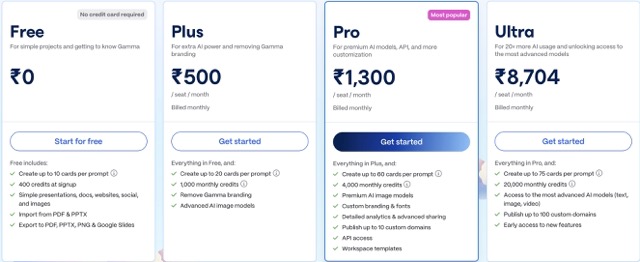
| Plan | Price | What You Get |
|---|---|---|
| Free | $0 | 400 credits at signup, public presentations |
| Plus | $5/month | Watermark removal, PPT export, custom branding |
| Pro | $13/month | Unlimited AI, team features, API access |
| Ultra | $90.50/month | Most advanced AI models, Studio Mode, 75-card decks |
| Enterprise | Custom | SSO, compliance, dedicated support |
Gamma AI Real Numbers
- 70 million total users
- 600,000+ paying subscribers
- $102M in annual recurring revenue (ARR) as of October 2025
- $2.1 billion valuation (Series B led by Andreessen Horowitz, November 2025)
- Profitable since 2023 — with only 52 employees
- 400 million+ presentations, websites, and docs created on the platform
(Source: Sacra, TechCrunch, November 2025)
Use Cases
- Students creating class presentations
- Startups building pitch decks fast
- Marketing teams producing campaign visuals
- Freelancers delivering client proposals
- Remote teams sharing async updates
Pros
- ✅ One of the fastest AI generation tools we tested
- ✅ Multi-format (decks, docs, pages, social)
- ✅ Generous free plan to start
- ✅ Active development — major updates every few months
- ✅ Stunning visual design out of the box
Cons
- ❌ PowerPoint export sometimes breaks layouts (a common complaint)
- ❌ The credit system can feel limiting on the free tier
- ❌ Design can feel repetitive after extended use
- ❌ Less control over precise layouts compared to PowerPoint
User Ratings
- G2: 4.1/5
- ProductHunt: 4.5/5
- Capterra: 4.0/5
- BotBunch: 4.0/5 (Based on Testing)
2. Canva AI — Best for Everyone, Especially Visual Creators
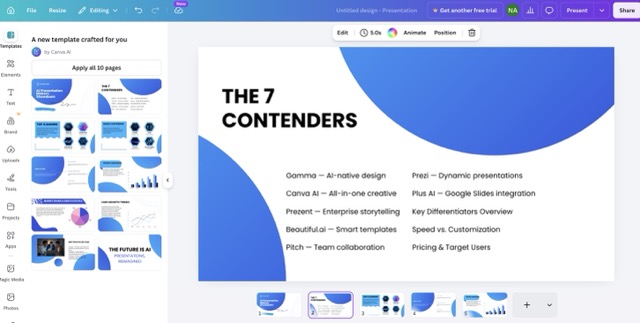
Canva started as a drag-and-drop design tool and has grown into one of the most powerful creative platforms in the world. Its AI features — bundled under the banner “Magic Studio” — now let you generate entire presentations, rewrite text, animate slides, and transform images automatically.
Key Features
- Magic Design: Generate a full presentation from a topic or an uploaded document
- Magic Write: AI text generator for slide content
- Magic Animate: One-click animation for all your slides
- Visual Suite 2.0: Docs, presentations, whiteboards, websites — all in one place
- Canva Sheets: Turn data into visual presentations automatically
- 160M+ templates and assets in the library
- 100+ languages supported
- Brand Kit for teams to maintain consistent visuals
Pricing
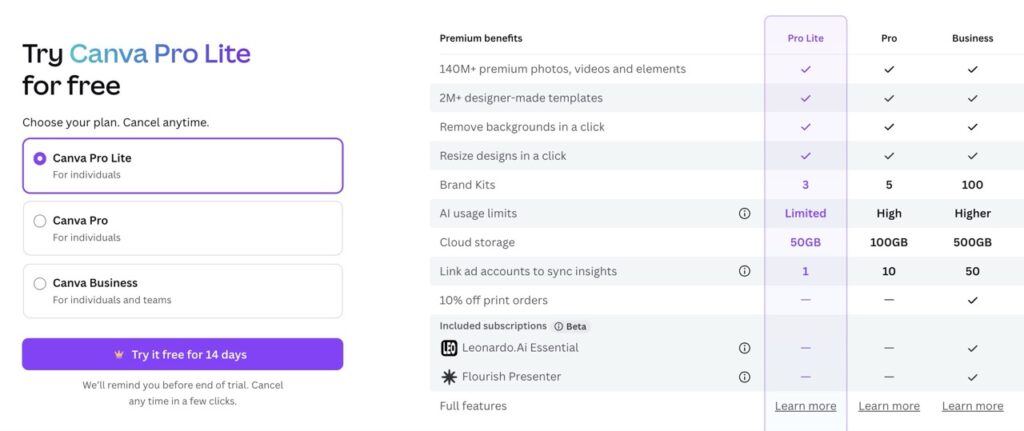
| Plan | Price | Who It’s For |
|---|---|---|
| Free | $0 | Casual users and students |
| Pro Lite | $2 | For Individuals (Free+premium design) |
| Pro | $5/month (Billed Monthly) | Individual creators and freelancers |
| Teams | ~$41.67/month (for 5 users) | Small businesses |
| Enterprise | Custom | Large organizations |
Canva Real Numbers
- 265 million monthly active users
- 31 million paying subscribers
- $4 billion in annual recurring revenue (2025)
- $42 billion valuation
- 800 million AI tool uses per month
- Over 35 billion total designs created on the platform
- 1 billion+ presentations created
- Industry analysts have widely speculated about a future IPO.
(Source: Demandsage, TechCrunch, February 2026)
Use Cases
- Students and teachers (Canva for Education: 60M+ users)
- Social media managers building visual content
- Small business owners creating pitch decks
- Marketing teams producing branded assets
- Anyone who already lives in Canva
Pros
- ✅ Massive template library (millions of options)
- ✅ Best free plan in its category
- ✅ AI tools deeply integrated into a familiar workspace
- ✅ Works for presentations AND design, video, docs, and more
- ✅ Most accessible tool for complete beginners
Cons
- ❌ AI presentation output is more “outline-level” — needs manual polish
- ❌ Can be overwhelming due to the sheer number of features
- ❌ Not as specialized for business presentations as Prezent or Beautiful.ai
- ❌ Heavy branding on free exports
User Ratings
- G2: 4.7/5
- ProductHunt: 4.8/5
- Capterra: 4.5/5
- BotBunch: 4.4/5 (Based on Testing)
3. Prezent — Best for Enterprise Teams & Fortune 500 Companies
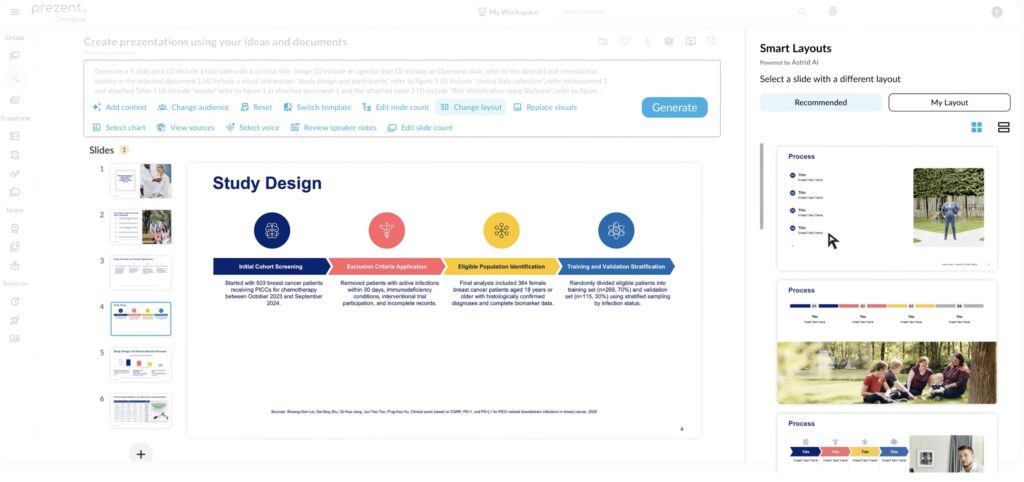
Prezent is not your average AI presentation tool. It’s an enterprise-grade platform designed for large business teams who need brand compliance, storytelling structure, and collaboration — all in one place. Its AI assistant, Astrid, builds fully branded slide decks from simple text prompts.
Key Features
- Astrid AI: Generates structured presentations that follow the “pyramid principle” — a logic framework used by top consultants
- Fingerprints: Learns the communication style and preferences of your audience and tailors the deck accordingly
- Slide Library: 35,000+ expert-designed slides (especially strong for Life Sciences and Tech)
- Synthesis: Converts long presentations into executive summaries
- Agent API (launched 2025): Lets developers embed Prezent’s slide generation in internal tools
- Overnight decks: Send a brief, get a polished deck by morning
- Brand compliance tools: Every slide stays on-brand, always
- Microsoft 365 + Google Slides compatible
Pricing
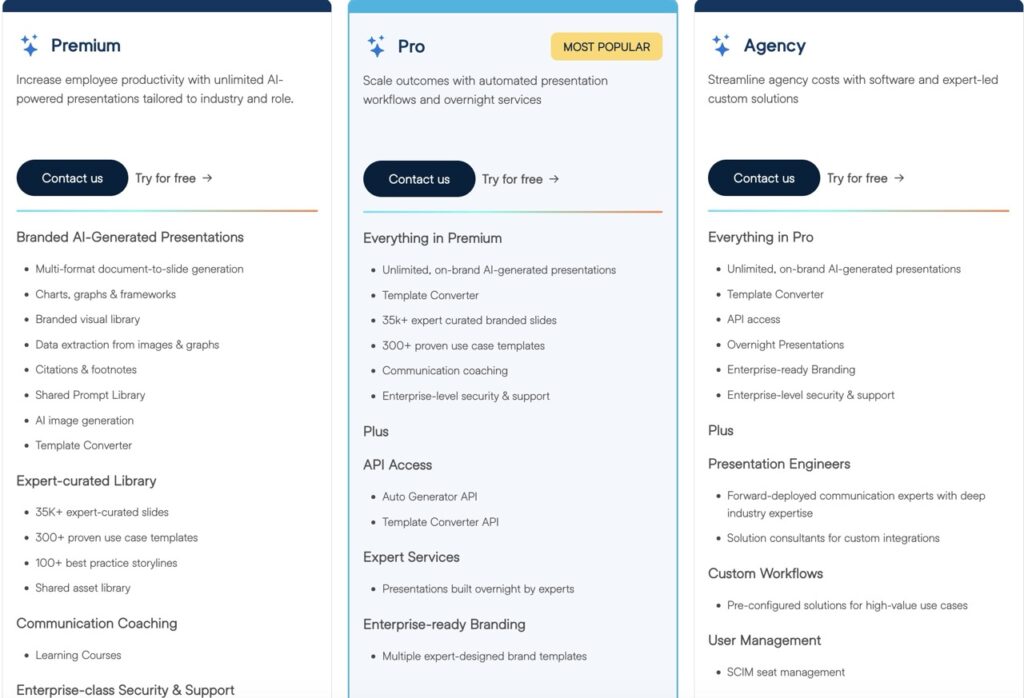
| Plan | Price | Who It’s For |
|---|---|---|
| Lite | ~$39/user/month | Basic professional use |
| Premium | Custom (contact sales) | Full enterprise features |
| Pro | Custom (contact sales) | Advanced enterprise + services |
| Agency | Custom | Large organizations |
Note: Prezent’s pricing is significantly higher than other tools on this list because it’s designed for enterprise budgets. It targets Fortune 2000 companies, not individuals.
Prezent AI Real Numbers
- $400 million valuation (October 2025)
- $74.3 million total funding raised
- 150+ Fortune 2000 customers
- 40 of the top 50 pharmaceutical companies are clients
- Backed by Greycroft, Zoom Ventures, Nomura Strategic Ventures
- Named among The Software Report’s Top 25 AI Companies of 2025
Real ROI example (Workday case study, cited on Prezent.ai):
- Rebranded 23,000 slides using Prezent
- Reported roughly 80% less time spent on presentations
- $675,000+ in cost savings
- 100% positive team feedback
(Source: Prezent, Yahoo Finance, TechCrunch – October 2025)
Use Cases
- Enterprise sales teams creating client proposals
- Life sciences companies building regulatory presentations
- Consulting firms producing strategy decks
- Large organisations standardising brand communications
Pros
- ✅ Deepest enterprise feature set on this list
- ✅ Audience intelligence (Fingerprints) is genuinely unique
- ✅ Expert slide library is massive and industry-specific
- ✅ Strong brand compliance and governance tools
- ✅ Saves significant time for high-volume presentation teams
Cons
- ❌ Very expensive — not for individuals or small businesses
- ❌ Pricing is not public for most plans (requires a sales call)
- ❌ Steeper learning curve than consumer tools
- ❌ Overkill if you only make a few presentations per month
User Ratings
- G2: 4.5/5
- Capterra: 4.5/5
- BotBunch: 4.5/5 (Based on Testing)
4. Beautiful.ai — Best for Business Presentations That Look Professional
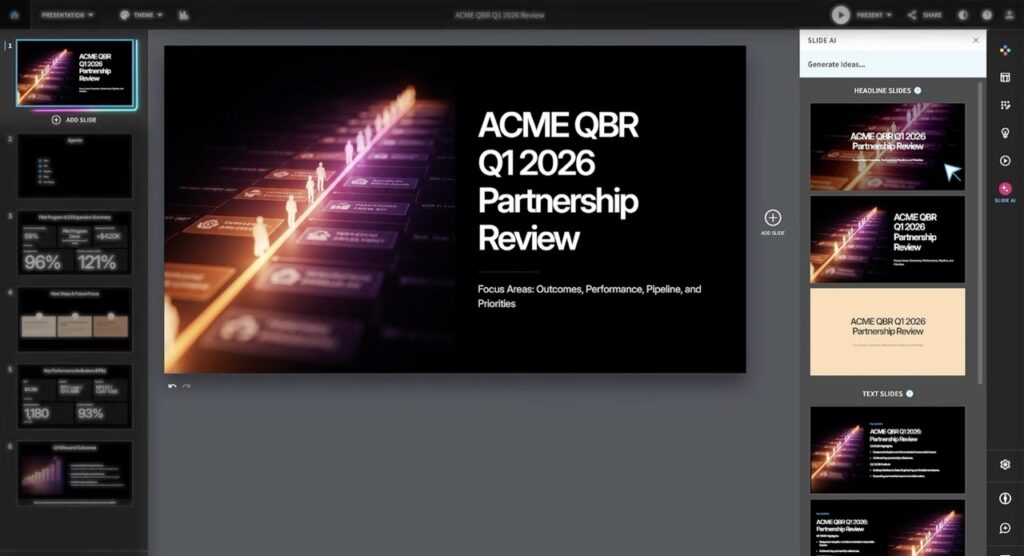
Beautiful.ai is an AI-powered presentation tool famous for its Smart Slide templates — layouts that automatically adjust as you add content. You never have to manually resize text boxes or reposition images. The AI handles the design so you can focus on the message.
Key Features
- Smart Slides: 70+ templates that automatically adapt to your content in real time
- AI Copilot (2026 update): Shows you a text outline before generating slides — so you approve the story before the design runs
- Brand Kit with content locking: Lock certain slides so no team member can change them — best-in-class brand governance
- Slide analytics + Salesforce integration: See exactly which slides a prospect spent time on, pushed directly into your CRM
- Export to: PowerPoint, PDF, JPEG, Google Slides
- Voiceover recording for async presentations
- Version history to track changes
Pricing
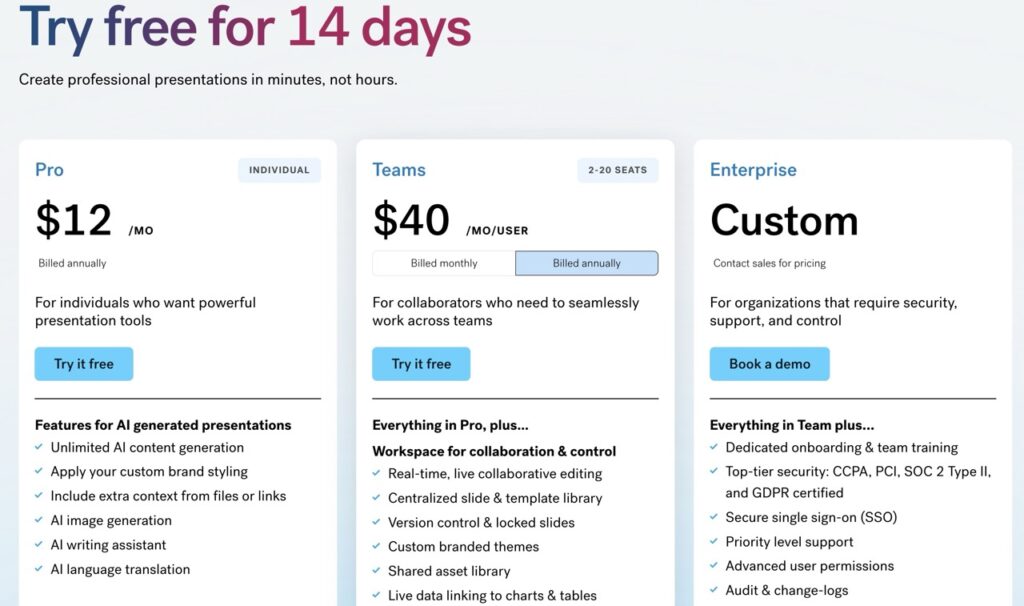
| Plan | Price | Who It’s For |
|---|---|---|
| Trial | 14-day | Try before you buy |
| Pro (Individual) | $12/month (annual) | Solo professionals |
| Team | $40/user/month (annual) | Small to mid-size teams |
| Enterprise | Custom | Large organizations with SSO |
Beautiful.ai Real Numbers
- $13.5 million in annual revenue (2025)
- 3.5 Monthly Active Users
- 93 employees
- Consistent growth since 2015
- Trusted by enterprise and startup clients across industries
(Source: getlatka.com, Semrush – October 2025)
Use Cases
- Sales teams tracking prospect engagement
- Marketing professionals building polished campaign decks
- Startup founders creating investor-ready pitch decks
- Teams that need strong brand control across every slide
Pros
- ✅ Consistently polished AI-generated first drafts
- ✅ Smart templates genuinely save time (users report 70%+ time savings)
- ✅ Content locking is a standout enterprise feature
- ✅ CRM integration for sales teams is unique in this space
- ✅ Story-first AI Copilot prevents “AI ran ahead of me” frustration
Cons
- ❌ No free plan (trial only)
- ❌ Team plan at $40/user/month is expensive for small teams
- ❌ Smaller user community than Canva or Gamma
- ❌ Less suited for non-linear or creative storytelling
User Ratings
- G2: 4.5/5
- Product Hunt: 3.5/5
- BotBunch: 4.0/5 (Based on Testing)
5. Pitch — Best for Teams That Collaborate on Presentations
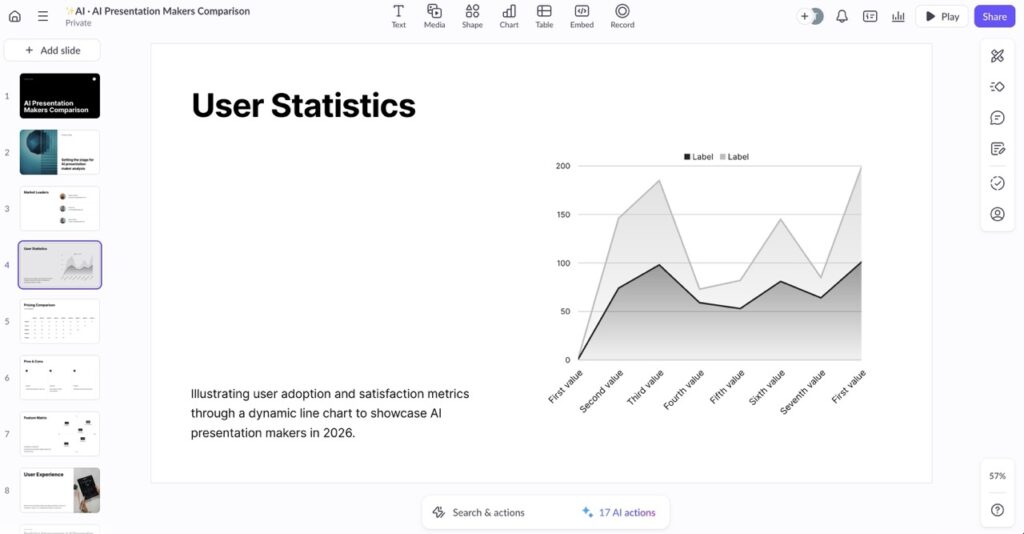
Pitch was built specifically for teams. It combines beautiful presentation design with real-time collaboration, CRM integrations, pitch rooms, and engagement analytics — making it as much a workflow system as a slide builder.
Brands like Intercom, Superhuman, and Notion use Pitch for their decks.
Key Features
- Real-time collaboration: Multiple people editing the same deck simultaneously
- AI tools: Generate draft content, refine tone, proofread, personalize slides for different audiences, and create speaker notes automatically
- Pitch Rooms: Personalized deal rooms where you share decks with clients and track their engagement
- Analytics: Track who opened your deck, how long they spent on each slide, and completion rates
- Hundreds of designer templates — consistently praised for visual quality
- Integrations: Google Sheets, Google Analytics, Unsplash, Giphy, YouTube, Vimeo
- Brand controls: Fonts, colours, logos applied consistently
Pricing
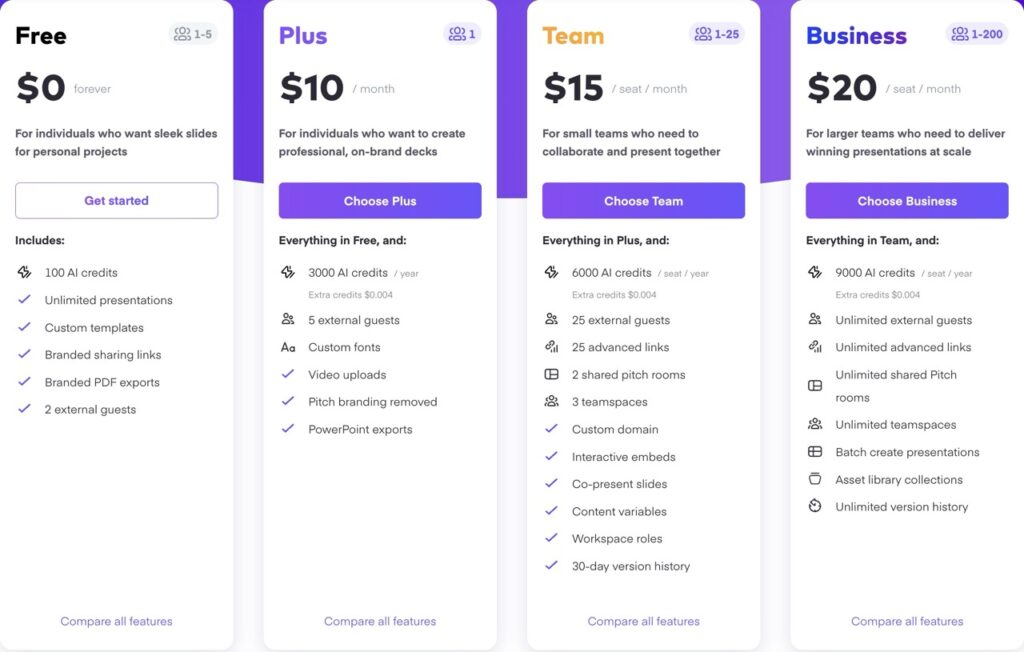
| Plan | Price | Who It’s For |
|---|---|---|
| Free | $0 | Unlimited presentations, basic features |
| Plus | ~$10/month | For Individuals |
| Team | $15/seat/month | Advanced collaboration + analytics |
| Business | $20/seat/month | Large teams with advanced needs |
Pitch AI Real Numbers
- Millions of teams use Pitch globally (including top brands like Intercom and Notion)
- Over 2 million teams worldwide
- $9.38M Revenue in 2024
- $10M in annual recurring revenue (ARR) in February 2025
- Roughly 90% YoY from $4.9M at the end of 2023
- The company raised $137M total across four rounds from 2018-2021
(Source: Sacra)
Use Cases
- Sales teams building and tracking prospect proposals
- Startup founders creating fundraising decks
- Marketing agencies collaborating with clients
- Product teams presenting quarterly updates
- Brands that care about design quality
Pros
- ✅ Best real-time collaboration features on this list
- ✅ Pitch Rooms make sales follow-up much smarter
- ✅ Engagement analytics show exactly how prospects interact with your deck
- ✅ Designer-quality templates out of the box
- ✅ Generous free plan with unlimited presentations
Cons
- ❌ Less focused on AI generation than Gamma or Canva
- ❌ Not ideal for solo creators who don’t need team features
- ❌ Brand governance not as strict as Beautiful.ai or Prezent
- ❌ Can feel lightweight for large enterprises
User Ratings
- G2: 4.4/5
- Product Hunt: 4.5/5
- BotBunch: 4.0/5 (Based on Testing)
6. Prezi — Best for Presentations That Tell a Story Visually
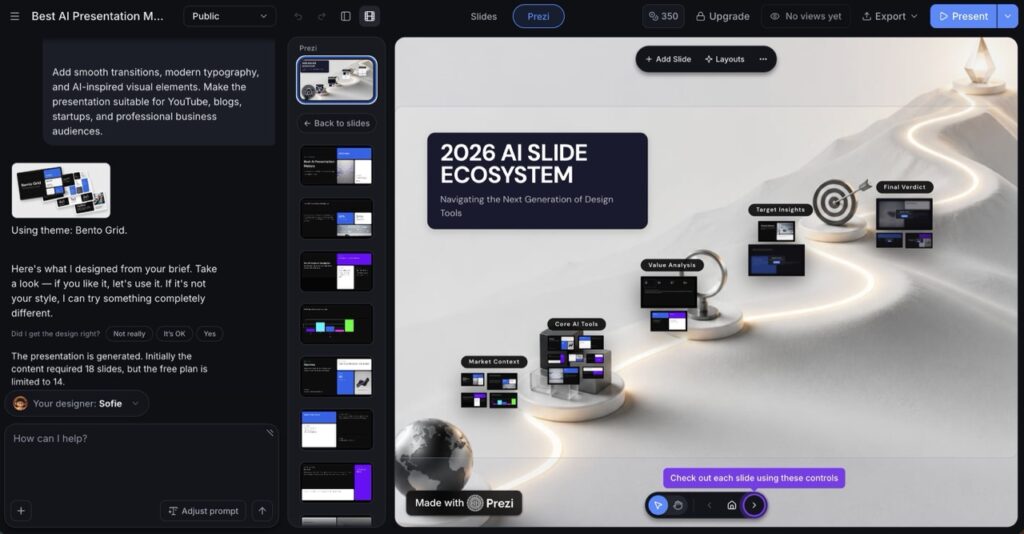
Prezi is the original “non-linear” presentation tool. Instead of advancing through slides one by one, Prezi places all your content on a large, open, zoomable canvas. You zoom in and out of sections as you present — creating a cinematic, connected experience that audiences remember.
In 2025–2026, Prezi added significant AI features, bringing it much closer to modern competitors while keeping its signature visual experience.
Key Features
- Zooming User Interface (ZUI): The signature feature — zoom in for details, pull back for the big picture
- Prezi AI: Generates complete presentations from text prompts or uploaded documents
- AI text tools: Shorten, expand, simplify, or convert text to visual elements
- Prezi Video: Overlay your presentation on your webcam feed — perfect for virtual presentations
- Prezi Design: Create interactive infographics and visual content
- 500 AI credits on the free plan
- Presenter analytics (Premium): Track audience engagement
- Offline mode (Plus plan and above)
Pricing
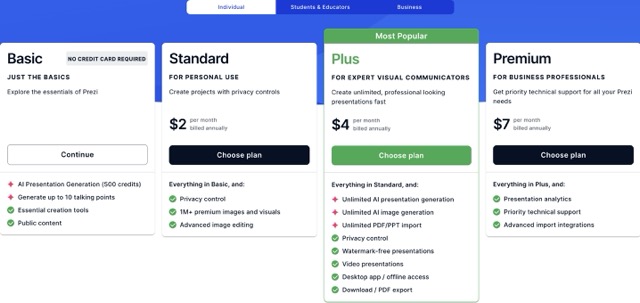
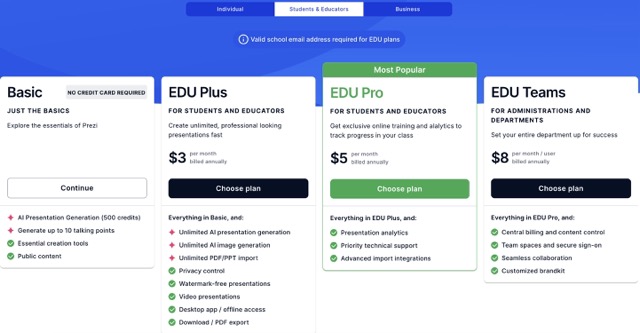
| Plan | Price | Who It’s For |
|---|---|---|
| Basic (Free) | $0 | Casual users, public presentations |
| Standard | $2/month | Privacy controls + basic AI |
| Plus | $4/month | Unlimited AI, offline access, PPT import |
| Premium | $7/month | Analytics, priority support |
| Teams | $39/month | Brand kits, SSO, collaboration |
| Edu Plus | $3 | For students & educators |
| Edu Pro | $5 | Online training & analytics |
| Edu Teams | $8 | For administrations & Departments |
Prezi AI Real Numbers
- 160 million+ global users — one of the largest user bases on this list
- 4.4 Million Monthly traffic in April 2026
- Revenue: $53.7 million
- Funding: $72.8 million
- 15+ years in market (founded 2009)
- One of the earliest presentation tools to gain mass adoption in education
(Source: Semrush, GetLatka)
Use Cases
- Teachers and professors in classrooms
- Conference speakers who want to stand out
- Marketers creating memorable brand stories
- Students who want something visually different from PowerPoint
- Remote presenters using Prezi Video
Pros
- ✅ Completely unique visual experience — no other tool replicates it
- ✅ Prezi Video is a standout feature for virtual presentations
- ✅ Very affordable entry price ($2/month)
- ✅ Massive global user base = large community and templates
- ✅ Great for storytelling and educational contexts
Cons
- ❌ Excessive zoom effects can feel distracting or overwhelming for some users
- ❌ Steep learning curve compared to slide-based tools
- ❌ AI features still lag behind Gamma, Canva, and Beautiful.ai
- ❌ Not ideal for data-heavy business presentations
- ❌ Linear business clients may find the format frustrating
User Ratings
- G2: 4.2/5
- Trustpilot: 3/5
- BotBunch: 4.4/5 (Based on Testing)
7. Plus AI — Best for People Already Using Google Slides or PowerPoint
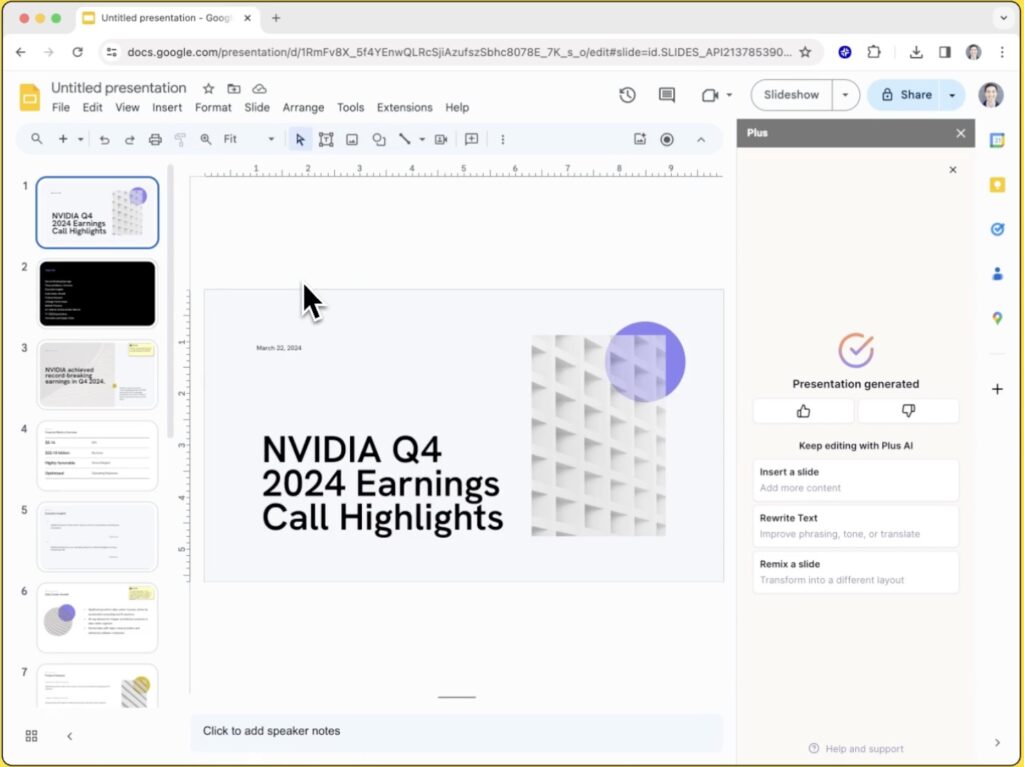
Plus AI takes a totally different approach from every other tool on this list. Instead of asking you to move into a new platform, it works directly inside Google Slides and Microsoft PowerPoint — as an add-on. You keep using the tools you already know, and Plus AI supercharges them with AI.
Key Features
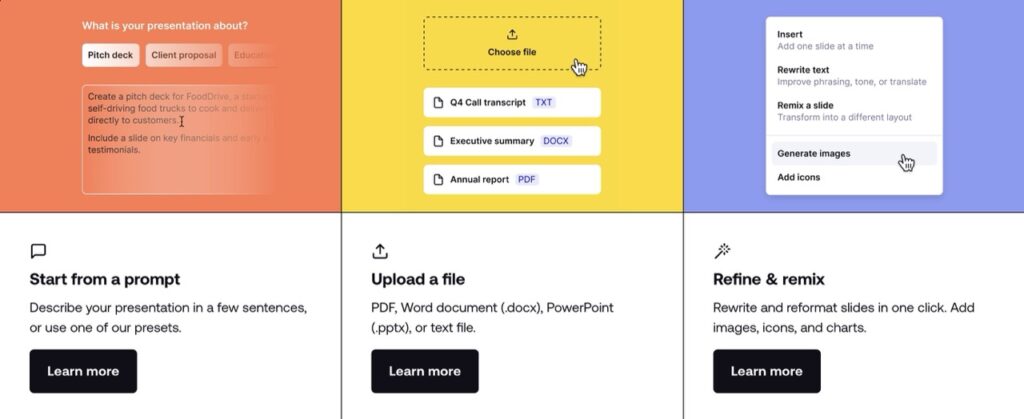
- Prompt-to-presentation: Describe your topic, get a full slide deck inside Google Slides or PowerPoint
- Document-to-slides: Upload a PDF, Word doc, or text file — Plus AI converts it to a presentation automatically
- AI Remix & Rewrite: Redesign or rewrite existing slides with one click
- 100+ language support — write or translate presentations globally
- Live Snapshots: Auto-refreshing data connections for slides that always show current info
- Custom templates: Apply your existing company templates, brand, and themes
- SOC 2 Type II certified — one of the strongest security certifications for enterprise teams
- PowerPoint API for workflow automation
Pricing
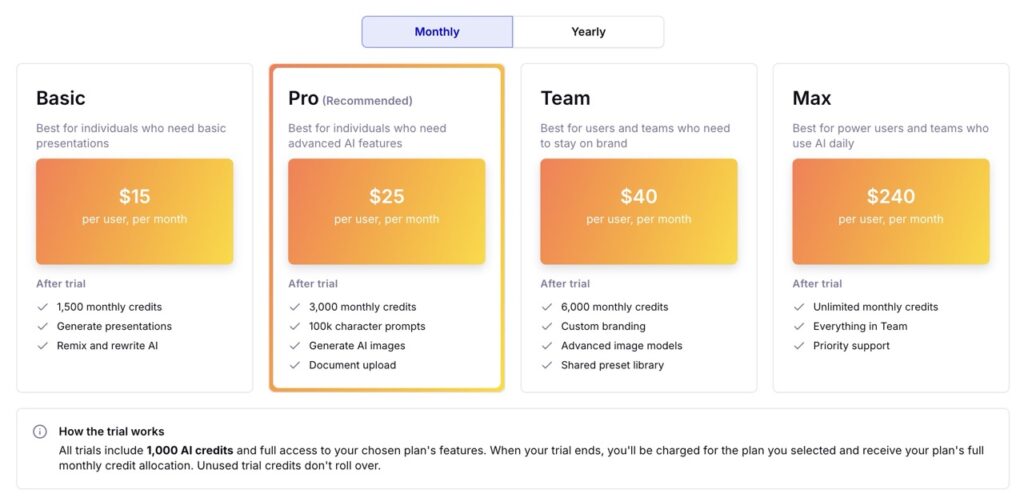
| Plan | Price | Who It’s For |
|---|---|---|
| Trial | 7-Days | Limited AI runs to test the tool |
| Basic | $15/month | Regular presenters |
| Pro | $25/month | Power users and teams |
| Team | $40/month | For teams |
| Max | $240/month | Large teams with compliance needs |
Plus AI Real Numbers
- 1 million+ installations on Google Workspace Marketplace
- Annual Revenue: Reached an estimated $47.5M ARR in late 2025.
- 4.6-star rating on Google Workspace Marketplace
- Valuation: $142.6M
- One of the most widely adopted AI presentation tools among business users
- SOC 2 Type II compliance — rare among AI presentation tools
(Source: Getlatka)
Use Cases
- Business professionals deeply embedded in Google Workspace
- Companies that can’t move their work out of their existing tools
- IT teams that need SOC 2-certified tools
- Teams that make frequent business presentations in PowerPoint or Google Slides
Pros
- ✅ No new platform to learn — works inside tools you already use
- ✅ Best choice if your team lives in Google Workspace or Microsoft 365
- ✅ SOC 2 Type II is a major trust signal for enterprise buyers
- ✅ Solid AI output quality for standard business decks
- ✅ Competitive pricing at $10/month
Cons
- ❌ No standalone editor — you must use Google Slides or PowerPoint
- ❌ PowerPoint integration lags behind the Google Slides experience
- ❌ AI stops at basic charts (bar, line, pie) — no advanced visualizations
- ❌ No free plan permanently (trial only)
- ❌ Less visually exciting output compared to Gamma or Prezi
User Ratings
- G2: 3.2/5
- Product Hunt: 4.2/5
- BotBunch: 4.0/5 (Based on Testing)
>>> 17 Best AI Productivity Tools for Small Businesses in 2026 – Complete Guide
Which AI Presentation Tool Should You Choose?
Here’s a simple breakdown based on who you are:
If you’re a student or beginner → Start with Gamma (free plan, fast results) or Canva AI (massive template library, easiest to learn).
If you’re an entrepreneur or startup founder → Gamma for speed and aesthetics, or Pitch if you need to track investor engagement.
If you’re in sales or marketing → Beautiful.ai for brand control and CRM integration, or Pitch for team collaboration and deal rooms.
If you work in a large company or Fortune 500 → Prezent is the enterprise choice, especially in Life Sciences and Tech.
If you’re already using Google Slides or PowerPoint → Plus AI is the obvious pick — no learning curve, no platform switch.
If you want something visually unique → Prezi for storytelling and memorable canvas-based presentations.
If you want the best overall value → Gamma (Pro at $13/month) or Canva AI (free plan) offer the best features-per-dollar ratio.
The Demand for AI Presentation Tools in 2026 — What the Data Says
The market for AI presentation tools is growing fast. Here’s why:
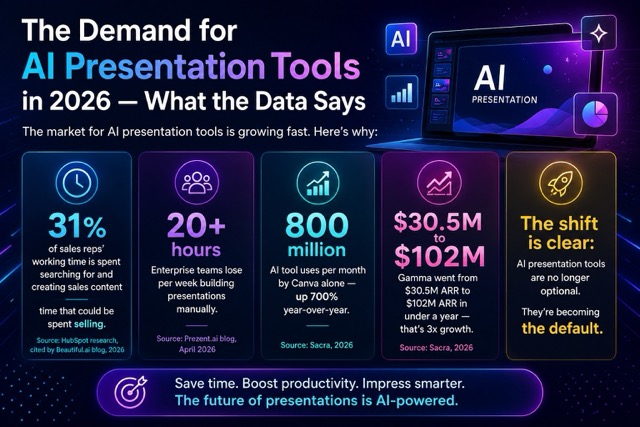
Sales reps spend 31% of their working time searching for and creating sales content — time that could be spent selling.
Enterprise teams lose 20+ hours per week building presentations manually.
Canva alone reports 800 million AI tool uses per month — up 700% year-over-year.
Gamma went from $30.5M ARR to $102M ARR in under a year — that’s 3x growth.
The shift is clear: AI presentation tools are no longer optional. They’re becoming the default.
The Future of AI Presentation Tools
The pace of improvement in 2025–2026 has been remarkable:
- Gamma launched an AI agent that researches the web and refines your deck through conversation
- Canva’s AI tools are now used 800 million times per month
- Prezent’s AI understands audience psychology and adapts presentations accordingly
- Beautiful.ai’s Copilot now shows you the story before building the slides
What’s coming next? Expect deeper personalization (AI that learns your communication style), real-time co-creation with AI during live meetings, and deeper integrations with CRM and project management tools.
Final Verdict
| Tool | Overall Rating | Best Value Pick? |
|---|---|---|
| Gamma | ⭐⭐⭐⭐⭐ | ✅ Yes — for most people |
| Canva AI | ⭐⭐⭐⭐½ | ✅ Yes — for beginners & designers |
| Prezent | ⭐⭐⭐⭐ | ✅ Yes — for enterprise |
| Beautiful.ai | ⭐⭐⭐⭐ | ✅ Yes — for sales/marketing teams |
| Pitch | ⭐⭐⭐⭐ | ✅ Yes — for collaborative teams |
| Prezi | ⭐⭐⭐½ | For specific storytelling use cases |
| Plus AI | ⭐⭐⭐⭐ | ✅ Yes — for Google/PPT users |
There’s no single “best” tool. The best one is the one that fits how you actually work.
Start with a free trial. Build a real presentation you actually need. See which one saves you the most time — and feels natural to use. That’s your tool.
Why Trust Us
We personally tested each tool by creating investor pitch decks, educational presentations, and marketing slides to compare generation speed, editing flexibility, export quality, and collaboration features.
FAQs
Q1. What is the best free AI presentation maker in 2026?
Gamma and Canva AI both offer strong free plans. Gamma’s free tier lets you create presentations with AI — though credits are limited. Canva’s free plan includes access to millions of templates with AI writing tools included. For most beginners, Canva’s free plan offers more flexibility.
Q2. Can AI presentation tools replace PowerPoint?
Not entirely — yet. Tools like Gamma and Canva AI are excellent for creating draft decks quickly, but for highly customized business presentations, most professionals still polish slides manually or use Plus AI directly inside PowerPoint. PowerPoint remains dominant in corporate environments.
Q3. Which AI presentation tool is best for students?
Gamma is the top pick for students — it’s fast, free to start, visually impressive, and incredibly easy to use. Prezi is also popular in education because of its unique visual storytelling format.
Q4. Is Gamma worth paying for?
If you create presentations more than once a week, yes. The Plus plan at $5/month removes watermarks, enables PowerPoint export, and allows custom branding — all essential for professional use. At $90.50/year, it’s one of the best value plans in the category.
Q5. What’s the difference between Gamma and Canva AI?
Gamma is purpose-built for AI-generated presentations and excels at speed and visual storytelling. Canva is a broader design platform — better for people who need presentations plus social media graphics, videos, docs, and more. Gamma wins on AI output quality; Canva wins on versatility.
Q6. Which AI presentation tool is best for startups and pitch decks?
Gamma for speed and design quality. Pitch if you need to share the deck with investors and track exactly how long they spent on each slide. Beautiful.ai if brand polish is critical.
Q7. Is Plus AI better than Gamma?
They serve different needs. Gamma is better for creating standalone AI presentations fast. Plus AI is better if you need to stay inside Google Slides or PowerPoint and want AI to help you within your existing workflow. They’re not really competitors — they solve different problems.
Q8. Does Canva AI generate presentations automatically?
Yes. Canva’s Magic Design feature can generate a presentation outline from a topic or uploaded document. However, the output is more of a starting point — it typically needs manual editing to reach “presentation-ready” quality. Gamma’s AI output tends to be more polished out of the box.
Q9. Is Prezent good for small businesses?
No. Prezent is built and priced for enterprise teams. The Lite plan starts at approximately $39/user/month — far beyond what most small businesses would budget. For small teams, Gamma, Canva, or Beautiful.ai are much better fits.
Q10. Which AI presentation tools have the best mobile support?
Canva has the strongest mobile app by far — full functionality on iOS and Android. Gamma works well on mobile browsers. Most other tools on this list are primarily desktop/browser-first experiences.

About Naseeb Akhter
The founder of BotBunch, where he researches, tests, and reviews the latest AI tools, automation software, and SaaS platforms. Along with the BotBunch editorial team, he helps creators, students, professionals, and businesses discover the best AI solutions through hands-on testing, honest reviews, detailed comparisons, and easy-to-follow guides.
Join us via email and social channels to get the latest updates straight to your inbox.