
Nowadays, AI video generators have become some of the most searched AI tools and for good reason. They help creators, marketers, and businesses save time while making engaging videos. One such tool, Kling AI Video Generator, is gaining attention in 2025 for its fast and high-quality video creation.
But is it really worth your time and money? In this review, BotBunch break down its features, pricing, pros, and cons to help you decide.
Let’s Get Started…
Kling AI Video Generator Overview:
| Category | Rating / Verdict |
| Ease of Use | ⭐⭐⭐⭐☆ (Beginner-friendly) |
| Video Quality | ⭐⭐⭐⭐☆ (Cinematic 1080p) |
| Character Consistency | ⭐⭐⭐⭐⭐ (One of the best) |
| Speed & Performance | ⭐⭐⭐☆☆ (Can be slow at times) |
| Reliability | ⭐⭐☆☆☆ (Bugs & credit issues) |
| Pricing Value | ⭐⭐⭐⭐☆ (Affordable, free tier) |
| Best For | Creators, marketers, social media |
| Not Ideal For | Agencies, deadline-driven teams |
What Is Kling AI Video Generator?
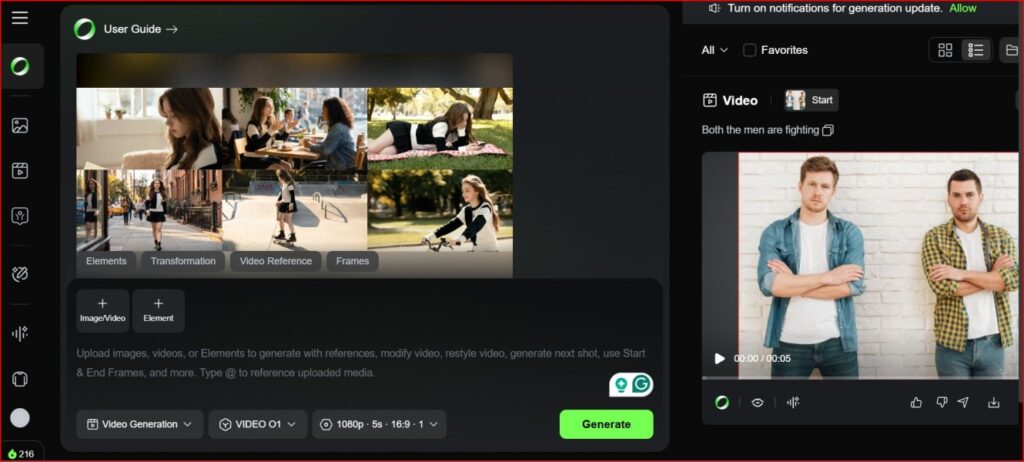
Kling AI is an AI-powered tool that can generate videos just by text and convert images into high-quality videos within a minute. It is developed by Kuaishou Technology, one of China’s biggest social media and tech companies, and this tool is making big headlines in the AI space.
Kling AI has quickly become one of the best AI video generator tools in 2025, because it offers high-quality video output, smart editing features, fast results, and pricing plans starting at just $6.99/month.
How Does Kling AI Video Generator Work?
Kling AI Video Generator is an AI-powered tool that helps you create videos from your ideas using text or image prompts. Simply enter a prompt, and Kling AI will generate a high-quality video within minutes, no technical knowledge or video editing skills required.
- Input Options (Text, Images, Prompts): The Kling AI video generator provides multiple ways to start your video. You can type a text prompt describing your idea, upload an image to guide the style, or use creative prompts to remix existing visuals. This flexibility makes it perfect for beginners as well as experienced creators.
- AI Video Rendering Process: Once you submit your input, Kling AI’s system gets to work. It analyzes your prompt, adds motion, applies realistic effects, and builds scenes using smart animation and physics. The entire process is automated, so your video comes together smoothly without manual editing.
- Output Formats & Quality: After rendering, Kling AI gives you a clean and professional-looking result. You can download it in HD or higher quality and use it on YouTube, social media, ads, or presentations. The video looks smooth, clear, and ready to share right away.
Key Features of Kling AI Video Generator
Here are the key features of Kling AI video generator;
- Text-to-Video Creation – This is the main reason that Kling AI is famous for. You can convert your ideas into stunning YouTube Shorts, Instagram Reels or Long Videos. This feature is best for those who don’t want to come in front of the camera.
- Image-to-Video – This is another best features where you can give your image a movement and animation just by giving a prompt within a minute.
- Create and Edit AI Images – Type a prompt of what you think, and Kling AI will create an image based on your ideas and use it in your projects. And also you can edit the same photo for more creative twists.
- Realistic Animation & Motion Effects – Kling AI is trending because its videos look smooth and natural. The effects & animations have realistic movements and physics, a variety of effects that instantly enhance your clips, giving you endless creative options without the extra effort, which means objects, characters, and scenes don’t look robotic in most of the output.
- Speed & Resolution (HD/4K) – Kling AI may take some time to create videos when the servers are busy. However, it generates high-quality 1080p HD videos, making them perfect for YouTube, ads, and professional use.
- Virtual Model – Kling AI Virtual Model is an AI-powered tool for fashion and e-commerce that creates realistic digital humans to try on clothes virtually. It helps shoppers and brands see how outfits look and move without needing real photoshoots.
- AI Outfits – The AI Outfit feature lets you change clothes on characters with just a tap. You can try different styles, colours, or looks instantly without reshooting or redesigning anything. This is perfect for fashion content, product demos, and creative videos where you want quick outfit changes.
- Lip Syns – You can use Kling AI’s lip sync feature for voiceovers with natural-looking lip movement. The lips match the voice smoothly, making dialogues and voice-overs feel more realistic.
- Extend Your Video – With the extend feature, you can continue your video story without starting over. It helps you add new scenes smoothly, keeping the same style and flow.
- Editing Options & Usability – Kling AI is easy to use, even for beginners. You can add, remove, or adjust elements in your video with simple tools—no technical or editing skills needed.
Kling AI Video Generator Pricing Plans (Free vs Paid)
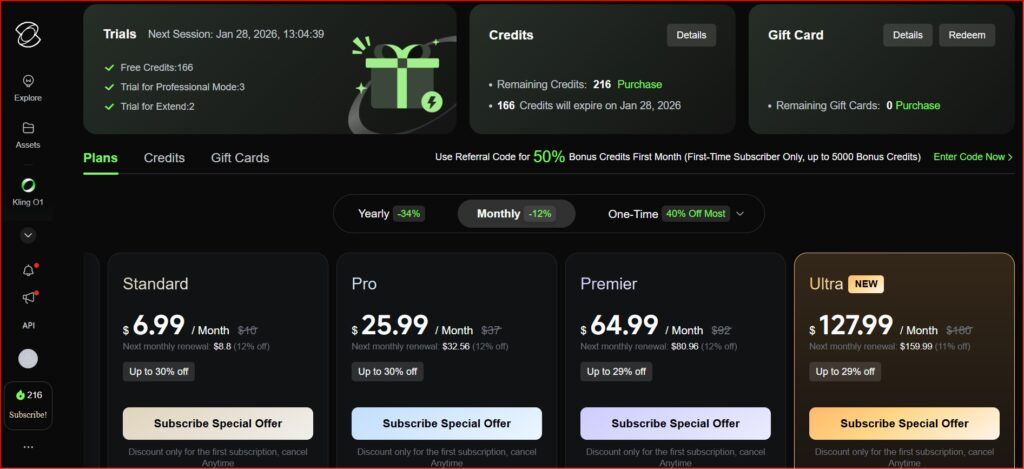
Free trial details. – Kling AI offers 166 free credits per month
Subscription plans breakdown. – It offers 4 plans breakdown
- Standard – $6.99/month (660 Credits per month)
- Pro – $25.99/month (3000 credits per month)
- Premier – $64.99/month (8000 credits per month)
- Ultra – $127.99/month (26000 credits per month)
Check the Kling AI Official website for price updates.
Value-For-Money Comparison:
| Feature | Kling AI | Runway | Luma AI | Pika Labs | Google Veo 3.1 | Magic Hour |
| Resolution | Up to 1080p | Up to 4K | 720p (upscale available) | 1080p | 1080p | 1024px standard |
| Best Pricing | $6.99/month (Standard) | $12/month (Standard) | $9.99/month (Lite) | $12/month (Standard) | $19.99/month | $14/month (Creator) |
| Free Credits | 66/day | 125 (one-time) | Limited | 300/month | Unlimited (with GPU) | 400 at signup + 100/day |
| Specialty | Character animation, lip-sync | All-in-one AI editing | Cinematic visuals | Special effects, creativity | Best fidelity, but very expensive | Face-swap & lip-sync |
| Control Level | High (prompts, Motion Brush) | Moderate (editor-based) | High (keyframes, cinematic prompts) | High (scene control) | High (technical control) | Moderate (template-based) |
Value Factors to Know
- Credit Expiration – Kling AI’s paid credits expire if not used within the validity period. In comparison, tools like Runway refresh credits monthly without immediate expiration.
- Refund Policy – Kling AI has a strict no-refund policy, even if a video generation fails at 99%, which may result in lost credits.
- Production Costs:
- Kling AI – A 5-second video costs around $0.37 on the Standard plan and drops to $0.11 on higher tiers.
- Google Veo 3.1 – Can cost up to $4 per clip for studio-level quality.
- Kling AI – A 5-second video costs around $0.37 on the Standard plan and drops to $0.11 on higher tiers.
- Annual Savings: Choosing yearly billing can save 20%–34% compared to monthly plans.
Note – Kling AI is priced as a budget-friendly option compared to major AI video tools like Runway and Google Veo. While it doesn’t offer a true unlimited plan, its credit-based system is affordable for creators who want high-quality videos without paying premium prices. However, users should be mindful of credit expiration and the no-refund policy when choosing a plan.
Is Kling AI Subscription Worth It?
If you’re thinking about subscribing to Kling AI Video Generator, the short answer is: Yes, it can be worth it, depending on how you plan to use it.
Kling AI offers affordable plans starting around $6.99/month, which is cheaper than many high-end AI video tools. For creators, influencers, and small businesses, this makes it a great option to test and use regularly without breaking the bank.
When It’s Worth It
A Kling AI subscription makes sense if:
- You create regular video content for YouTube, TikTok, Reels, or ads
- You want an easy-to-use tool without learning complex software
- You’re on a budget but still want high-quality output
- You enjoy experimenting with different styles and effects
When It Might Not Be Worth It
- If you need 4K videos regularly (Kling AI currently goes up to 1080p)
- If you create very long videos frequently
- If you want truly unlimited generation without credits
Pros And Cons of the Kling AI Video Generator:
Pros
- High-Quality Video Output – Creates cinematic, detailed 1080p videos with strong visuals and realistic motion.
- Longer Video Clips – Supports videos up to 2 minutes, longer than many AI video tools.
- Advanced Motion & Camera Control – Smooth pans, zooms, tilts, and realistic physics make videos look professional.
- Strong Character Consistency – Uses reference images to keep characters consistent across scenes.
- Easy to Use – Beginner-friendly interface with simple prompts and editing tools.
- Flexible Inputs – Supports text-to-video and image-to-video for creative freedom.
- Versatile Use Cases – Great for social media, marketing, and concept videos.
- Affordable Pricing – Generous free tier and budget-friendly paid plans.
Cons
- Human Realism Issues – Faces and hands can sometimes look distorted or unrealistic.
- Reliability Problems – Videos may freeze at 99% completion while still using credits.
- Slow Performance – Generation speed can be slow, with motion glitches or slow-motion results.
- Poor Customer Support – No refunds, limited support, and expiring credits can be risky.
- Learning Curve for Advanced Features – Some controls need experimentation to master.
- Limited Business Integration – Doesn’t easily connect with other professional tools.
- Moderation & Prompt Limits – Some prompts may fail or be restricted.
- Not Ideal for High-Reliability Needs – Less suitable for strict deadlines.
Kling AI vs Competitors:
- Comparison with Runway Gen-2, Pika Labs, and OpenAI Sora.
- Include a simple comparison table.
| Feature | Kling AI | OpenAI Sora | Runway Gen-2 / Gen-3 | Pika Labs |
| Developer | Kuaishou | OpenAI | Runway ML | Pika Labs |
| Availability | Public beta, free credits & paid plans | Limited / experimental access | Public with free & paid plans | Public with free & paid plans |
| Max Video Length | Up to 2 minutes | Up to ~60 seconds (demo) | 4–8 sec clips | 4–6 sec clips |
| Resolution | Up to 1080p | Up to 1080p | Up to 4K (enhancement) | Up to 1080p |
| Motion & Physics | ⭐⭐⭐⭐⭐ (very strong) | ⭐⭐⭐⭐⭐ (best overall) | ⭐⭐⭐⭐☆ | ⭐⭐⭐☆☆ |
| Human Realism & Lip-Sync | Excellent | Best in class | Good | Limited |
| Editing & Workflow | Moderate–High | Limited (no public editor) | ⭐⭐⭐⭐⭐ (best tools) | Moderate |
| Camera Control | Advanced camera & motion control | Prompt-based only | Advanced controls | Limited |
| Best For | Realistic motion, dialogue, long clips | Pure realism, demos | Professional editing & VFX | Social, memes, stylized videos |
| Pricing | Free + affordable tiers | Subscription (Plus/Pro) | Tiered, scalable | Subscription (~$35/month) |
| Overall Value | ⭐⭐⭐⭐⭐ (best balance) | ⭐⭐⭐☆☆ (quality but limited) | ⭐⭐⭐⭐☆ | ⭐⭐⭐☆☆ |
Key Differences Explained:
- 👉 Best Realism: Sora / Google Veo 3 leads in pure photorealism, but access is limited, and costs are high.
- 👉 Best Motion & Characters: Kling AI shines in realistic movement, physics, lip-sync, and longer videos.
- 👉 Best Professional Workflow: Runway is ideal for editors, VFX work, and enhancing existing footage.
- 👉 Best for Fun & Social Content: Pika Labs is great for short, creative, and meme-style videos.
Use Cases of Kling AI Video Generator
Kling AI Video Generator is a powerful tool that fits many creative and professional needs. From social media content to business marketing and education, here’s how different users can benefit from it.
For YouTubers & Influencers
Kling AI is perfect for creating short-form videos for YouTube Shorts, Instagram Reels, and TikTok. Influencers can generate eye-catching clips, virtual spokesperson videos, and AI influencer content using features like lip sync, motion control, and audio syncing. It helps creators post more content without filming every time.
For Business Marketing & Ads
Businesses use Kling AI to create high-quality ads, promo videos, and product demos without expensive studio shoots. You can easily change backgrounds, lighting, weather, or even swap products and outfits. E-commerce brands also use it to create 360-degree product videos from a single image, making marketing faster and more affordable.
For Educators & Storytellers
Educators and trainers can turn simple lesson plans, diagrams, or slides into animated learning videos. Kling AI is also great for storytelling and filmmaking—creators can design consistent characters across scenes and build longer video stories. Corporate teams even use it to create multilingual training and onboarding videos with virtual avatars.
Is Kling AI Video Generator Good for Content Creators or Filmmakers?
Yes, Kling AI is a very good tool for both content creators and filmmakers. It helps users create high-quality, cinematic videos using simple text or images.
Content creators can easily make videos for YouTube Shorts, TikTok, Reels, ads, and promotions without spending hours editing.
Filmmakers can use Kling AI to plan scenes, test ideas, and pre-visualise stories before real filming, which saves both time and money.
Kling AI also handles smooth movement, lighting, and realistic motion, making videos look professional.
However, it works best for short videos (up to 2 minutes). For longer stories, creators need to combine multiple clips using regular video editing software.
Overall, Kling AI is a useful, affordable, and powerful tool for anyone who wants to improve their video creation process using AI.
How Long Does Kling AI take to make a video?
Kling AI usually takes a few minutes to create a video, depending on the video length, quality, and how busy the servers are. Short videos are generated faster, while longer or more detailed videos may take more time.
Sometimes, videos can freeze at 99% completion, and the process may fail even though credits are used. It can be frustrating, especially when the servers are busy.
Conclusion – Is Kling AI Video Generator Worth It?
Yes, Kling AI is worth it in 2025, but not for everyone.
It is a strong choice for content creators and marketers who want cinematic, high-quality AI videos at an affordable price. Kling AI shines in motion, physics, and character consistency, making it great for short videos, social media content, ads, and concept work.
However, there are some clear downsides. The free plan adds watermarks and limits videos to 720p, while 1080p and watermark-free exports start at $6.99/month.
Kling AI does not support 4K, and video generation can sometimes be slow—especially during busy hours. A common issue in 2025 is videos freezing at 99% completion, which still uses credits. Paid credits also expire, and customer support is very limited.
Kling AI works best for short clips (5–10 seconds). Longer videos require the “extend” feature, which can reduce quality over time. Some users also report problems with hands, faces, and complex movements, and lip-sync is still basic.
Note – Kling AI is worth it for creators on a budget who want realistic motion and cinematic videos without expensive tools. But professionals with tight deadlines, long video needs, or business-level reliability may find its limitations frustrating.
FAQs
What is the Kling AI Video Generator used for?
It is used to create AI videos from text or images for social media, ads, and storytelling.
Is Kling AI free to use?
Yes, it offers 166 free credits per month, but with limits and watermarks.
Does Kling AI Video Generator support 4K video?
No, the maximum resolution is 1080p.
How does Kling AI Video Generator compare to Runway Gen-2?
Kling AI is better for motion and characters, while Runway is better for editing tools.
Can Kling AI create YouTube Shorts or TikTok videos?
Yes, it is great for Shorts, Reels, and TikTok videos.
Is Kling AI Video Generator worth paying for?
Yes, for creators who want quality videos at a low cost.
Who owns Kling AI?
Kling AI is developed by Kuaishou.
What are some use cases of Kling AI?
Social media videos, ads, education, storytelling, and product demos.
Is Kling AI Open Source?
No, Kling AI is not open source.
Is The Kling AI Video Free Download?
Yes, but free videos include watermarks.
Does Kling AI Video Generator Allow NSFW?
No, NSFW content is not allowed.
Are Kling AI Videos Private?
Yes, your generated videos are private by default.