You’re sitting at your desk. You have a coding project in front of you. But instead of typing every single line yourself… you just talk to your computer.
You say: “Build me a login page.”
And boom — it builds one.
You say: “Fix this bug.”
And boom — it finds it, understands it, and fixes it.
In 2026, Cursor AI are using by millions of developers every single day.
In fact, Cursor went from basically zero to $2 billion in annual revenue in approximately 18 to 24 months, according to a Bloomberg source. That’s faster than any software company in history. Faster than Slack. Faster than Zoom. Faster than anyone.
So here, we’re going to break down exactly what Cursor is, how it works, how much it costs, who’s using it, and whether it’s worth it for you — even if you’ve never written a single line of code in your life.
Let’s Get Started…
What Is Cursor AI?
Think of a regular code editor — like Microsoft Word, but for writing programs. Most developers use something called Visual Studio Code (VS Code) every day. It’s free, it’s powerful, and pretty much every developer on the planet has heard of it.
Now imagine someone took VS Code… and rebuilt it completely with an AI brain inside.
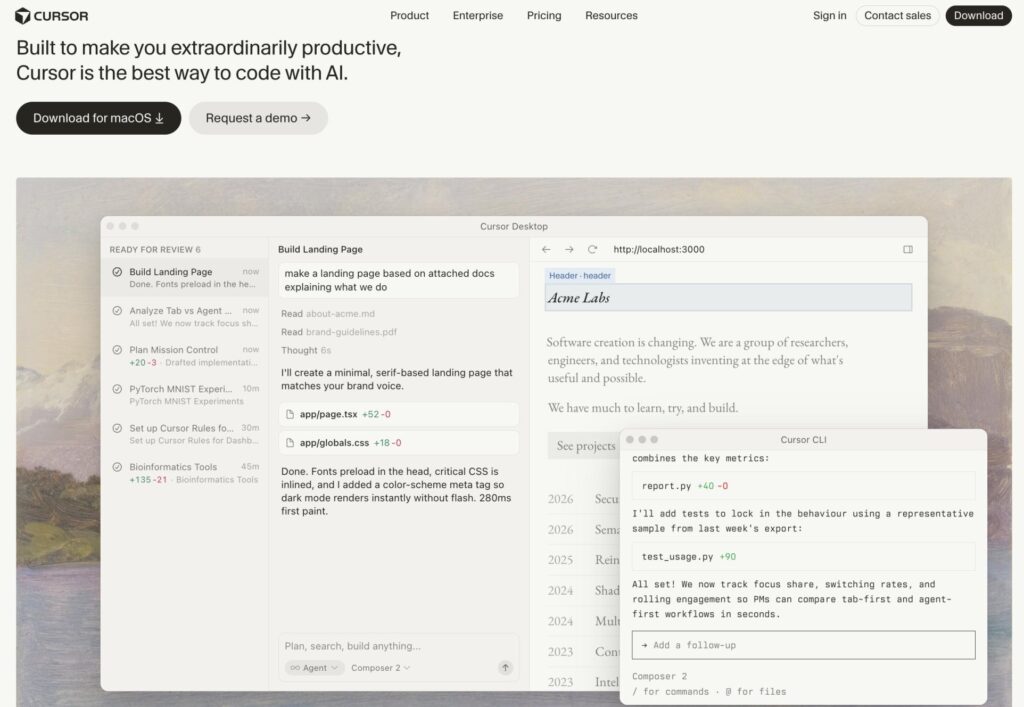
That’s Cursor AI.
It was built by a company called Anysphere, which was started in 2022 by four students from MIT — Michael Truell, Sualeh Asif, Arvid Lunnemark, and Aman Sanger. These weren’t just regular students — they were ex-OpenAI researchers who understood AI at a deep level.
Their idea was simple but powerful: instead of adding AI to a code editor as a plugin… build the whole editor around AI from the ground up.
The result? A tool that doesn’t just help you type faster. It actually understands your entire codebase — every file, every function, every line — and acts like a highly intelligent coding partner sitting right beside you.
Key Features of Cursor (What Makes It Special?)
Let’s talk about what Cursor can actually DO. Because this is where it gets really exciting.
AI Autocomplete (Tab Completion)
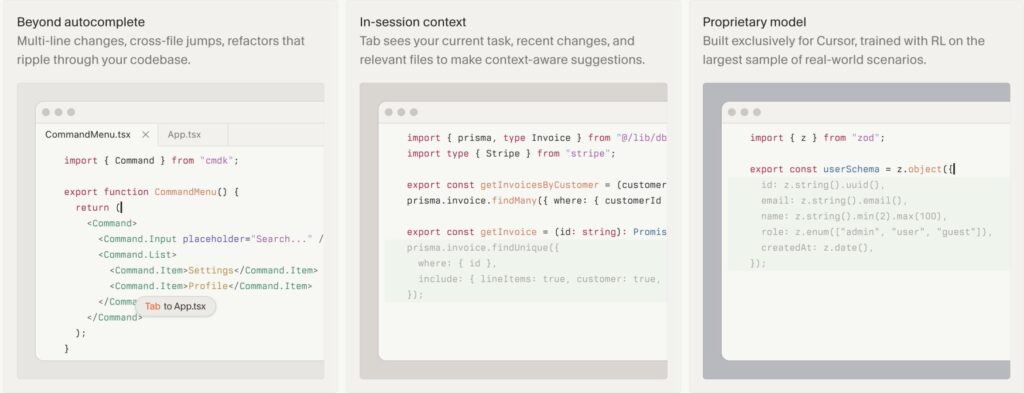
This is Cursor’s most-used feature, and it’s shockingly good.
As you’re typing code, Cursor watches what you’re doing and predicts what comes next — not just one word, but sometimes entire blocks of 10–20 lines of code. You press Tab, and it fills it in.
It feels less like autocorrect and more like a mind reader.
Codebase Understanding (This Is the Big One)
Most AI tools are like a stranger who just walked into your house. They don’t know where anything is.
Cursor is different. It reads your entire project — every single file — and understands the connections between them. So when you ask it to change something, it knows everywhere that change needs to happen.
This is what developers call “codebase awareness,” and it’s incredibly rare and valuable.
Chat + Natural Language Editing
You can literally chat with Cursor in plain English.
“Add a dark mode to this app.” “Why is this function throwing an error?” “Refactor this so it’s easier to read.”
Cursor understands your question, looks at your code, and gives you a real answer — or even makes the change for you.
Agent Mode (Cursor’s Most Powerful Feature)
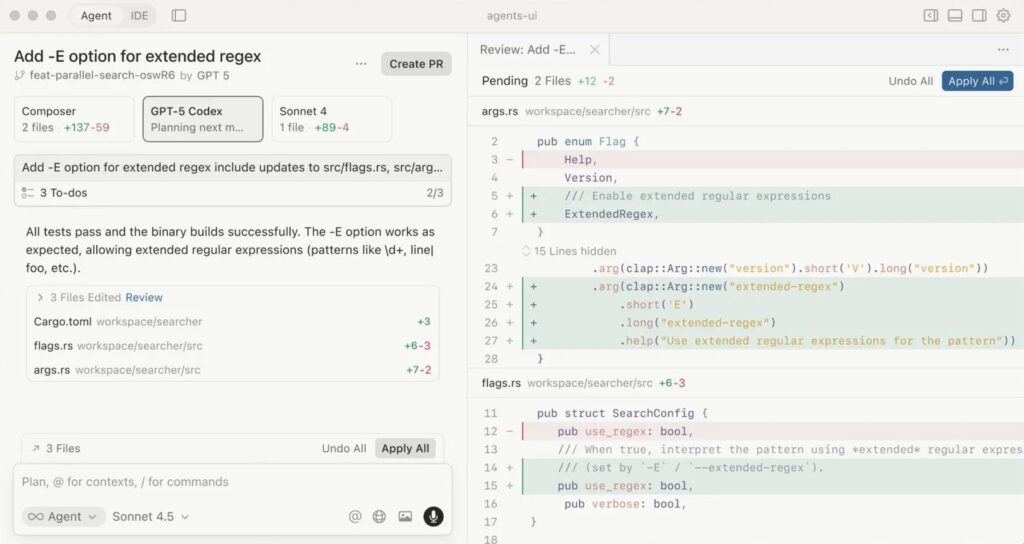
This is where Cursor goes from “helpful assistant” to “autonomous developer.”
In Agent Mode, you give Cursor a big task — like “Build me a full user authentication system” — and it figures out the steps on its own, creates multiple files, writes the code, runs tests, and delivers the result.
It’s not just answering questions. It’s doing the work.
Multi-File Editing
Most AI coding tools can only work on one file at a time.
Cursor can look at dozens of files at once, understand how they connect, and make changes across all of them simultaneously. This saves hours of work for complex projects.
Access to Top AI Models
Cursor doesn’t use just one AI. It gives you access to the best AI models in the world, including:
- Claude (from Anthropic)
- GPT-4 (from OpenAI)
- Gemini (from Google)
So you always get the best possible results.
Privacy Mode
For companies that care about keeping their code private, Cursor offers Privacy Mode — which means your code is never stored by external AI providers and never used for training.
This is a big deal for enterprise customers.
>>> 7 Best AI Coding Tools in 2026: Tried & Tested (Honest Review)
Cursor Pricing – How Much Does It Cost?
Good news: Cursor has a free plan, so you can try it without spending a single rupee.
Here’s the complete pricing breakdown as of 2026:

| Plan | Price | Best For |
|---|---|---|
| Hobby (Free) | $0/month | Beginners trying it out |
| Pro | $20/month (~₹1,670) | Serious daily developers |
| Pro+ | $60/month (~₹5,000) | Heavy AI users |
| Ultra | $200/month (~₹16,700) | Power users who code all day |
| Teams | $40/user/month | Companies with developer teams |
| Enterprise | Custom pricing | Large organizations |
Source – Cursor
Quick Note on the Billing System: Since June 2025, Cursor switched to a credit-based system. Each paid plan gives you a monthly credit pool equal to your plan price. Light tasks are unlimited; heavy AI requests use up your credits. If you go over, you get charged extra — so keep an eye on usage.
Which Plan Should You Pick?
- Never coded before? → Start with the Free plan
- Code 2–4 hours a day? → Pro at $20/month is perfect
- Building products full-time with AI? → Pro+ or Ultra
- Running a dev team? → Teams plan
Use Cases – Who Uses Cursor AI?
You might be thinking: “This sounds like it’s only for expert programmers.” But that’s not true. Here’s who Cursor actually helps:
👩💻 Professional Developers: This is Cursor’s core user. If you write code for a living, Cursor makes you dramatically faster. Need to add a feature? Debug an error? Refactor messy code? Cursor does it in seconds instead of hours.
🎓 Students Learning to Code: Learning programming is hard. With Cursor, beginners can write real code and immediately understand what it does. Ask “Why does this work?” and Cursor explains it in plain English. It’s like having a patient tutor on standby 24/7.
🚀 Startup Founders and Entrepreneurs: Many non-technical founders are now using Cursor to build their own MVPs (minimum viable products) without hiring expensive developers. You describe what you want, and Cursor builds it. This is the “vibe coding” movement — and it’s changing who can build software.
🏢 Enterprise Engineering Teams: Large companies use Cursor to make their teams more efficient. With the Teams and Enterprise plans, companies get centralized billing, shared rules, and privacy controls — making it safe to roll out to thousands of engineers.
🌍 Developers in Emerging Markets: Brazil is growing particularly fast in Cursor adoption, up +20% year-over-year — reflecting the global democratization of software development. Cursor lowers the barrier to building software in emerging markets.
Pros and Cons of Cursor AI
We’re keeping it real here. Nothing is perfect.
✅ PROS
- Genuinely understands your code — not just individual lines, but your entire project
- Powerful Agent Mode — can handle complex, multi-file tasks autonomously
- Works with top AI models — Claude, GPT-4, Gemini — you get the best
- Free plan available — try it with zero commitment
- Built on VS Code — familiar interface, all your existing extensions still work
- Privacy Mode — keeps code safe for enterprises
- Incredible speed — autocomplete and responses are fast
- Widely adopted — used by NVIDIA, Uber, Stripe, Adobe, and more
❌ CONS
- Requires coding knowledge — Cursor accelerates development; it doesn’t replace the need to understand code entirely
- Pricing controversy — The June 2025 switch to credit-based billing caught many users off guard with surprise bills. The CEO apologized publicly, but it’s still worth monitoring your usage.
- No real-time collaboration — Not ideal for teams working together on the same file simultaneously
- Credits can run out fast — Heavy users of powerful models like Claude Sonnet can exhaust their credit pool quickly
- Internet required — Since it relies on cloud AI models, you need a stable connection
- Learning curve — New users need some time to understand Agent mode and how credits work
Cursor AI by the Numbers (Real Data, Real Facts)
These figures are based on publicly available reports and industry sources.
👥 Users:
- Cursor reported over 1 million daily active users as early as 2025
- Used by over 50,000 engineering teams globally, with nearly 70% of the Fortune 1000 represented in its customer base — including NVIDIA, Uber, Adobe, Salesforce, and PwC
- Companies like Stripe — with 40,000 engineers — have moved their entire engineering team onto Cursor
💵 Revenue:
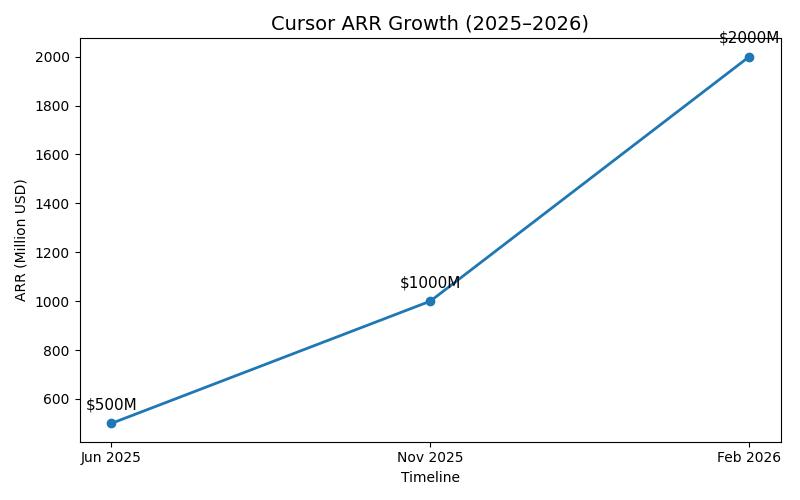
- Cursor hit $500M ARR in June 2025, then $1B ARR in November 2025, then $2B ARR by February 2026
- Cursor is the fastest-growing SaaS company of all time from $1M to $500M in ARR, with revenue doubling approximately every two months — surpassing previous records set by Wiz, Deel, and Ramp
🏦 Valuation & Funding:
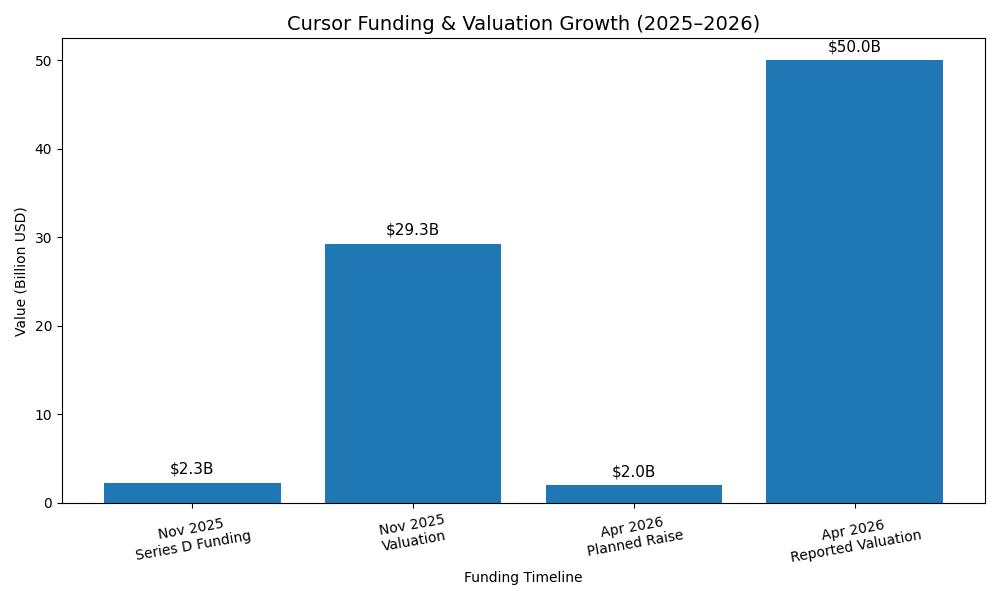
- In November 2025, Cursor closed a $2.3 billion Series D co-led by Accel and Coatue Management, valuing the company at $29.3 billion
- As of mid-April 2026, Cursor was reportedly in talks to raise at least $2B at a $50B valuation
- Notable investors include Andreessen Horowitz, Thrive Capital, Google, and NVIDIA
👨💻 Team Size:
- As of August 2025, the company employs roughly 150 people — incredibly lean for a $29B company
📈 Market Context:
- Stack Overflow’s 2025 survey found that 84% of developers are using or planning to use AI tools in their workflows, and 51% of professional developers use AI daily
(Sources: Anysphere, Sacra, Bloomberg, TechCrunch)
Cursor AI vs Competitors: Complete AI Code Editor Comparison Table (2026)
8 tools covered: Cursor, Windsurf, GitHub Copilot, Claude Code, Cline, Zed, Devin, and VS Code + Copilot — every major player in the 2026 AI coding market.
7 comparison dimensions per tool: Free tier availability, paid pricing, tool type (IDE/plugin / terminal agent), AI models supported, best use case, agent mode status, and overall rating.
| Tool | Free Tier | Paid Plan (Starting) | Type | AI Models | Agent Mode | Best For | Rating |
|---|---|---|---|---|---|---|---|
| Cursor ⭐ Top Pick | ✅ Yes (Hobby plan) | $20/mo Pro · $60 Pro+ · $200 Ultra | Full IDE | Claude, GPT-4, Gemini, Composer | ✅ Yes (Composer + Background Agents) | Best all-round AI IDE. Multi-file editing, largest community, polished UX | ⭐⭐⭐⭐½ (4.5) |
| Windsurf | ✅ Yes (Unlimited autocomplete) | $20/mo Pro · $60 Pro+ · Teams available | Full IDE | Claude, GPT-4, SWE-1.5 | ✅ Yes (Cascade Agent) | Budget-conscious developers & beginners switching from VS Code | ⭐⭐⭐⭐ (4.0) |
| GitHub Copilot | ✅ Yes (50 req/mo) | $10/mo Pro · $39/mo Business | Plugin / Extension | GPT-5, Claude 4, Gemini | ✅ Yes (Agent Mode) | Teams already using GitHub & Microsoft ecosystem | ⭐⭐⭐½ (3.5) |
| Anthropic Claude Code | ⚠️ Limited (API credits needed) | $17/mo Pro · $100+/mo Max | Terminal Agent | Claude Opus, Claude Sonnet | ✅ Yes (Autonomous + Sub-agents) | Terminal-first developers & large codebases | ⭐⭐⭐⭐½ (4.5) |
| Cline | ✅ Yes (BYO API key) | Free (Pay API usage only) | Plugin (VS Code) | Any API model · Ollama local models | ✅ Yes (Full agentic) | Developers wanting full control & customization | ⭐⭐⭐½ (3.5) |
| Zed | ✅ Yes (50 prompts/mo) | $10/mo Pro | Native IDE | Claude, GPT-4 | ⚠️ Limited | Speed-focused developers with low memory usage needs | ⭐⭐⭐ (3.0) |
| Cognition Devin | ⚠️ Trial only | $500/mo Teams · Enterprise custom | Autonomous Agent | Proprietary | ✅ Fully autonomous | Enterprises wanting autonomous AI developers | ⭐⭐⭐ (3.0) |
| Visual Studio Code + Copilot | ✅ Yes (2,000 completions/mo) | $10/mo Pro | Full IDE | GPT-5, Claude, Gemini | ✅ Yes (Agent Mode) | Beginners & enterprise users on a budget | ⭐⭐⭐ (3.0) |
Final Thoughts – Is Cursor AI Worth It?
So here’s the honest summary:
If you write code — even a little — Cursor is probably worth trying. The free plan costs nothing. The Pro plan at $20/month is a realistic investment for any developer who values their time.
If you’re a student, Cursor is a powerful learning companion. If you’re an entrepreneur, it might just let you build your first product without hiring a team.
The numbers speak for themselves: No other B2B SaaS company in history reached the first billion in annual revenue faster. Revenue is roughly doubling every two months.
That kind of growth only happens when a product genuinely solves a real problem.
Cursor solves the problem of software being too slow, too expensive, and too hard to build.
FAQs
Is Cursor AI Free to Use?
Yes! Cursor AI has a free Hobby plan that lets you try the editor with limited AI features. You don’t even need a credit card. It’s a great way to test it before committing.
Do I need to know how to code to use Cursor AI?
Technically, Cursor AI is designed for people who already code. But beginners are increasingly using it to learn coding — because they can write something, ask Cursor to explain it, and understand instantly. It’s not a replacement for learning; it’s a powerful learning partner.
Is Cursor AI safe for my company’s code?
Yes — if you enable Privacy Mode. With this setting on, your code is never stored by Cursor’s AI model providers and never used for AI training. This is a major reason why Fortune 500 companies trust it.
What is “vibe coding”, and does Cursor AI enable it?
“Vibe coding” is when you describe what you want in plain English, and the AI builds it. Yes, Cursor is one of the main tools powering this movement — especially Agent Mode. Many non-technical founders are using it to build apps without traditional programming skills.
How is Cursor AI different from GitHub Copilot?
Both are AI coding assistants, but they differ in key ways. Cursor is a full, standalone code editor with deep codebase understanding, multi-file editing, and Agent mode. GitHub Copilot is mainly a plugin that lives inside your existing editor and is better for line-by-line suggestions. Cursor is generally seen as more powerful for complex tasks, though it costs twice as much at the Pro level ($20/month vs. $10/month).
Who founded Cursor AI, and where is it from?
Cursor AI was founded in 2022 by Michael Truell, Sualeh Asif, Arvid Lunnemark, and Aman Sanger while they were students at MIT. The company is headquartered in San Francisco, California.
How much does Cursor AI make in revenue?
Cursor AI surpassed $2 billion in annualized revenue by early 2026, doubling its revenue over a three-month period. It is one of the fastest-growing software companies in history.
What is Cursor’s valuation?
Cursor AI raised $2.3 billion at a $29.3 billion post-money valuation in November 2025. As of April 2026, it was reportedly in talks for a new round that could value it at $50 billion.
What AI models does Cursor AI use?
Cursor AI gives you access to models from Anthropic (Claude), OpenAI (GPT-4, GPT-5), Google (Gemini), and its own proprietary model called Composer. You can choose which model to use, depending on your needs and credit balance.
Can Cursor AI replace a developer?
Not yet — and probably not for a while. Cursor AI makes individual developers dramatically faster and allows non-technical founders to do more themselves. But Cursor creates code, not complete applications. You still need hosting, CI/CD, databases, and all the infrastructure of modern web development. Think of it as a supercharged assistant, not a replacement.

About Naseeb Akhter
The founder of BotBunch, where he researches, tests, and reviews the latest AI tools, automation software, and SaaS platforms. Along with the BotBunch editorial team, he helps creators, students, professionals, and businesses discover the best AI solutions through hands-on testing, honest reviews, detailed comparisons, and easy-to-follow guides.
Join us via email and social channels to get the latest updates straight to your inbox.