If you’ve never heard of Google Antigravity, that’s about to change. Because right now, this tool is reshaping how software gets built — and it’s not just for experienced developers anymore. Whether you’re a student learning to code, an entrepreneur building your first app, or just someone curious about AI, this article about Google Antigravity 2026 Review is for you.
We’re going to break down exactly what Google Antigravity is, what all those versions mean (2.0, CLI, IDE, SDK — we’ll translate every single one), how much it costs, who it’s best for, and whether it can actually replace tools like Cursor or GitHub Copilot.
What Is Google Antigravity?
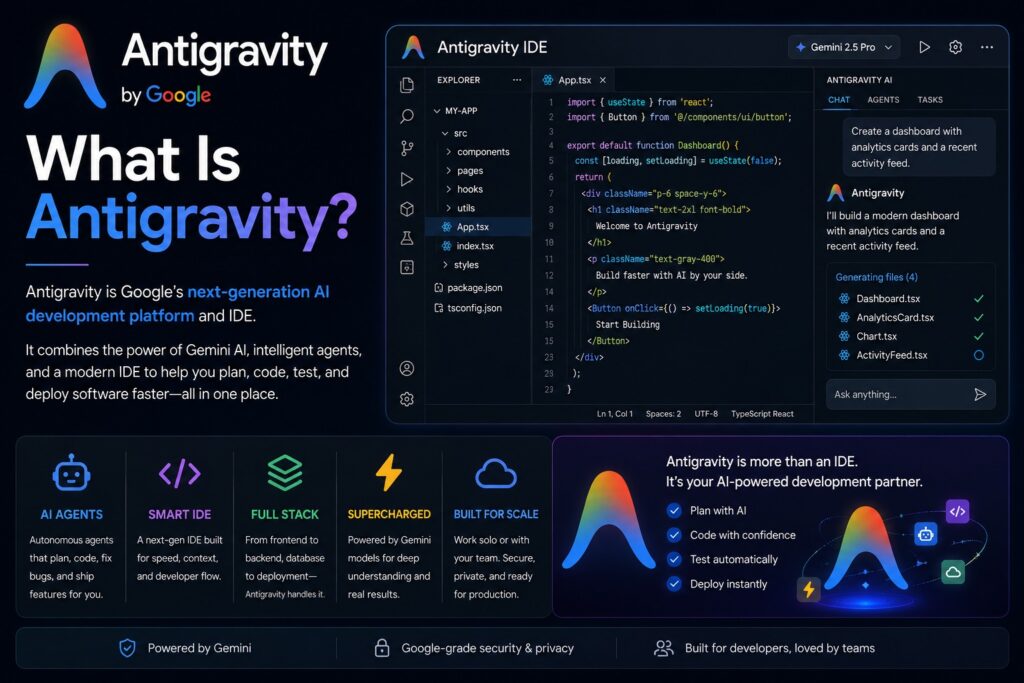
Think of it this way. You know how normally, if you want to build software, you have to write every line of code yourself — or hire a developer who does? Google Antigravity flips that idea on its head.
Instead of you writing code, Antigravity sends out AI “agents” — think of them as smart assistants — that plan the work, write the code, test it in a browser, find bugs, fix them, and deliver you a finished product. You’re the manager. The agents do the work.
Google launched the original Antigravity in November 2025 as a free, experimental tool to compete with products like Cursor. At the time, it was a single app — a code editor powered by AI. But at Google I/O 2026 in May, Google came back with version 2.0, and it’s a completely different beast.
Now Antigravity is not just an app. It’s a full platform. Let me walk you through each piece.
Breaking Down All 4 Versions of Antigravity
1. Antigravity IDE (The Original App)
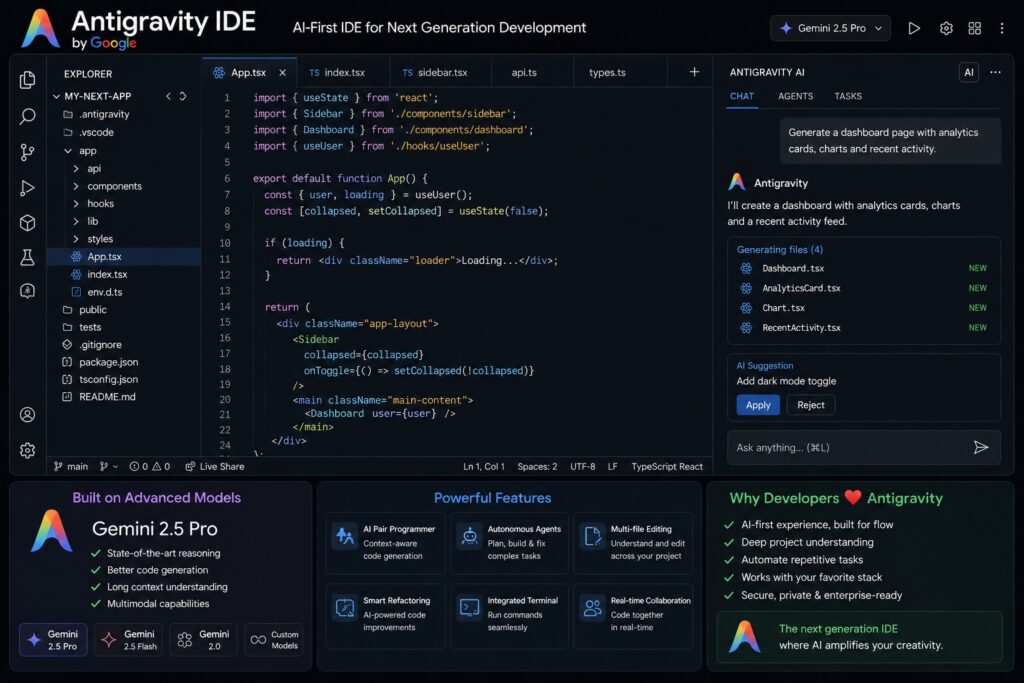
The IDE — short for “Integrated Development Environment” — is basically a supercharged code editor. Picture Microsoft Word, but for writing software. The original Antigravity IDE launched in late 2025 and is available on Windows, Mac, and Linux. It’s built on top of VS Code (the world’s most popular code editor), so if you’ve used that before, it’ll feel familiar.
What makes the IDE special is its “Agent View” and “Manager Surface.” You tell the AI your goal — say, “build me a login page with a forgot-password feature” — and instead of just giving you code to copy, it fires off multiple agents that work simultaneously to actually build it for you. It shows you exactly what each agent is thinking and doing, so you’re never confused.
- Gemini 3 Pro
- Claude Sonnet 4.5
- Gemini 3.5 Flash
- GPT-OSS
One huge perk: Antigravity supports multiple AI brains — Gemini 3 Pro (Google’s best), Claude Sonnet 4.5 (Anthropic’s model), and even GPT-OSS. You pick which AI engine you want powering your agents.
2. Antigravity 2.0 (The New Desktop App)
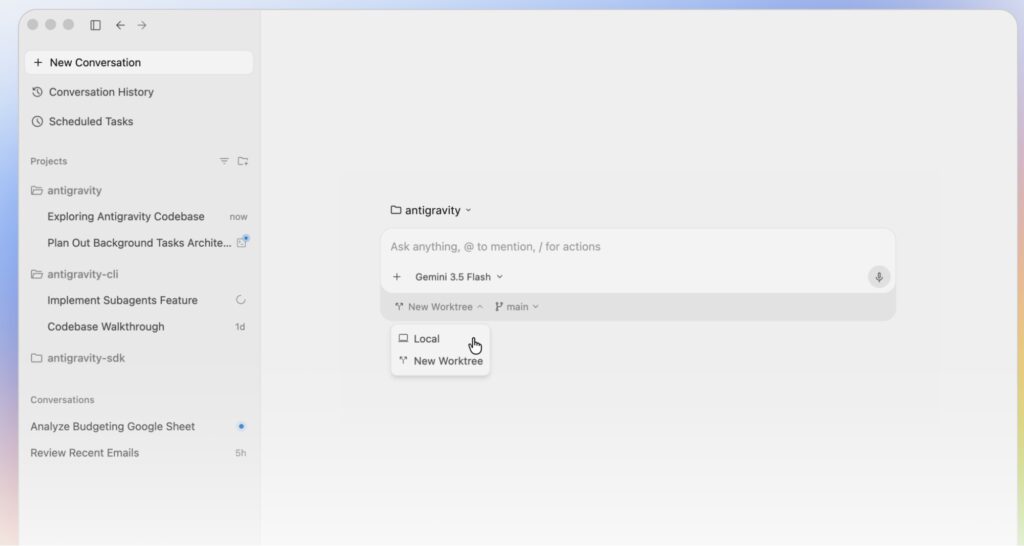
Think of Antigravity 2.0 as the IDE’s upgraded sibling. It’s a brand-new standalone desktop application — completely separate from the old IDE — built from the ground up for one purpose: orchestrating multiple AI agents at the same time.
The star of the show is parallel agents. Instead of one AI assistant working through your task one step at a time, Antigravity 2.0 can run 5 agents simultaneously. One might be writing your database code, another is building the user interface, a third is writing automated tests, and a fourth is checking everything works in a real browser. All at the same time.
You can also schedule tasks to run in the background automatically — even while you’re sleeping. And it connects directly with Google AI Studio, Firebase (Google’s app-building platform), and Android development tools.
3. Antigravity CLI (For Terminal Power Users)
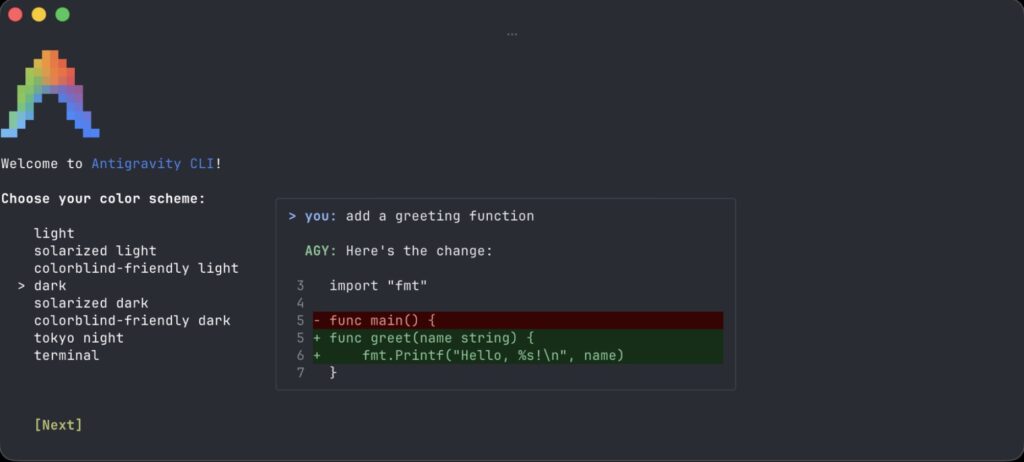
CLI stands for “Command Line Interface.” If you’ve never used a terminal or command prompt, here’s the simple version: some developers prefer to type commands into a black text window rather than clicking around a visual app. It’s faster for pros.
Google built Antigravity CLI specifically for those people. It’s a brand-new tool — built in the Go programming language, which makes it very fast and lightweight — that lets you launch AI agents, manage tasks, and get your work done entirely from the terminal. No clicking, no windows, just text commands.
Importantly, Google is retiring the old Gemini CLI tool on June 18, 2026 and asking all users to switch to Antigravity CLI. If you were using Gemini CLI, the clock is ticking.
4. Antigravity SDK (Build Your Own AI Agents)
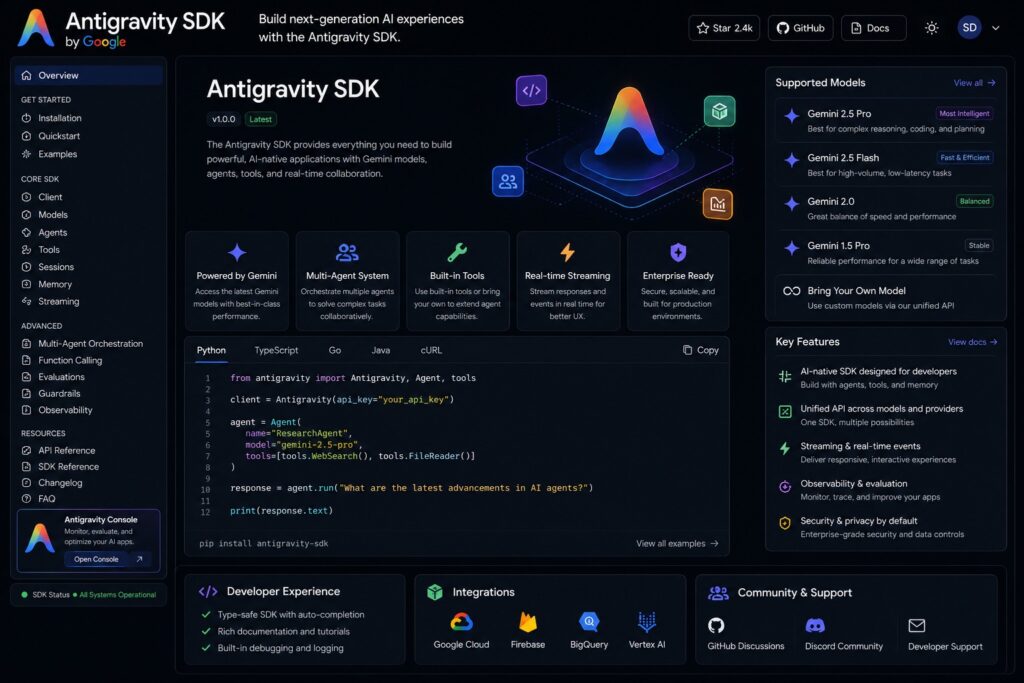
SDK stands for “Software Development Kit.” Think of it as a toolbox that lets developers build custom AI agent systems on top of Antigravity’s engine — and host them on their own servers.
This is the most advanced piece of the puzzle, designed mainly for businesses and engineering teams. With the SDK, a company could build an AI agent that automatically reviews all incoming code, or one that monitors their app and fixes bugs without anyone pressing a button. You’re essentially hiring the Antigravity brain as a contractor for your own infrastructure.
Antigravity Key Features
Let’s talk about the features that set Antigravity apart. Real stuff that changes how you work:
- Parallel Multi-Agent System: Up to 5 AI agents working at the same time on different parts of your project. It’s like having a small dev team.
- Browser Verification Loop: Agents can actually open a browser, test your app, see errors, and fix them — automatically.
- Scheduled Background Tasks: Set a task, go to sleep, wake up to finished work. Agents run on your schedule.
- Google Ecosystem Integration: Native connections to Firebase, Android Studio, Google AI Studio, and Google Play Console.
- Voice Commands: Talk to your agents. Describe what you want to build out loud and the agent runs with it.
- Artifact System: Every agent action creates a transparent record — diffs, screenshots, test results — so you always see what changed and why.
- Multi-Model Flexibility: Switch between Gemini 3 Pro, Claude Sonnet, and GPT-OSS depending on the task.
- MCP Integration: Connect Antigravity to external tools and APIs using the Model Context Protocol standard.
Google Antigravity Pricing
Google Antigravity offers both free and paid plans depending on how much AI coding power you need.
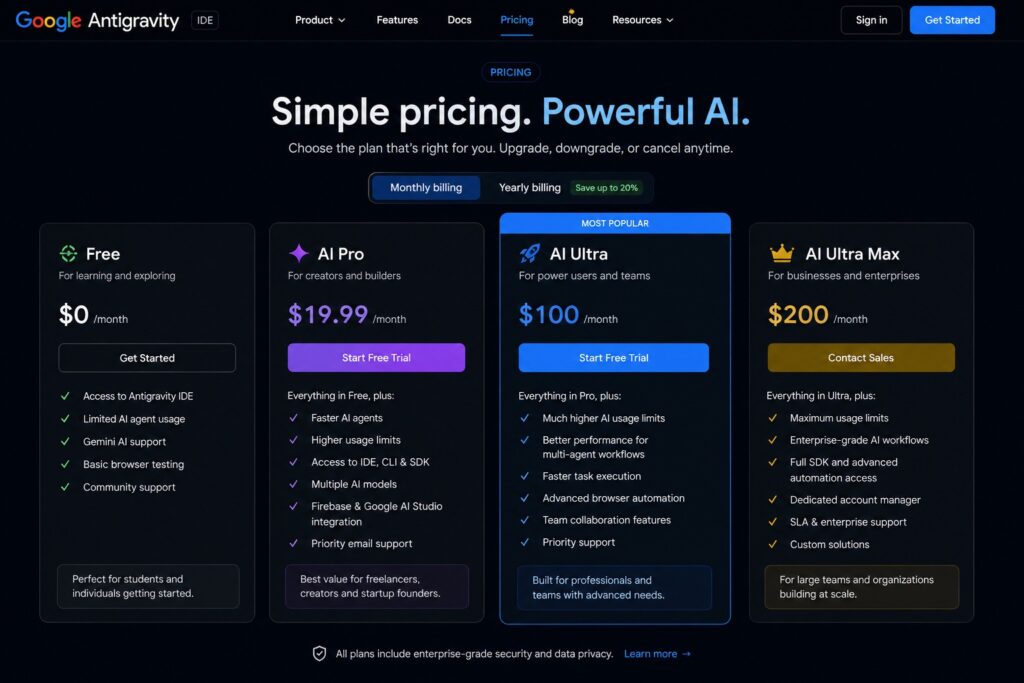
Free Plan: $0 (Best for beginners and students)
AI Pro Plan: $19.99/month (Best for creators, freelancers, and startup founders)
AI Ultra Plan: $100/month (Best for teams and heavy users.
AI Ultra Max: $200/month (Best for businesses and enterprise teams
One honest warning: Antigravity’s pricing has changed multiple times since launch. The credit system can make your actual costs unpredictable. Our advice? Start on the free tier, test it heavily, and only upgrade once you know you’ll use it every day.
Use Cases – Who Should Actually Use Google Antigravity?
Students Learning to Code: The free tier gives you a real AI coding partner. Instead of staring at a blank file, you describe what you want and watch an agent show you how it’s done — great for learning.
Solo Entrepreneurs: Building your startup’s MVP without hiring developers? Antigravity can build full-stack features end-to-end. The Pro plan at $20/month could save you thousands in dev costs.
Full-Stack Developers: Antigravity is strongest for developers who already trust AI to handle meaningful work and want to supervise 5 agents doing work in parallel instead of writing it themselves.
Engineering Teams: The SDK lets companies build custom internal AI workflows. Imagine an agent that automatically reviews every pull request or monitors production and patches issues overnight.
Google Antigravity Pros & Cons
✅ Pros
- Parallel multi-agent system is genuinely unmatched — nothing else runs 5 agents at once this smoothly
- Free tier is generous — you can do real work without paying
- Multi-model support (Gemini, Claude, GPT) gives you flexibility
- Built-in browser testing means agents can actually verify their own work
- Deep Google ecosystem integration (Firebase, Android, AI Studio)
- Transparent Artifact system shows you every action agents take
- VS Code foundation means familiar UI and extension support
- CLI is fast, lightweight, and terminal-native
- SDK gives businesses the power to build custom agent pipelines
- Voice command support — describe tasks out loud
❌ Cons
- Pricing has changed multiple times — opaque credit system makes budgeting hard
- Still in public preview — known security limitations and stability issues
- Gemini CLI users must migrate by June 18 — a forced change that will frustrate many
- Account eligibility can be complex; availability varies by geography
- Not the best choice for simple one-off tasks — overkill for basic needs
- Some VS Code extensions require manual VSIX installation
- Heavy multi-agent tasks can exhaust weekly quotas fast on the free tier
Competitor Comparison: Antigravity vs The Competition
Antigravity didn’t show up to an empty room. Here’s how it stacks up against the tools developers are already using:
| Tool | Starting Price | Agent Support | Best For | Weakness |
|---|---|---|---|---|
| Google Antigravity 2.0 | Free / $19.99/mo | Up to 5 parallel | Full-stack, teams | Pricing transparency |
| Cursor | $20/mo Pro | Single agent | Daily reliability | No parallel agents |
| Claude Code | API-based (~$20+) | Single agent | Complex reasoning tasks | No GUI, CLI only |
| GitHub Copilot | Free / $10/mo Pro | Limited | Code autocomplete | Not truly agentic |
| Windsurf (Codeium) | $20/mo Pro | Cascade engine | Multi-file editing | Less parallel power |
| Kiro | $20/mo (1,000 credits) | Spec-driven | Structured workflows | Newer, less proven |
If you want rock-solid stability and predictable pricing, Cursor is still the safer daily driver. But if you want the most powerful, forward-looking agent system available right now — and you’re willing to ride some rougher edges — Antigravity 2.0 is ahead of everyone else.
Final Verdict – Google Antigravity Overall Rating: 4.5 / 5
Google Antigravity 2.0 is the most technically ambitious AI coding platform available today. The parallel multi-agent system, browser verification loop, and deep Google ecosystem integration are genuinely ahead of the competition. The free tier is real and generous. But pricing instability and preview-stage roughness hold it back from a perfect score. For anyone serious about AI-assisted development in 2026, it’s essential to at least try it — especially while free tiers remain generous.
For beginners: download the free IDE today and spend an hour trying it. For entrepreneurs: the $19.99 Pro plan could be the most cost-effective developer hire you ever make. For businesses: the SDK and Ultra tiers are worth a serious evaluation call with your team.
Why Trust Us
We tested Google Antigravity hands-on and compared it head-to-head against Cursor, Claude Code, GitHub Copilot, and Windsurf — scoring each tool on pricing clarity, speed, ease of use, features, and real output quality. Every claim in this article is backed by a named source (TechCrunch, Google I/O 2026 keynote, ToolWorthy, Lushbinary, MarkTechPost, etc.). We earn no commission from Google, and this review has not been sponsored.
Is Google Antigravity free?
Yes! There is a free tier that gives you access to the Antigravity IDE with weekly usage quotas powered by Gemini 3 Pro. You can do real development work without paying anything. Paid plans start at $19.99/month for heavier usage and priority access.
What is the difference between Antigravity IDE and Antigravity 2.0?
The IDE is the original code editor app (like VS Code with AI built in). Antigravity 2.0 is a brand-new, separate desktop application focused entirely on running multiple AI agents in parallel. Think of 2.0 as the control room where you manage a team of AI workers, while the IDE is where you can write and review code yourself.
Do I need to know how to code to use Google Antigravity?
Not necessarily. Google Antigravity is designed so you can describe what you want in plain English and agents will do the technical work. That said, having some coding knowledge will help you review and guide the agents better, especially for complex projects.
Is Google Antigravity better then Cursor?
It depends on what you need. Cursor is more stable, has clearer pricing, and is better for daily use by professional developers. Antigravity has more powerful multi-agent capabilities, deeper Google integrations, and a more ambitious technical vision — but is still in preview with rougher edges.
What is the Google Antigravity CLI and do I need it?
The CLI (Command Line Interface) is for developers who prefer working in a terminal window instead of a visual app. If you’re a beginner or you prefer clicking through a graphical interface, you don’t need the CLI — the IDE or desktop app will serve you fine. The CLI is mainly for advanced developers and automation workflows.
What is Gemini CLI and why is it being retired?
Gemini CLI was Google’s older command-line AI coding tool. Google is replacing it entirely with Antigravity CLI, which is faster (built in Go) and more powerful. If you use Gemini CLI, you must switch to Antigravity CLI before June 18, 2026 or you’ll lose access.
What AI models does Google Antigravity use?
Antigravity supports Gemini 3 Pro, Gemini 3.5 Flash, Anthropic’s Claude Sonnet 4.5, and OpenAI’s GPT-OSS. You can choose which model powers your agents depending on the task.
Is Google Antigravity good for non-technical entrepreneurs?
Yes — with caveats. Antigravity is one of the most beginner-accessible ways to build software using AI. You describe your goal, agents build it. But for complex apps, you’ll want some technical knowledge (or a technical co-founder) to review the agents’ work and catch mistakes.

About Naseeb Akhter
The founder of BotBunch, where he researches, tests, and reviews the latest AI tools, automation software, and SaaS platforms. Along with the BotBunch editorial team, he helps creators, students, professionals, and businesses discover the best AI solutions through hands-on testing, honest reviews, detailed comparisons, and easy-to-follow guides.
Join us via email and social channels to get the latest updates straight to your inbox.