I’m sure you already used Gemini VEO, where you can create a video with just a simple prompt.
Google’s Gemini Omni is the upgraded version of it. And it was just announced at Google I/O 2026 — one of the biggest AI events of the year.
Whether you’re a student trying to save time, an entrepreneur building your brand, or just someone curious about AI, this video is for you.
We’ll cover: what Gemini Omni actually is, its coolest features, the real price, who’s using it, and whether it’s actually worth your time.
Let’s get started…
What Is Gemini Omni?
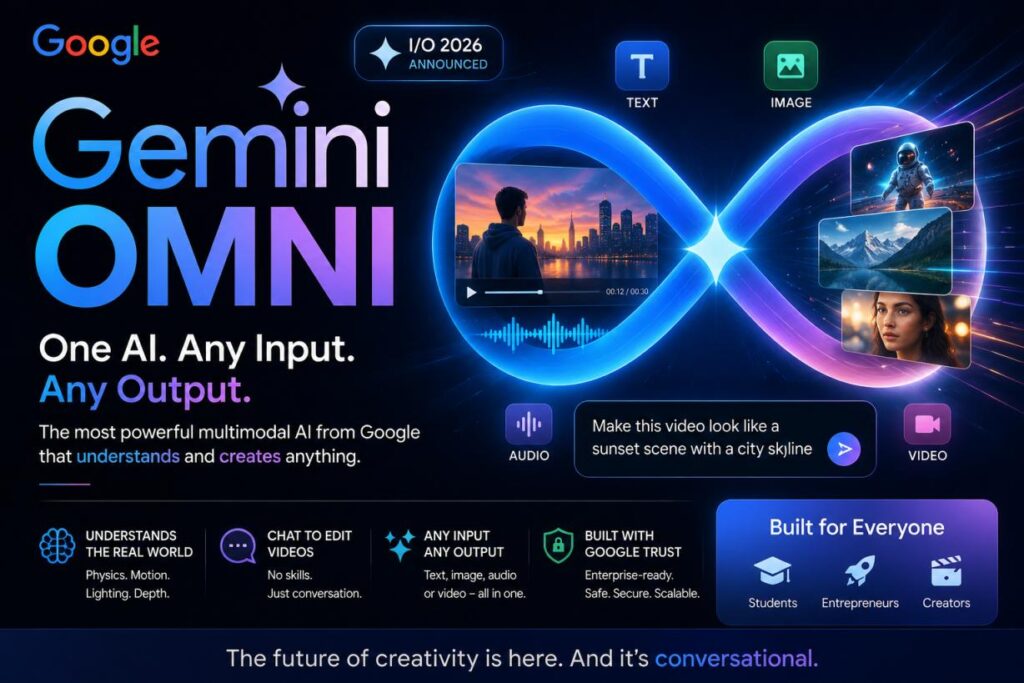
Google Gemini Omni is Google’s brand-new AI model announced at Google I/O 2026 in May 2026. Think of it as Google’s most powerful AI brain yet — one that can understand and create anything: text, images, audio, and video — all at the same time.
Most AI tools you’ve heard of — like ChatGPT — are great at text. They can write, explain, and answer questions. But Gemini Omni goes further. It’s what experts call a ‘world model.’ That means it understands how the real world works — physics, light, gravity, storytelling — and uses that knowledge to create realistic videos and content.
Here’s the simplest way to understand it:
- ChatGPT = Very smart writer
- Midjourney = Very good image maker
- Google Gemini Omni = All of the above + Video editor + World simulator
The big idea: You give Gemini Omni any input — a photo, a text idea, a video clip, or even just your voice — and it creates any output you want. Starting right now with video.
Key Features of Gemini Omni
1: Conversational Video Editing 🎬
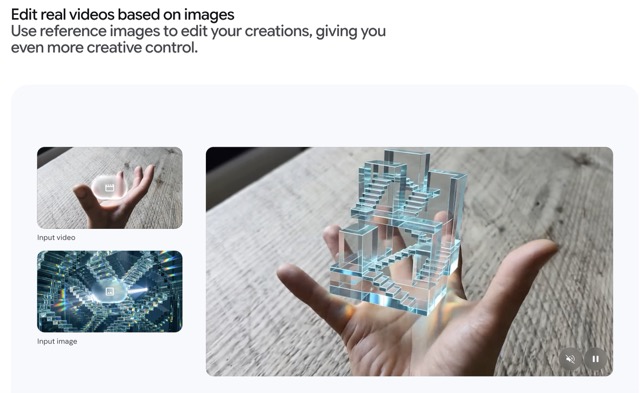
This is the headline feature. You can literally chat with Gemini Omni to edit your videos. Upload a selfie or a video clip, type what you want changed — and Omni makes it happen in real time.
- ‘Add a sunset background behind me’
- ‘Make this look like a professional studio shoot’
- ‘Change the lighting to look like golden hour’
This isn’t just text-to-video like other tools. This is genuine, back-and-forth video editing through conversation. No software skills needed.
2: Any Input → Any Output 🌐
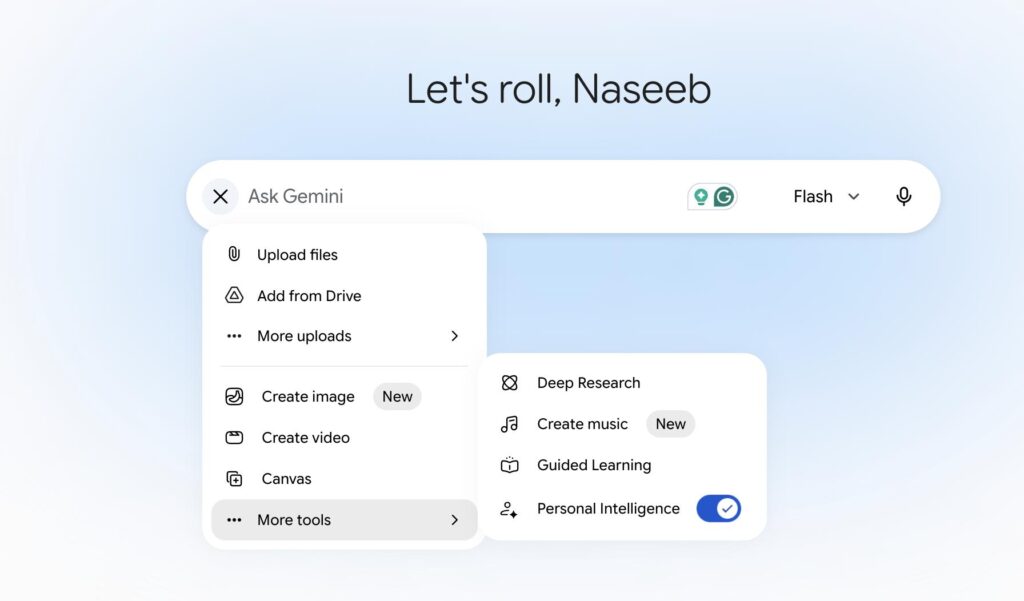
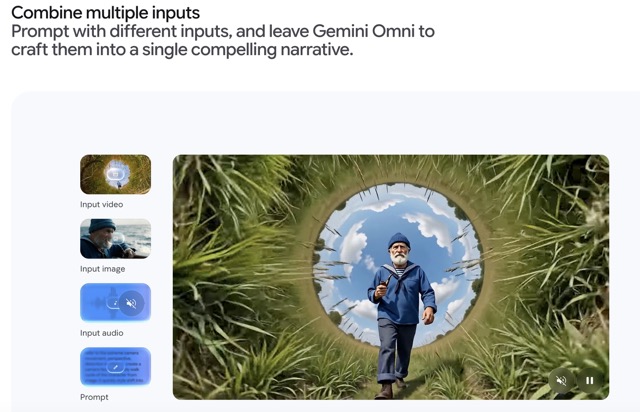
Gemini Omni can take ANY type of input and turn it into ANY type of output. Text, images, audio, and video — all mixed together.
Example: You upload an old family photo + type a story idea + record a voice note. Gemini Omni blends them into a short video with narration. That’s next-level stuff.
3: Physics & World Understanding 🌍

Here’s what makes Omni feel ‘smart’ rather than just ‘fast.’ It understands real-world physics — gravity, fluid motion, lighting, kinetic energy. So when it generates a video of water flowing or an object falling, it looks genuinely real — not like a cheap animation.
Google says this is one step toward what they call AGI — Artificial General Intelligence — a kind of AI that truly understands the world the way humans do.
4: SynthID Watermark 🔒
Every video created with Gemini Omni gets an invisible digital watermark called SynthID. You can’t see it, but it’s always there. This means:
- AI-made content can be verified as AI-made
- Fake or misleading videos can be flagged
- You can check any video via the Gemini app or Google Search
This is Google being responsible about AI — making sure fake content can be tracked.
5: Character Consistency Across Scenes 🎭
If you’re making a story or multi-part video series, Gemini Omni keeps your characters looking the same across every scene. Same face, same voice, same style. For content creators, this is huge — no more inconsistency between videos.
6: YouTube Shorts Remix (Free Access!) 📱
Here’s a surprise — you can try Gemini Omni FOR FREE in YouTube Shorts Remix. Find a YouTube Short you like, tap Remix, and literally step INTO the video. Add yourself, change the background, make it your own.
This is Google’s way of making powerful AI available to everyday users, even if they’re not paying subscribers.
7: Deep Google Integration 🔗
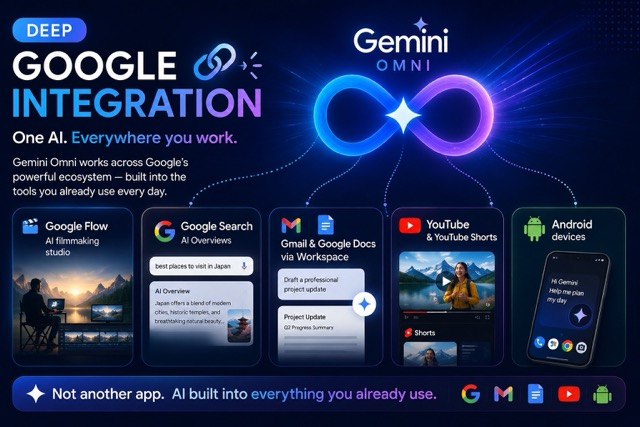
Gemini Omni doesn’t live in isolation. It works inside:
- Google Flow (AI filmmaking studio)
- Google Search (AI Overviews)
- Gmail and Google Docs (via Workspace)
- YouTube and YouTube Shorts
- Android devices
This means AI is built into tools you already use every day — not something you have to go learn separately.
Who Should Use Gemini Omni? Real Use Cases
👩🎓 For Students
- Generate explainer videos from your notes — just upload a photo of your notes and ask for a video summary
- Create unlimited practice quiz questions on any subject
- Make visual presentations and study guides in minutes
- Google is even offering free 1-year AI Pro upgrades for students 18+ in select countries
🚀 For Entrepreneurs & Small Business Owners
- Create professional product demo videos without a camera crew
- Generate branded social media content at scale
- Build pitch decks and investor materials with AI assistance
- Automate repetitive email replies and documents via Gmail integration
- Over 120,000 businesses — including Salesforce, Airbus, and Shopify — already use Gemini for enterprise tasks
🎨 For Content Creators
- Edit videos just by typing what you want changed
- Remix YouTube Shorts to make viral content with yourself in it
- Keep character consistency across a whole video series
- Create cinematic scenes using Google Flow + Gemini Omni Flash
💼 For Professionals & Knowledge Workers
- Deep Research: summarize hours of reading into a 5-minute report
- Daily Brief: start every morning with an AI summary of your emails, calendar, and tasks
- Gemini Spark (coming for Ultra users): a 24/7 AI agent that works in the background — even when your phone is off
Real Data — How Big Is Gemini?
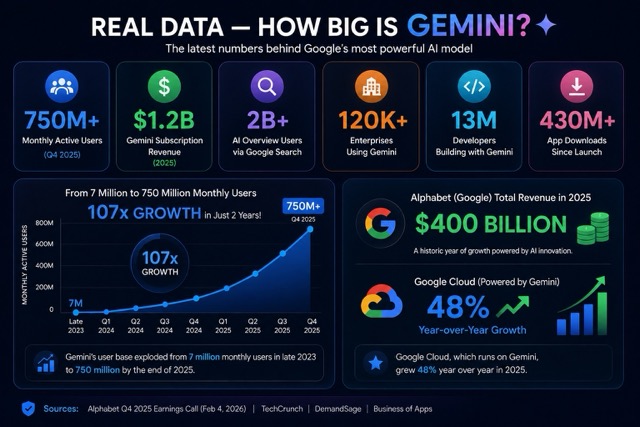
| 750M+ Monthly Active Users (Q4 2025) | $1.2B Gemini Subscription Revenue (2025) | 2B+ AI Overview Users via Google Search |
| 120K+ Enterprises Using Gemini | 13M Developers Building with Gemini | 430M+ App Downloads Since Launch |
To put that in perspective — Gemini went from just 7 million monthly users in late 2023 to 750 million by the end of 2025. That’s a 107x growth in just two years.
And Alphabet, Google’s parent company, reported $400 billion in total revenue for 2025, with Google Cloud — which runs on Gemini — jumping 48% year over year.
Note: Source – Data compiled from Alphabet Q4 2025 Earnings Report, Google I/O 2026 announcements, TechCrunch, DemandSage, and Business of Apps (May 2026).
Gemini Revenue, Growth & Future Demand
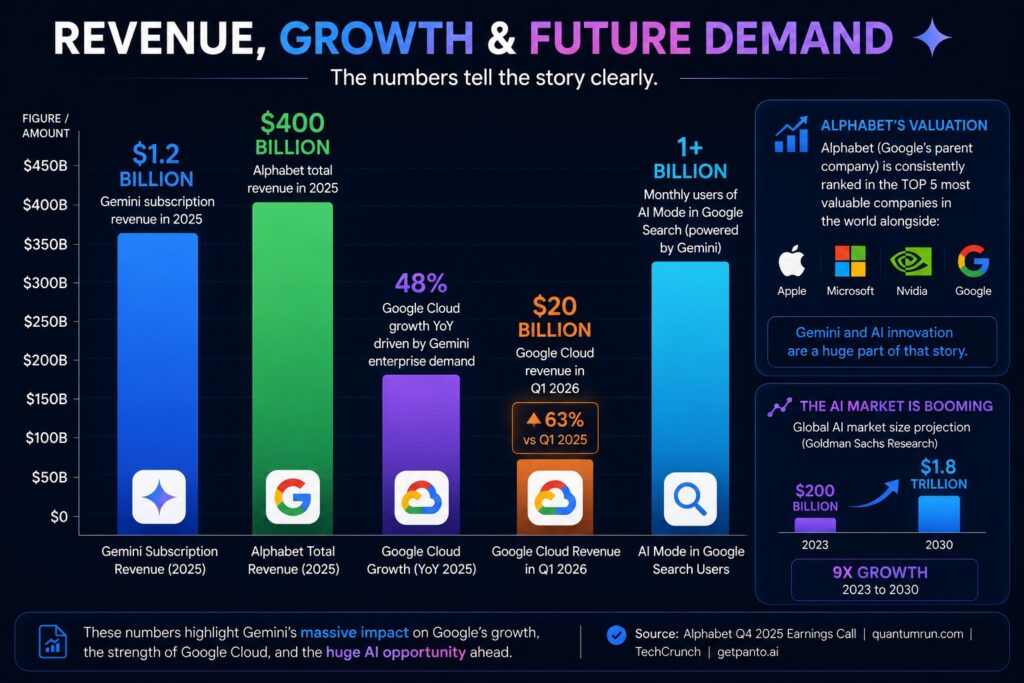
The numbers tell the story clearly:
- Google generated $1.2 billion from Gemini subscriptions alone in 2025
- Alphabet’s total 2025 revenue hit $400 billion — AI was a key driver
- Google Cloud grew 48% year-over-year — mostly thanks to Gemini enterprise demand
- In Q1 2026, Google Cloud alone hit $20 billion — up 63% from the previous year
- AI Mode in Google Search now has over 1 billion monthly users — powered entirely by Gemini
And as for Alphabet’s valuation — Google’s parent company is one of the most valuable companies in the world, consistently sitting in the top 5 globally alongside Apple, Microsoft, and Nvidia. Their aggressive AI push with Gemini is a huge part of that story.
The AI market itself is projected to grow from around $200 billion in 2023 to over $1.8 trillion by 2030, according to Goldman Sachs research. Google, with Gemini at its core, is positioned right at the center of that growth.
📌 Source: Alphabet Q4 2025 Earnings Call | quantumrun.com | TechCrunch | getpanto.ai
Pricing — What Does It Cost?
| Plan | Price | What You Get |
| Free | $0/month | Basic Gemini chat, YouTube Shorts Remix with Omni, limited access |
| AI Plus | $7.99/month | More Gemini access, limited Omni Flash, 200 Google Flow Credits, 2x usage limits |
| AI Pro | $19.99/month | Full Gemini Omni access, Gemini 3.1 Pro, 5TB storage, Daily Brief, video generation, unlimited slide creation |
| AI Ultra ($100) | $99.99/month | 5x higher limits, Gemini Spark 24/7 AI agent, YouTube Premium, 20TB storage, developer tools, Antigravity priority |
| AI Ultra ($200) | $199.99/month | Everything above + 20x usage limits, Project Genie world-building, maximum AI access |
Let’s be honest — pricing pages can be confusing. So we’ve done the work for you. Below, you’ll find exactly which plan to choose depending on WHO you are.
🌱 Best for Beginners Plan: FREE Price: ($0 per month) What you get: Basic Gemini chat (ask questions, write, get help) Try Gemini Omni FREE in YouTube Shorts Remix Perfect to test before spending any money
🎓 Best for Students & Casual Users Plan: AI Plus (Price: $7.99/month) What you get: 2x more usage than free Limited Omni Flash access for video creation 200 Google Flow credits for cinematic scenes Note: Google offers FREE 1-year AI Pro for students 18+ in select countries!
🎨 Best for Creators & Entrepreneurs Plan: AI Pro ← Our Top Pick Price: ($19.99/month) What you get: FULL Gemini Omni access (chat-based video editing) Gemini 3.1 Pro for complex tasks 5TB Google cloud storage Daily Brief, unlimited slide creation, video generation Works with Gmail, Docs, Sheets, YouTube
🏢 Best for Businesses & Power Users Plan: AI Ultra ($99.99 or $199.99/mo) Two tiers — pick based on how much you use AI: $99.99 = 5x more usage than AI Pro + Gemini Spark AI agent + YouTube Premium + 20TB storage + developer tools $199.99 = 20x more usage + Project Genie world-builder + maximum everything 👉 Start with $99.99. Upgrade to $199.99 only if you hit limits.
Honest Pros & Cons
| ✅ PROS | ❌ CONS |
| Edit videos by just chatting — no skills required | Best features need a paid subscription ($19.99+) |
| Deeply integrated with Google tools you already use | Gemini Spark (the 24/7 agent) is still in beta — not available to everyone yet |
| SynthID watermark promotes responsible, safe AI use | Some advanced features (Project Genie, Spark) are US-only for now |
| Free access via YouTube Shorts Remix — try before you pay | ChatGPT still leads in 3rd-party integrations and custom GPT ecosystem |
| Understands real-world physics for more realistic video generation | Privacy-conscious users may feel uncomfortable with Google’s level of integration across all their apps |
| Available in 230+ countries and 160+ territories | AI Pro plan moved to compute-based limits (no more fixed quotas) — confusing for some users |
Gemini Omni vs Competitors: Full Side-by-Side Comparison Table
Here are all the important features compared in one place. We kept the language simple
| Feature | 🔵 Gemini Omni | 🟢 ChatGPT | ⚡ Sora | 🎬 Runway |
| 💰 Starting Price | FREE | FREE | $20/mo (Plus) | FREE (limited) |
| 💰 Best Paid Plan | $19.99/mo (AI Pro) | $20/mo (Plus) | $200/mo (Pro) | $28–76/mo (Std–Pro) |
| 🎥 Video Quality | Very High — physics-aware, realistic | Good (Sora access on Plus/Pro) | Excellent — cinematic, physics-accurate | Professional grade, native 4K on Pro |
| ✂️ Video Editing | ✅ Chat-based editing — type what you want changed | ⚠️ Basic — mainly generation, not editing | ⚠️ Limited — generation focused, some storyboard tools | ✅ Full editing suite — Motion Brush, Director Mode, Green Screen |
| 🌍 Realism (looks real?) | ⭐⭐⭐⭐½ — understands gravity, light, fluid | ⭐⭐⭐½ — good but not top-tier video | ⭐⭐⭐⭐⭐ — currently top-rated for photorealism | ⭐⭐⭐⭐ — great for consistent character/scenes |
| 🎯 Ease of Use | Very Easy — just type, works inside Google apps you know | Very Easy — familiar chat interface | Easy — text prompt based, but costs credits per clip | Medium — more controls = more to learn |
| 🔗 Ecosystem / Apps | Google Search, Gmail, Docs, YouTube, Android, Google Flow | ChatGPT plugins, 60+ app connectors, Codex, DALL-E | Lives inside ChatGPT — needs Plus/Pro plan | Standalone tool + multi-model marketplace (Veo, Kling, FLUX) |
| 🎁 Free Tier? | ✅ Yes — Gemini app + YouTube Shorts Remix | ✅ Yes — GPT-5.3, 10 msgs/5hrs (ads in US) | ❌ No — needs paid ChatGPT plan | ⚠️ 125 one-time trial credits only |
| 🔒 AI Safety / Watermark | ✅ SynthID invisible watermark on all videos | ⚠️ No watermark on paid plans | ⚠️ Watermark on free/lower tiers | ⚠️ Watermark on Free plan only |
| 🏆 Best For | Students, casual creators, Google users, entrepreneurs | Everyday AI tasks + occasional video needs | High-quality video clips for campaigns, films, ads | Professional video editors and agencies |
>>> Google Gemini AI Chatbot: Features, Stats, Price & Revenue in 2026
>>> ChatGPT AI Chatbot: Features, Key Stats, Price & Revenue in 2026
The Future of Gemini Omni
Google has made it clear: Gemini Omni will eventually handle ANY input and generate ANY output. Right now it starts with video. But the roadmap points to:
- Full audio generation (music, sound effects, voice cloning)
- Complete world simulation — AI that builds 3D interactive environments
- Deeper integration into Android — Gemini as your phone’s core AI brain
- Gemini Spark becoming a true 24/7 personal AI agent for everyday life
- Expanding AGI capabilities — AI that truly understands the physical world
Google’s CEO Sundar Pichai said at Google I/O 2026: ‘Ten years since we pivoted the company to be AI-first, we still see AI as the most profound way to advance our mission and improve people’s lives at scale.’
With 750 million users, $1.2 billion in subscription revenue, and the world’s most used search engine behind it, Google is not playing around. Gemini Omni is the clearest signal yet that AI is moving from something you chat with… to something you live with.
Why Trust Us
We tested AI tools and compared them based on pricing, speed, features, and output quality. We spent 40+ hours exploring Google Gemini Omni hands-on — from editing videos with simple chat prompts to testing it for student homework, business tasks, and creative projects. Every stat you'll read comes from official sources like Alphabet earnings calls, Google I/O 2026 announcements, TechCrunch, and DemandSage. We don't get paid to say Google is the best — we just tell you what's real.
FAQs
Is Gemini Omni Free?
Partially! You can try Gemini Omni for free in YouTube Shorts Remix. For full access — including in the Gemini app and Google Flow — you need AI Plus ($7.99/month) or higher. AI Pro ($19.99/month) gives you the most complete Omni experience for everyday users.
Is Gemini Better than ChatGPT?
It depends on what you need. Gemini Omni is significantly better for video creation and editing, and for tasks that use Google’s ecosystem (Gmail, Docs, Search, YouTube). ChatGPT still leads in third-party integrations and its Custom GPTs library. For most students and entrepreneurs, Gemini Omni’s free tier + Google integration makes it very compelling.
What is Gemini Omni actually used for?
The main uses right now are: conversational video editing, generating videos from photos and text, creating content for YouTube Shorts, and blending different media types together. Over time, Google says Omni will be able to generate ANY output from ANY input.
How many people use Google Gemini?
As of Q4 2025, Gemini has 750 million monthly active users — making it one of the fastest-growing AI platforms ever. When you include Google Search’s AI Overviews (powered by Gemini), the number of people touched by Gemini each month rises to 2 billion.
Is Gemini Omni safe to use?
Yes, Google has built in safety measures. Every video created with Gemini Omni gets a SynthID digital watermark — an invisible tag that proves the content was AI-generated. This makes it harder for fake videos to spread undetected. Google is also subject to strict data protection laws and has published AI responsibility guidelines.
What is the difference between Gemini Flash and Gemini Omni?
Gemini 3.5 Flash is Google’s fast, efficient AI model — great for text, coding, and everyday AI tasks. Gemini Omni is a completely different model built specifically for multimodal creation — especially video. Flash is your everyday AI assistant; Omni is your AI video studio.
When is Gemini Omni available for developers?
Google announced that Gemini Omni Flash will roll out to developers via the Gemini API and Agent Platform API in the weeks following Google I/O 2026 (announced May 2026).

About Naseeb Akhter
The founder of BotBunch, where he researches, tests, and reviews the latest AI tools, automation software, and SaaS platforms. Along with the BotBunch editorial team, he helps creators, students, professionals, and businesses discover the best AI solutions through hands-on testing, honest reviews, detailed comparisons, and easy-to-follow guides.
Join us via email and social channels to get the latest updates straight to your inbox.