Imagine you’re a YouTuber. You have a great idea for a video — a cinematic short film about a robot exploring a lost city. Normally, you’d need a camera crew, a location, expensive software, and weeks of editing. But what if you could type that idea into a box and watch it come to life in seconds?
That’s exactly what Google Flow promises. And in 2026, it’s getting closer to delivering on that promise than ever before.
Whether you’re a student, a content creator, or a business owner trying to make marketing videos, Google Flow is the tool everyone’s talking about. We can say – Google Flow is an AI-powered filmmaking tool.
Let’s Get Started…
What Is Google Flow?
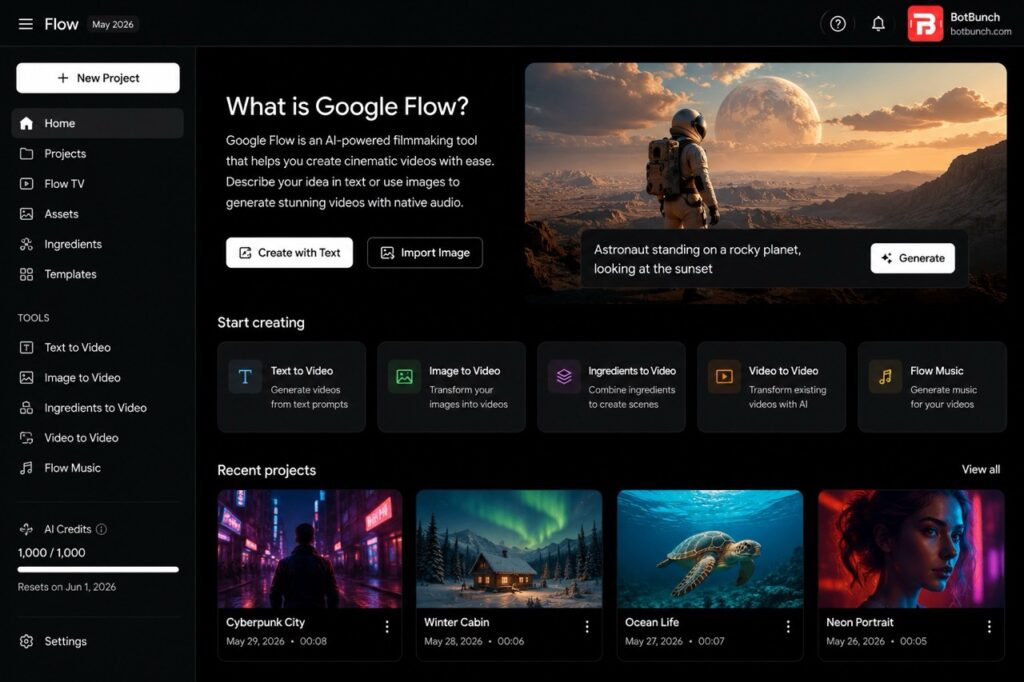
Google Flow is an AI-powered video creation tool built by Google Labs. Think of it as your personal film studio — but instead of cameras and actors, you use words (called “text prompts”) to create videos.
📅 Launched: Google I/O 2025 (May 2025)
🛠 Built by: Google Labs
🧠 Powered by: Veo 3.1 (video), Imagen 4 (images), Gemini (text & prompting)
You type something like: “A woman walking through a rainy neon-lit Tokyo street at night, cinematic style” — and Flow generates a high-quality video clip from that description.
But it’s not just about typing prompts. Flow is a full creative workspace where you can:
- Generate videos from scratch using text descriptions
- Turn photos into videos
- Edit and extend your clips using simple language commands
- Control camera angles and movements
- Add native audio — sound effects, dialogue, and background sound
- Build multi-shot scenes like a real film director
Key Features of Google Flow (2026)
1. Text-to-Video Generation
Type a description → Get a video. Simple as that. Flow uses Google’s Veo 3.1 model to turn words into cinematic clips. You don’t need any technical skills.
2. Image-to-Video
Upload a photo, and Flow will animate it into a video. A still photo of a beach becomes a moving scene with waves and wind.
3. Ingredients-to-Video
You can combine multiple images and videos together — like mixing ingredients in a recipe — to create a full scene. This is unique to Flow.
4. Native Audio Generation
This is a big one. Flow can add realistic sound to your videos — background noise, dialogue, music cues — all synced automatically. No separate audio editing needed.
5. Camera Motion Controls
You can tell Flow: “slow zoom in” or “pan left” or “bird’s eye view” — and it adjusts the camera like a real director would.
6. Scene Builder & Shot Extension
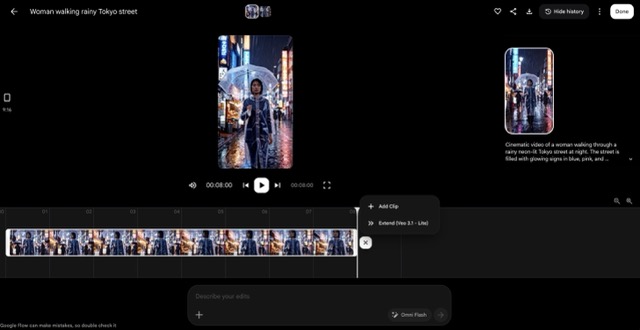
Build multi-shot video sequences. You can even extend an existing clip — if your scene is 8 seconds, Flow can continue it with matching visuals and characters.
7. Flow TV
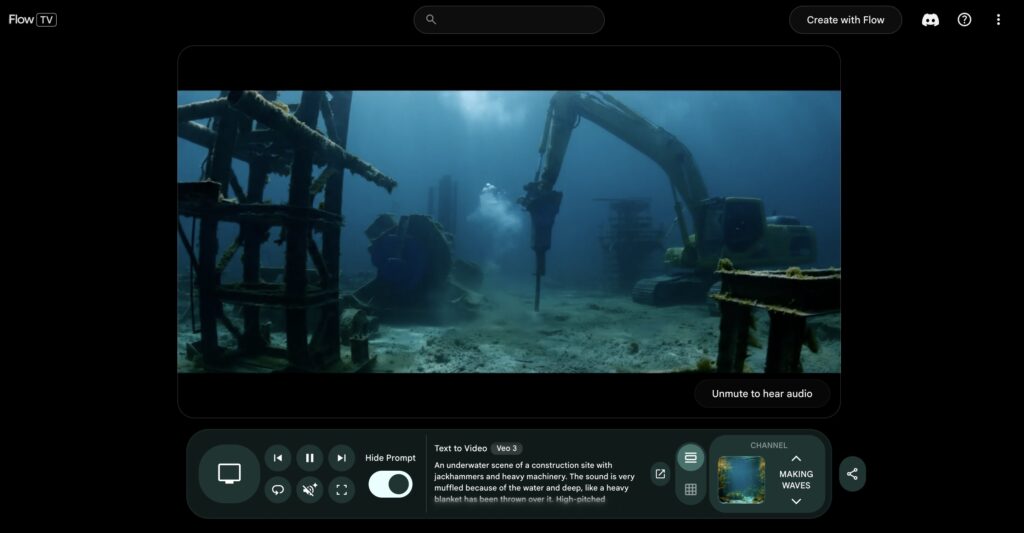
A curated feed where you can see videos created by others — and the exact prompts they used. It’s like a learning community for AI filmmakers.
8. Omni Model (New in 2026)
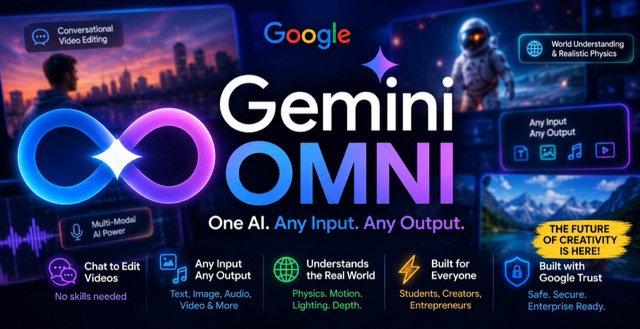
At I/O 2026, Google upgraded Flow with the Gemini Omni model — making the editing more conversational. You can now have a back-and-forth “conversation” with Flow to refine your video, like chatting with an assistant. Google Omni
9. Flow Music
In April 2026, Google added Flow Music — a rebranded version of ProducerAI — that gives musicians and creators AI tools to produce background music and soundscapes.
10. Lasso Editing Tool
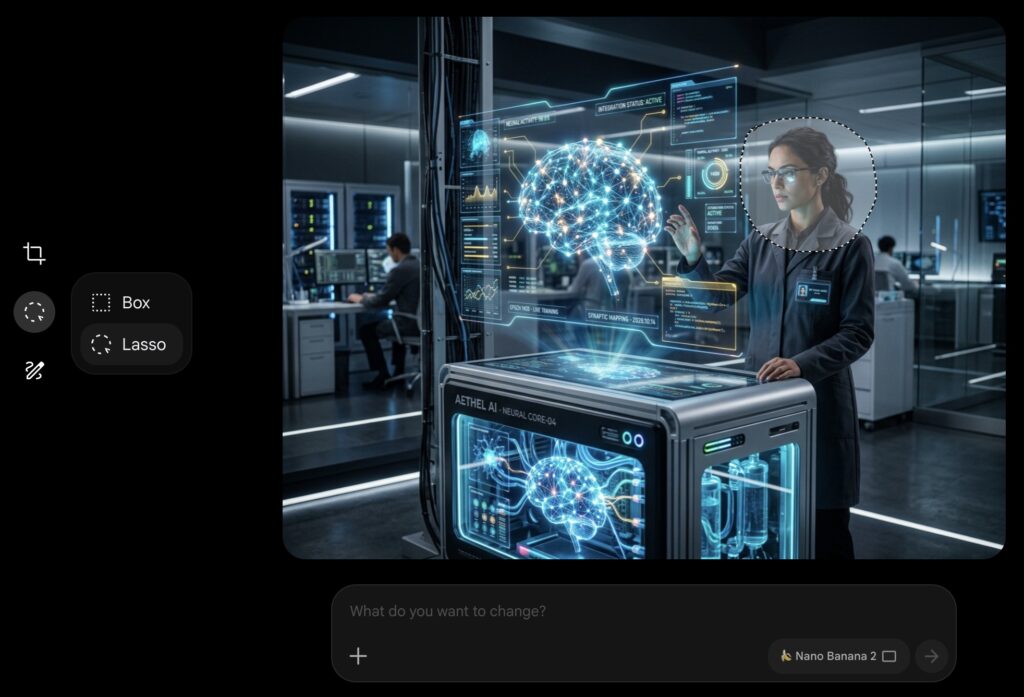
Select any part of an image with a simple lasso tool and type what you want changed. Like Photoshop, but using plain English.
>>> 11 Best AI Video Generators in 2026: Tried & Tested (With Pricing)
Google Flow Pricing — How Much Does It Cost?
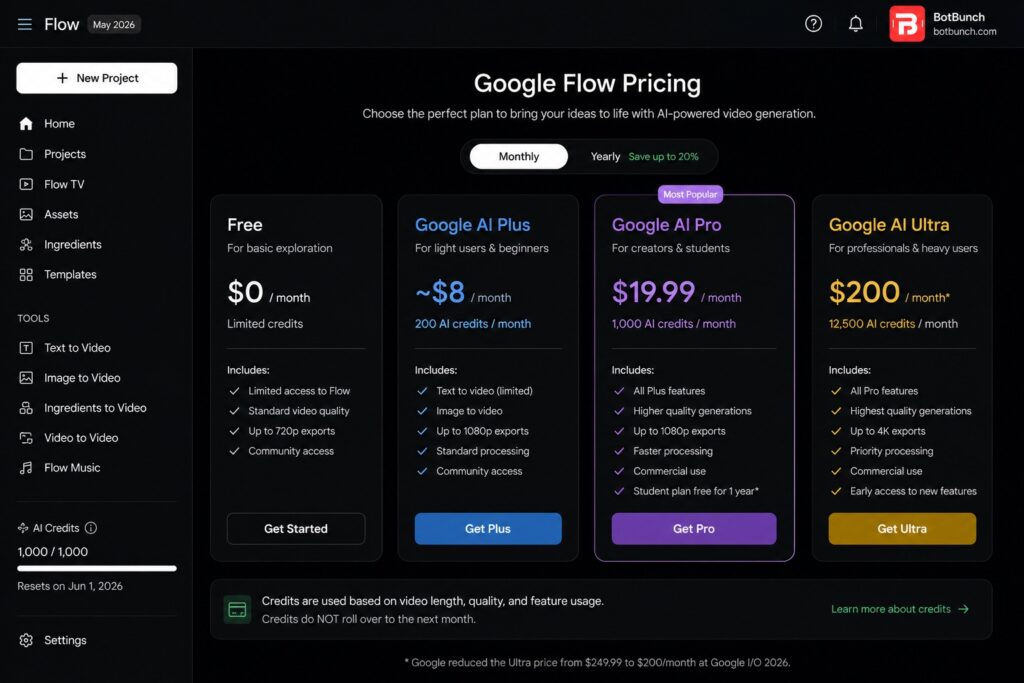
Google Flow works on a credit system. Here’s a simple breakdown:
| Plan | Monthly Cost | AI Credits/Month | Best For |
| Free | $0 | Limited (0 credits) | Basic exploration only |
| Google AI Plus | ~$8/month | 200 credits | Light users & beginners |
| Google AI Pro | $19.99/month | 1,000 credits | Creators & students |
| Google AI Ultra | $200/month* | 12,500 credits | Heavy users & professionals |
* Google reduced the Ultra price from $249.99 to $200/month at I/O 2026.
📌 Source: Google Blog — I/O 2026 | MindStudio.ai — April 2026 | costgoat.com — May 2026
How Many Videos Can You Make?
Using the Pro plan ($19.99/month with 1,000 credits):
- ~100 Lite-quality videos per month
- ~50 Fast-quality videos per month
- ~10 high-quality videos per month
Note: Credits do NOT roll over month to month. And college students can get the Pro plan free for 1 year through Google’s education program.
Pay-As-You-Go (API Pricing)
If you’re a developer or only need occasional videos, you can pay per second of video generated:
- Veo 3.1 Lite: $0.03–0.15/second
- Veo 3.1 Fast: ~$0.20/second
- Veo 3.1 Quality: ~$0.60/second
📌 Source: Google AI API Pricing | getaiperks.com — May 2026
Who Should Use Google Flow? (Real Use Cases)
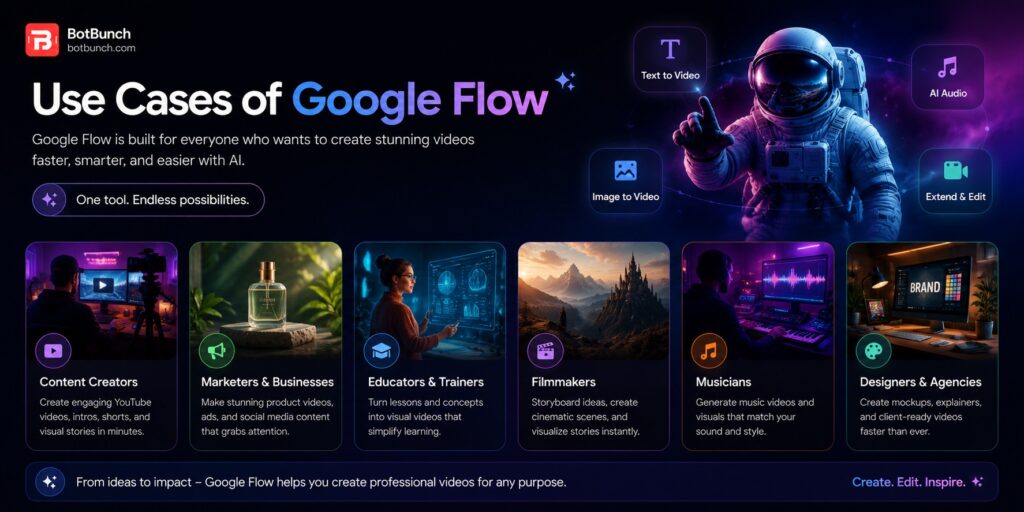
📱 For YouTubers & Content Creators
Create cinematic B-roll footage, trailers, and short films without a camera. Perfect for faceless YouTube channels or adding professional visuals to your videos.
📚 For Students
Make project presentations come alive. History class? Generate a video of ancient Rome. Science project? Visualize how photosynthesis works.
🏢 For Entrepreneurs & Small Businesses
Create product demo videos, social media ads, and explainer videos in minutes — without hiring a video production company. Save thousands of dollars.
🎬 For Indie Filmmakers
Use Flow to prototype scenes, create animatics, or produce short films at a fraction of traditional cost.
🎵 For Musicians
Create music videos, lyric videos, or visualizers using Flow and Flow Music combined — no video editing skills needed.
Real Numbers — Google Flow & Google AI in 2026
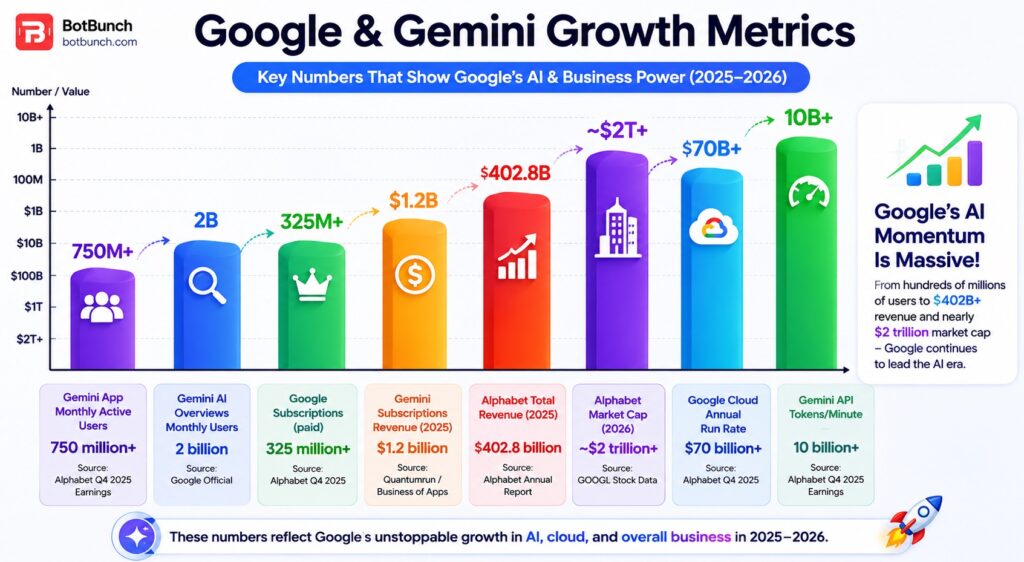
Google doesn’t publish specific numbers for Flow alone, but here’s the real picture from official Alphabet data:
| Metric | Number | Source |
| Gemini App Monthly Active Users | 750 million+ | Alphabet Q4 2025 Earnings |
| Gemini AI Overviews Monthly Users | 2 billion | Google Official |
| Google Subscriptions (paid) | 325 million+ | Alphabet Q4 2025 |
| Gemini Subscriptions Revenue (2025) | $1.2 billion | Quantumrun / Business of Apps |
| Alphabet Total Revenue (2025) | $402.8 billion | Alphabet Annual Report |
| Alphabet Market Cap (2026) | ~$2 trillion+ | GOOGL Stock Data |
| Google Cloud Annual Run Rate | $70 billion+ | Alphabet Q4 2025 |
| Gemini API Tokens/Minute | 10 billion+ | Alphabet Q4 2025 Earnings |
📌 Source: Alphabet SEC Filing Q4 2025 | Quantumrun.com | Business of Apps | getpanto.ai
Future & Demand — Where Is Google Flow Headed?
Competition in AI video generation has intensified in 2026, with Google Flow, Runway, Kling, and other platforms competing for market share. Google Flow is increasingly being viewed as one of the major AI video generation platforms alongside Runway and Kling.
Here’s what’s coming next for Google Flow:
- Mobile apps launching on Android (announced at I/O 2026)
- More conversational editing with the Gemini Omni model
- Flow Music expanding to full music production workflows
- Pay-as-you-go top-up credits for Pro and Ultra users
- Expansion beyond the US to more countries
Google is clearly positioning Flow as a long-term creative platform — not just a one-trick prompt tool. As Google Labs VP Elias Roman said: “We’re really building a new Google product line that’s entirely dedicated to creativity.”
Pros & Cons of Google Flow
| ✅ Pros | ❌ Cons |
|---|---|
| Powered by Google’s latest AI models (Veo 3.1, Gemini, Imagen 4) | Credits don’t roll over; unused credits expire each month |
| Native audio generation eliminates the need for separate audio tools | High-quality video generation consumes credits quickly |
| Beginner-friendly interface with no technical skills required | Some plans and features are currently limited to the U.S. |
| Seamlessly integrates with Google Drive, Workspace, and other Google services | No support for switching between different AI models |
| Free tier available for testing before committing to a paid plan | Videos are limited to 8 seconds per generation |
| Eligible students can access Google AI Pro free for 1 year | Creating longer videos requires multiple generations and more credits |
| Built-in scene extension and multi-shot storytelling workflows | Google AI Ultra may be too expensive for casual users ($200/month) |
| Flow TV community helps users learn from real prompts and projects | AI-generated content can occasionally contain inaccuracies or unwanted outputs |
| Frequent feature updates backed by Google’s ongoing investment | |
| Ultra plan price reduced from $249.99 to $200/month, improving value |
Google Flow: 2025 Launch vs 2026 Improvements
What it launched with in 2025 (baseline):
- Basic text-to-video generation, camera motion control, scene extension, and the ability to edit and extend previously generated videos — available only to Google AI Pro and Ultra subscribers in the US.
What changed/improved in 2026:
UI & Usability
- Simplified upfront controls to make it easier to generate visuals, plus more flexible asset management in an updated UI.
- A simple lasso tool was added, letting users select a specific area of an image and use conversational prompts to ask Flow to make tweaks — no technical skills needed.
Image & Video Quality
- Users can now generate high-resolution images and use them directly as elements within Veo video generations, all within Flow.
- Videos from photos via text commands were added — you upload a photo and describe how you want it to move.
- The Veo 3.1 model received progressive updates through 2026 — better motion coherence, tighter audio sync, and longer maximum clip lengths.
Director’s Toolkit & Scene Building
- Camera controls, motion direction parameters, and character continuity features that were rough in late 2025 became reliable — consistent character across 4+ scenes now produces production-quality output.
- Scene extension reached production-grade: extending a clip with coherent character and environment continuity became reliable in early 2026.
Audio
- Native audio synchronization tightened, with lip-sync accuracy improving meaningfully — short dialogue clips now pass casual-viewer scrutiny.
New AI Model: Gemini Omni Flash (I/O 2026)
- Gemini Omni Flash was introduced — a model that can “create anything from any input, starting with video.” It combines Gemini’s intelligence with generative media models and is described as a leap forward in world understanding, multimodality, and precise video editing.
- Omni Flash improves character consistency, meaning identity and voice are preserved across every scene.
- The model enables conversational video editing — you can now iterate and refine your video through back-and-forth conversation rather than re-prompting from scratch.
New: Flow Agent
- Google launched a Flow Agent — an AI-powered creative assistant that can plan and reason through complex, multi-step creative tasks using your inputs while remaining under your control.
New: Flow Tools
- A Flow Tools system was introduced, letting users build custom creative workflows in natural language — essentially letting creators “vibe code” their own pipelines.
Flow Music (New in 2026)
- Google launched Flow Music in April 2026 as a rebrand of ProducerAI, powered by the Lyria 3 Pro model for artists, producers, and songwriters.
- Creators can now edit specific sections of songs individually without changing the entire track, generate alternate song versions, and translate lyrics.
- Music videos can be created using Gemini Omni — you conversationally direct the visuals to match the narrative and pacing of your track.
Global & Platform Expansion
- Google Flow expanded from a US-only tool at launch to availability in over 140 countries.
- Gemini Omni Flash is now rolling out to AI Plus, Pro, and Ultra subscribers globally — not just Ultra as it was at launch.
- Flow became available as an additional Google service for Workspace customers with granular admin controls, opening it up to enterprise and organizational use.
Mobile Apps (I/O 2026)
- The Flow app launched on Android in beta (iOS coming soon), and the Flow Music app launched on iOS (Android coming soon) — both designed for on-the-go creation.
Google Flow vs Competitors
| Feature | Flow | Runway | Kling 3.0 | Luma | Pika |
|---|---|---|---|---|---|
| Entry price/month | $0 free cheapest | $12(annual) | $6.99 | $30 | $8 |
| Free tier(ongoing) | Yes — daily credits | Trial only (125 once) | Yes — 66/day | Limited trial | Yes — 80/mo |
| Native audio(built-in) | Yes best-in-class | Limited | Yes (multilingual) | No | Basic |
| Text-to-video | Yes (Veo 3.1) | Yes (Gen-4.5) | Yes (3.0) | Yes (Ray3) | Yes |
| Image-to-video | Yes | Yes | Yes | Yes | Yes |
| Max clip length | ~8s (extendable) | 60s longest | 10s | 10-15s | 5-10s |
| Character consistency | Strong (4+ scenes) | Best-in-class | Strong | Moderate | Weak |
| Camera motion control | Yes | Yes (Director mode) | Yes (Motion Brush) | Yes (strong) | Basic |
| Conversational editing | Yes (Gemini Omni) new | Limited (Aleph tool) | No | No | No |
| Scene builder / multi-shot | Yes (Scenebuilder) best | Basic | Yes (storyboard) | No | No |
| Music / audio creation | Yes (Flow Music) only one | No | No | No | No |
| Mobile app | Android beta new 2026 | No | Yes | iOS | Yes |
| Countries available | 140+ | Global | Global | Global | Global |
| 4K / high-res output | Yes (2K/4K) | Yes (4K upscale) | Yes (Ultra HD) | 1080p | Max 1080p |
| Video benchmark rank (2026) | Top 3 (Veo 3.1) | #1 Video Arena top ranked | #1 ELO score (Apr) | Mid-tier | Lower tier |
| Credits roll over? | No | No | No | No | No |
| Best for | Storytelling, audio, Google users | Pro filmmakers, client work | Budget creators, motion realism | Camera exploration, realism | Social media, TikTok effects |
📌 Note: Prices, features, and availability may change over time. Please visit Google’s official website for the most up-to-date information.
Who should use what
| User Type / Need | Recommended Tool | Why It’s the Best Choice |
|---|---|---|
| Beginners & Students | Google Flow | Best free experience, beginner-friendly interface, and eligible students can get Google AI Pro free for 1 year. |
| Professional Filmmakers | Runway Gen-4.5 | Delivers top-tier video quality, supports longer clips, and offers advanced editing capabilities. |
| Budget Creators | Kling 3.0 | Affordable pricing, strong video quality, and excellent value for money. |
| Social Media & TikTok Creators | Pika Labs | Fast generation speeds, creative visual effects, and optimized for short-form content. |
| Narrative Storytelling & Audio Videos | Google Flow | Native audio generation, dialogue synchronization, and multi-shot storytelling with Scenebuilder. |
| Entrepreneurs & Marketers | Google Flow or Kling 3.0 | Great balance of pricing, video quality, and tools for product demos, ads, and marketing content. |
| AI Filmmakers & Creative Storytellers | Google Flow | Designed for cinematic workflows, scene extensions, and consistent storytelling. |
| Fast Content Production | Pika Labs | Quick video creation for viral content and rapid social media publishing. |
| Studio-Quality Commercial Work | Runway Gen-4.5 | Best suited for client projects, branded content, and professional productions. |
| Realistic Human & Motion Scenes | Kling 3.0 | Known for realistic motion, human interactions, and strong visual consistency. |
| Category | Google Flow | Runway Gen-4.5 | Kling 3.0 | Luma Dream Machine | Pika Labs |
|---|---|---|---|---|---|
| 🎥 Video Quality | 8/10 | 9/10 | 9/10 | 7/10 | 6/10 |
| 🏃 Motion Realism | 9/10 | 8/10 | 7/10 | 9/10 | 5/10 |
| 👤 Character Consistency | 7/10 | 10/10 | 8/10 | 6/10 | 5/10 |
| 🔊 Native Audio Quality | 8/10 | 9/10 | 7/10 | 5/10 | 4/10 |
| 😊 Ease of Use | 9/10 | 6/10 | 6/10 | 4/10 | 8/10 |
Quick summary: Runway leads on professional quality. Kling wins on price. Google Flow wins on audio integration and narrative storytelling. Pick based on what YOU need.
Why Trust Us?
We tested Google Flow hands-on and compared it against other leading AI video tools based on pricing, speed, output quality, ease of use, and features. Our goal is simple: give you honest, clear, and useful information — no fluff, no hype. All data and facts in this review are backed by real sources including Google’s official announcements, Alphabet’s earnings reports, and independent reviews.
FAQs
Q1: Is Google Flow free to use?
Yes, there is a free tier — but you get very limited or zero AI credits for video generation. To actually create videos regularly, you’ll need the Pro plan ($19.99/month) or higher.
Q2: How long are videos created by Google Flow?
Each generation creates up to 8 seconds of video. If you need a longer video, you use multiple generations and the scene extension feature to stitch them together. You can also trim and edit existing clips to segment sizes of up to 10 seconds
Q3: What is the difference between Veo and Flow?
Veo 3.1 is the AI model (the engine that actually makes the videos). Flow is the interface — the workspace where you use Veo along with other tools like Imagen and Gemini to build and edit your creative projects. Think of Veo as the engine, Flow as the car.
Q4: Can Google Flow make videos with people talking?
Yes! Flow’s native audio generation includes dialogue. You can create videos where characters speak, with synchronized lip movement and sound — one of Flow’s strongest features vs competitors.
Q5: Is Google Flow better than Runway?
It depends on what you need. Flow is better for narrative storytelling, audio integration, and working within Google’s ecosystem. Runway is better for professional studio-quality output and fine-grained editing control. Both are excellent tools.
Q6: Can students get Google Flow for free?
Yes! Google offers the AI Pro plan (worth $19.99/month) free for 1 year for eligible college students. This gives you 1,000 AI credits per month — plenty to experiment and create.
Q7: What is Flow Music?
Flow Music is Google’s AI music creation tool, launched in April 2026 as a rebrand of ProducerAI. It lets you create AI-generated background music and soundscapes — and works alongside Google Flow for complete audio-visual projects.

About Naseeb Akhter
The founder of BotBunch, where he researches, tests, and reviews the latest AI tools, automation software, and SaaS platforms. Along with the BotBunch editorial team, he helps creators, students, professionals, and businesses discover the best AI solutions through hands-on testing, honest reviews, detailed comparisons, and easy-to-follow guides.
Join us via email and social channels to get the latest updates straight to your inbox.