
Imagine creating a professional video — with a lifelike presenter, speaking in your voice, in your language — without ever turning on a camera.
No studio. No editor. No expensive equipment.
Just you, your laptop, and one of these 9 powerful AI tools.
Welcome to the world of AI Avatar Generators — and in 2026, these tools have gotten so good that it’s getting seriously hard to tell the difference between a human presenter and an AI one.
I’m going to walk you through the 9 best AI avatar generators we personally tested — with honest pros, real cons, actual pricing, and a clear answer to who each tool is right for.
Let’s get started…
What Is an AI Avatar Generator?
Quick basics first — especially if you’re brand new to this.
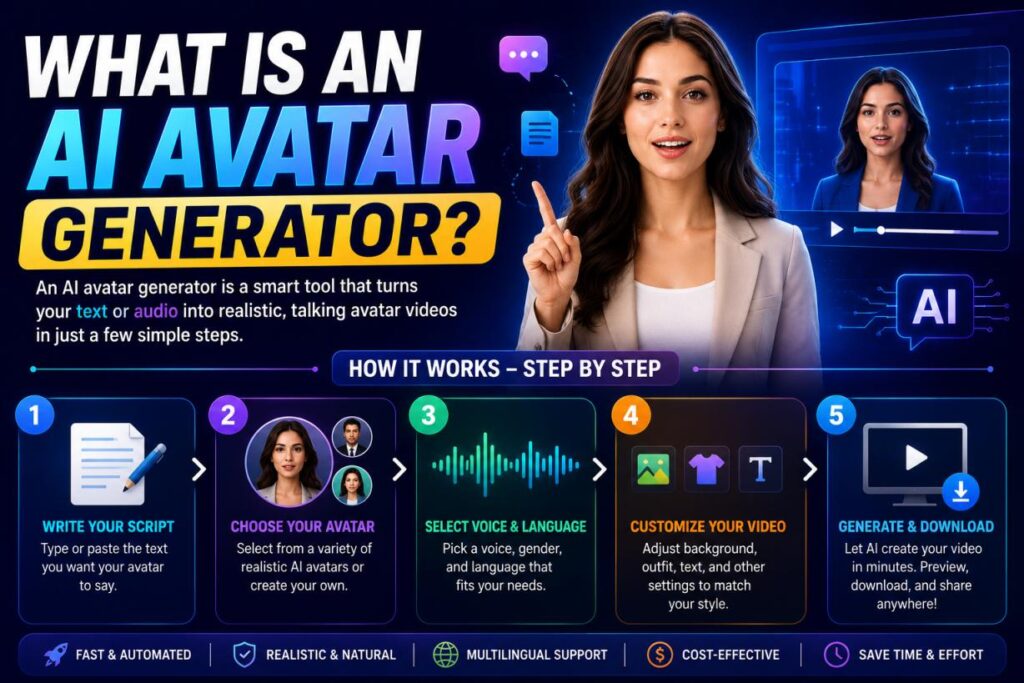
An AI avatar generator is a tool that creates a digital human — or ‘avatar’ — that can speak, move, and present content just like a real person.
You type your script. You choose your avatar. The tool generates a polished video in minutes.
Some tools go even further and let you clone your own face and voice — so the avatar literally looks and sounds like you, minus the camera anxiety.
These tools are used for:
- YouTube videos and social media content
- Online courses and tutorials
- Business presentations and pitch decks
- Sales and marketing videos
- Customer support explainers
- Training videos for employees
- Language learning content
And if you want to dive deeper into AI video creation beyond avatars, check out our full guide on the 11 Best AI Video Generators in 2026.
Quick Comparison – 9 Best AI Avatar Generators in 2026
Here’s the complete side-by-side breakdown:
| Tool | Best For | Free Plan | Starting Price | Avatar Quality | Ease of Use | Languages | Verdict |
|---|---|---|---|---|---|---|---|
| HeyGen | Creators & Entrepreneurs | Yes (1 min) | ~$24/mo | ⭐⭐⭐⭐⭐ | ⭐⭐⭐⭐⭐ | 175+ | ⭐⭐⭐⭐⭐ |
| D-ID | Photo Animation | Trial (14-day) | ~$4.7/mo | ⭐⭐⭐⭐ | ⭐⭐⭐⭐ | 100+ | ⭐⭐⭐⭐ |
| Elai | E-Learning & Corporate | Yes (1 min) | ~$23/mo | ⭐⭐⭐⭐ | ⭐⭐⭐⭐ | 75+ | ⭐⭐⭐⭐ |
| Colossyan | Corporate Training | Trial only | ~$19/mo | ⭐⭐⭐⭐⭐ | ⭐⭐⭐⭐ | 70+ | ⭐⭐⭐⭐⭐ |
| VEED | Social Media Creators | Yes | ~$5.50/mo | ⭐⭐⭐ | ⭐⭐⭐⭐⭐ | 50+ | ⭐⭐⭐⭐ |
| Canva | Absolute Beginners | Yes | ~$5.20/mo | ⭐⭐⭐ | ⭐⭐⭐⭐⭐ | 100+ | ⭐⭐⭐⭐ |
| Synthesia | Enterprise & Teams | Yes (10min/mo) | ~$15.60/mo | ⭐⭐⭐⭐⭐ | ⭐⭐⭐⭐ | 140+ | ⭐⭐⭐⭐⭐ |
| Vidnoz AI | Students & Budget Users | Yes | ~$13.50/mo | ⭐⭐⭐ | ⭐⭐⭐⭐ | 140+ | ⭐⭐⭐⭐ |
| Leadde | Sales & Outreach | Yes (10min/mo) | $15/mo | ⭐⭐⭐ | ⭐⭐⭐⭐ | Limited | ⭐⭐⭐⭐ |
Note: Pricing is approximate. Always verify on official websites before purchasing.
TOOL #1 — HeyGen
🏆 Best For: YouTubers, Entrepreneurs & Content Creators
“Kicking off our list with the most talked-about AI avatar tool right now — HeyGen.
And after testing it ourselves, we completely understand the hype.
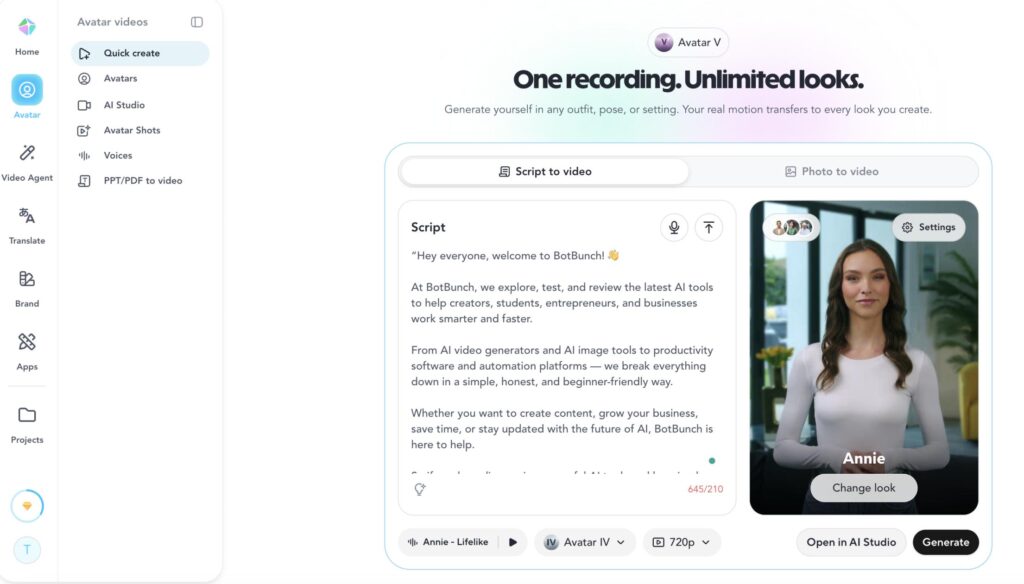
During our testing, HeyGen generated a 60-second avatar video in under 3 minutes — faster than almost every tool we tried. The lip sync was smooth, the expressions felt natural, and when we showed the output to people who didn’t know it was AI-generated, most of them couldn’t tell.
What Makes HeyGen Special:
HeyGen supports over 175+ languages, which is genuinely impressive for global creators. But the standout feature is Avatar Cloning — you upload a short video of yourself speaking, and HeyGen creates a digital version of you that can deliver any script you type. We tested this, and the result was eerily good.
✅ Pros
- Extremely lifelike avatars — among the best we tested
- Fastest rendering speed on this list
- 175+ language support with natural-sounding voices
- Avatar and voice cloning that actually works
- Clean, beginner-friendly interface
- Regular feature updates
❌ Cons
- Free plan is very limited — just 1 minute per month
- Starting price of ~$24/month feels steep for beginners
- Some advanced features (like avatar cloning) are locked behind higher-tier plans
- Occasional inconsistency in hand and body movements
🚫 Who Should Avoid HeyGen?
If you’re looking for a completely free long-term solution, or you only need to make one or two videos a year, the pricing may not justify itself. Start with Vidnoz AI or Canva first.
Pricing:
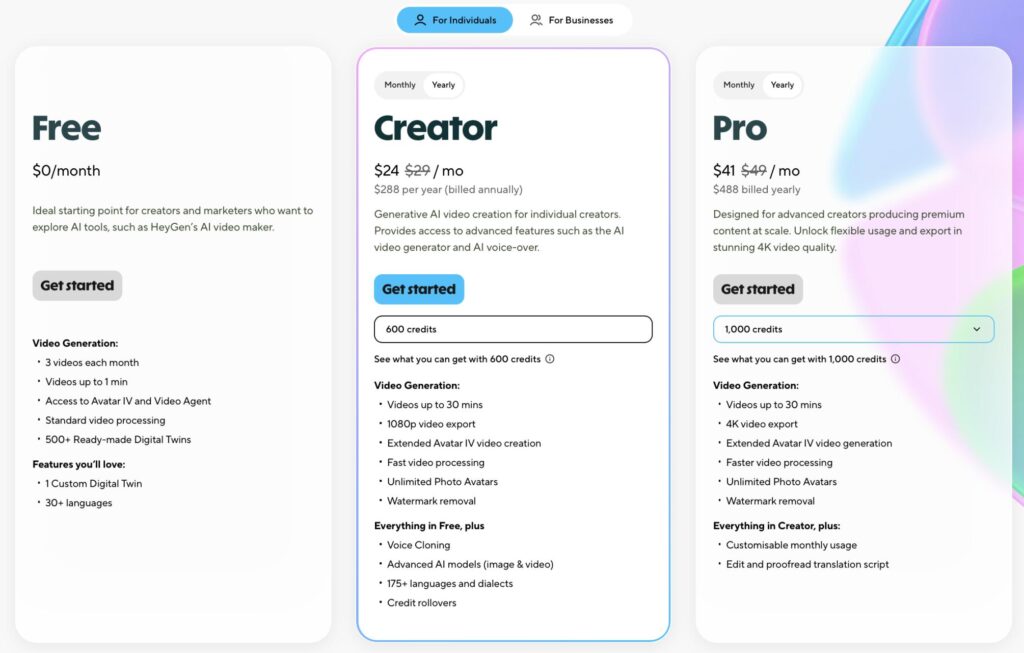
- Free plan: 1 minute/month (3 videos each month)
- Creator plan: ~$24/month – Videos up to 30 mins (Yearly subscription)
- Team plans available for higher usage
Our Verdict: ⭐⭐⭐⭐⭐ The best all-around AI avatar tool in 2026. If quality and speed matter most to you, this is where to start.
| Ease of Use | Avatar Quality | Speed | Value |
|---|---|---|---|
| ⭐⭐⭐⭐⭐ | ⭐⭐⭐⭐⭐ | ⭐⭐⭐⭐⭐ | ⭐⭐⭐⭐ |
TOOL #2 — D-ID
📸 Best For: Animating Photos & Personalized Video Messages
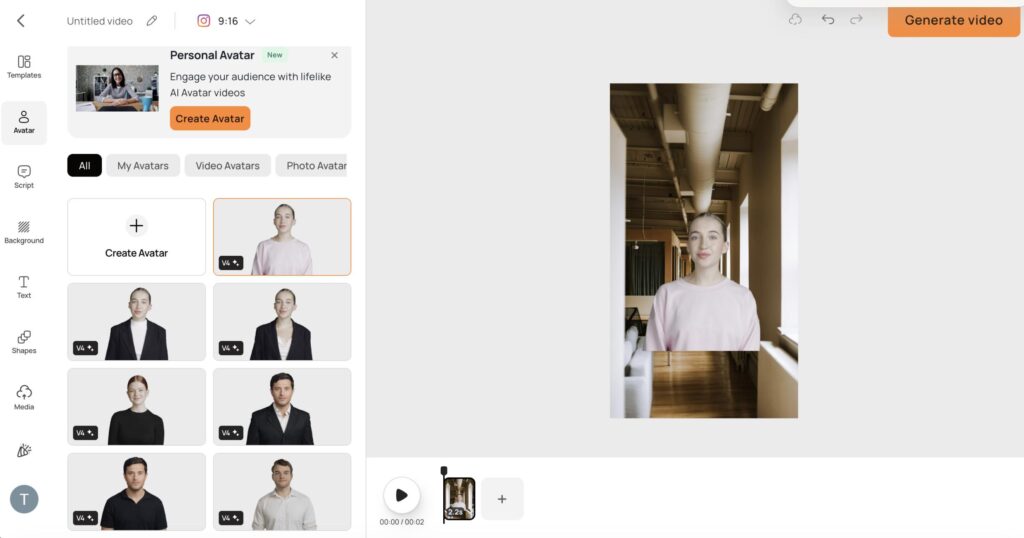
Imagine this. You’ve got a single photo — a LinkedIn headshot, an old family picture, even a painting — and you want it to speak.
That’s D-ID’s superpower.
When we tested D-ID, we selected a low-resolution avatar; the tool animated it into a smooth, expressive talking video. The head moved naturally, the lips synced correctly, and it felt genuinely lifelike. We were surprised.
What Makes D-ID Special:
D-ID was one of the first companies to make ‘talking photo’ technology accessible to regular users. In 2026, it remains the go-to tool for anyone who wants to bring still images to life — whether that’s for e-learning, personalized marketing, or just a creative project.
✅ Pros
- Remarkably good results even with low-quality input photos
- Natural facial expressions and head movement
- API available for developers wanting to build custom tools
- Works well for personalized one-to-one video outreach
- Affordable starting price
❌ Cons
- Not ideal for full-length, multi-scene video production
- Avatar variety is more limited compared to HeyGen or Synthesia
- Advanced features require technical comfort (especially the API)
- Background customization is limited on lower plans
🚫 Who Should Avoid D-ID?
If you need a full video production suite with templates, slides, and multiple scenes, D-ID isn’t the right fit. It’s a specialized photo animation tool, not a full video studio.
Pricing:
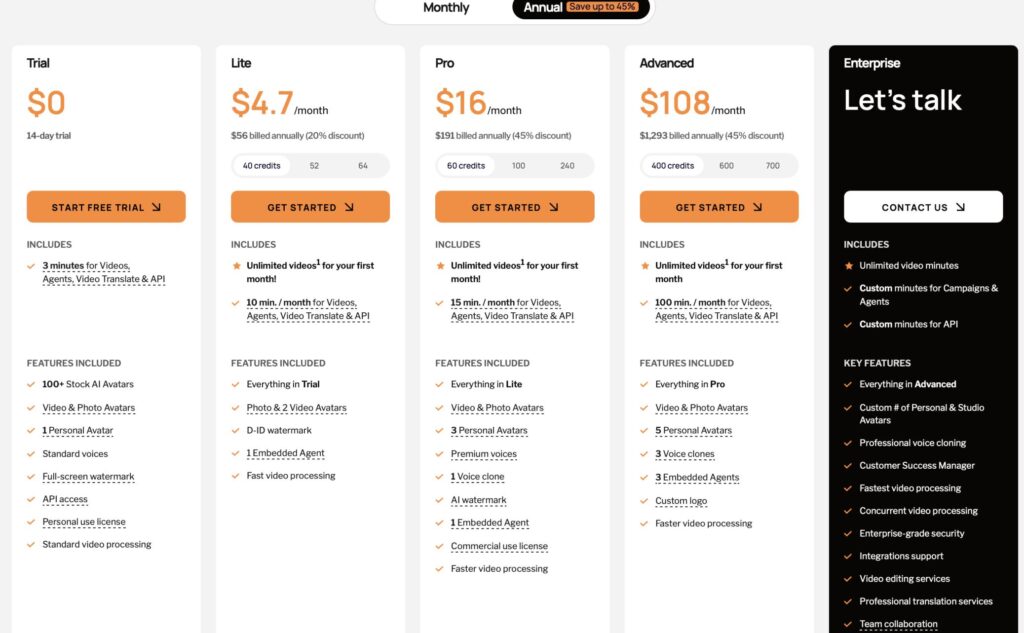
- Free trial: 14-day trial (3 minutes for videos)
- Lite plan: ~$4.7/month
- Pro and enterprise plans available
Our Verdict: ⭐⭐⭐⭐ Unmatched for turning photos into talking videos. Not a full video production tool — but at what it does, nothing beats it.
| Ease of Use | Avatar Quality | Speed | Value |
|---|---|---|---|
| ⭐⭐⭐⭐ | ⭐⭐⭐⭐ | ⭐⭐⭐⭐ | ⭐⭐⭐⭐⭐ |
TOOL #3 — Elai
🎓 Best For: Teachers, Corporate Trainers & E-Learning Creators
Next up is Elai — and this one quietly impressed us more than we expected.
Elai is built for one specific goal: making AI video creation simple enough for anyone — even if you’ve never made a video in your life.
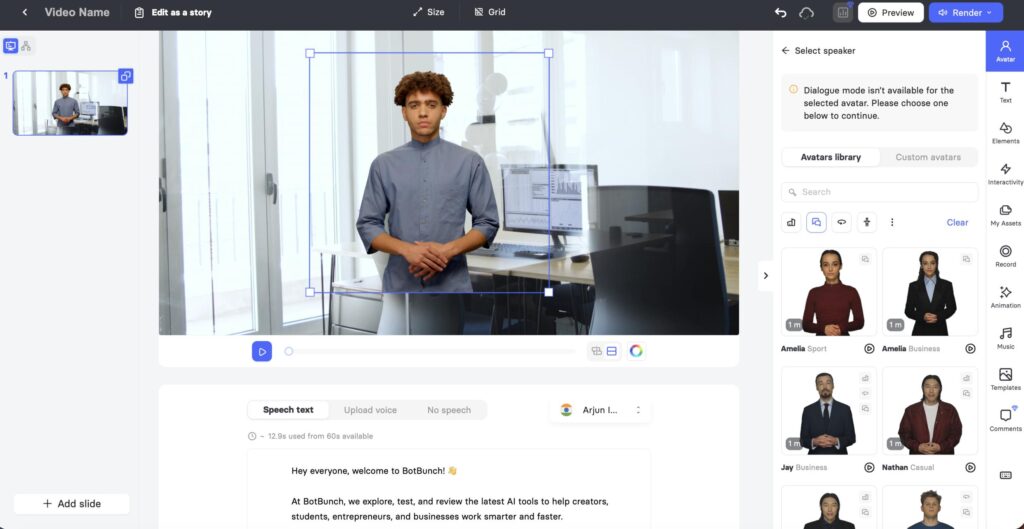
During testing, we gave a script, and Elai turned it into a fully narrated avatar video in minutes. For teachers and corporate trainers, that’s a massive deal — it means your existing content can become video content instantly.
We also noticed Elai’s avatar library is one of the most diverse on this list — over 80 human-looking avatars across different ethnicities, ages, genders, and professional styles. That kind of representation matters when you’re creating content for global teams or diverse classrooms.
✅ Pros
- Slide-to-video feature is genuinely time-saving
- 80+ diverse, human-looking avatars
- Supports 75+ languages
- Custom avatar creation (upload your own footage)
- Clean interface — easy to learn
- Built-in screen recorder
❌ Cons
- Free plan is restrictive (1 minute/month)
- Not the best for social media-style short-form content
- Fewer templates than VEED or Canva
- Some users report slower rendering for longer videos
🚫 Who Should Avoid Elai?
If you’re a social media creator looking for quick Reels or TikTok-style content, Elai isn’t optimized for that. It’s built for educational and professional video — not entertainment content.
Pricing:
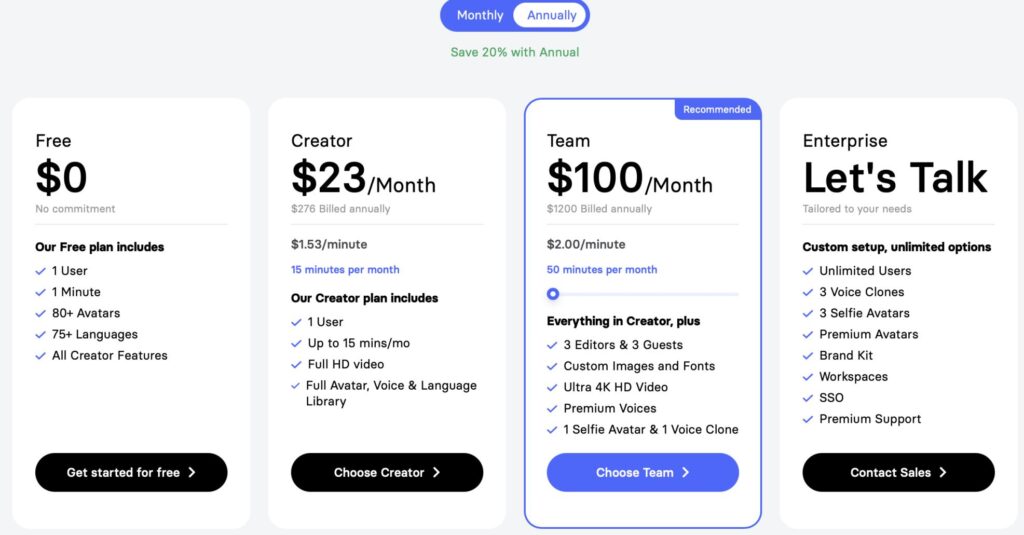
- Free plan: 1 minute/month
- Basic plan: ~$23/month (Billed Annually)
- Advanced plans for teams available
Our Verdict: ⭐⭐⭐⭐ A quiet AI tool for e-learning and corporate content. The slide-to-video feature alone makes it worth trying.
| Ease of Use | Avatar Quality | Speed | Value |
|---|---|---|---|
| ⭐⭐⭐⭐ | ⭐⭐⭐⭐ | ⭐⭐⭐ | ⭐⭐⭐⭐ |
TOOL #4 — Colossyan
🏢 Best For: Corporate Training & Multilingual Video at Scale
If you work in HR, Learning & Development, or corporate training, stop what you’re doing — because Colossyan was practically designed for you.
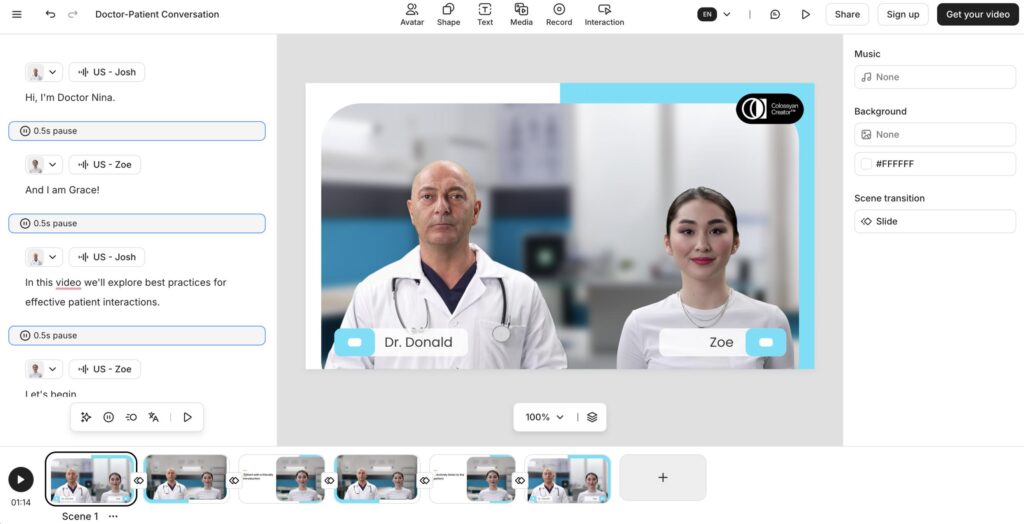
Here’s what blew us away during testing: Colossyan’s auto-translate + lip-sync feature.
We wrote a script in Hindi, then used Colossyan to translate it into English automatically. The impressive part was that the avatar’s mouth movements also changed to match the new language naturally. It didn’t feel like simple dubbed audio — the whole video looked properly adapted for the new language. That’s really useful for multilingual training teams.
We also produced the most natural-looking eye contact and blinking from Colossyan’s avatars compared to most other tools — small details that make a big difference in viewer trust.
✅ Pros
- Auto-translate + lip-sync into 70+ languages — a standout feature
- 150+ diverse avatars
- Best-in-class eye movement and micro-expressions
- SCORM export for LMS platforms (Moodle, TalentLMS, etc.)
- Scenario-based templates for training content
- Built-in screen recorder
❌ Cons
- Not the best tool for entertainment or social media content
- Free trial is limited — no ongoing free plan
- Higher learning curve than Canva or VEED
- Pricing can add up quickly for large teams
🚫 Who Should Avoid Colossyan?
If you’re an individual creator or student just exploring AI avatars, Colossyan’s pricing and corporate-focused features may feel like overkill. Start with something simpler first.
Pricing:
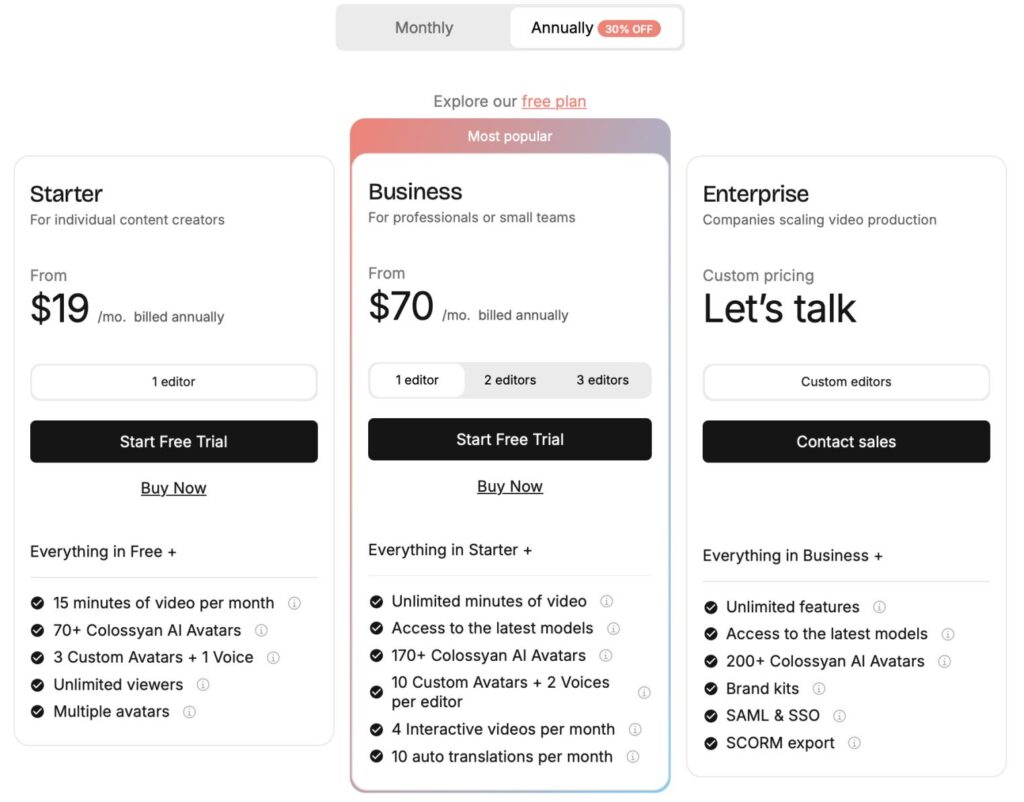
- Free trial available
- Starter plan: ~$19/month (Billed Annually)
- Enterprise pricing for large organizations
Our Verdict: ⭐⭐⭐⭐⭐ The single best tool for corporate training and multilingual content. The auto-translate lip-sync is something competitors haven’t matched yet.
| Ease of Use | Avatar Quality | Speed | Value |
|---|---|---|---|
| ⭐⭐⭐⭐ | ⭐⭐⭐⭐⭐ | ⭐⭐⭐⭐ | ⭐⭐⭐⭐ |
TOOL #5 — VEED
🎬 Best For: Social Media Creators & All-In-One Video Editing
Here’s one for the social media creators — VEED.
VEED started as a simple online video editor, but it’s evolved into one of the most complete content creation platforms out there. Think of it as the Swiss Army knife of video tools.
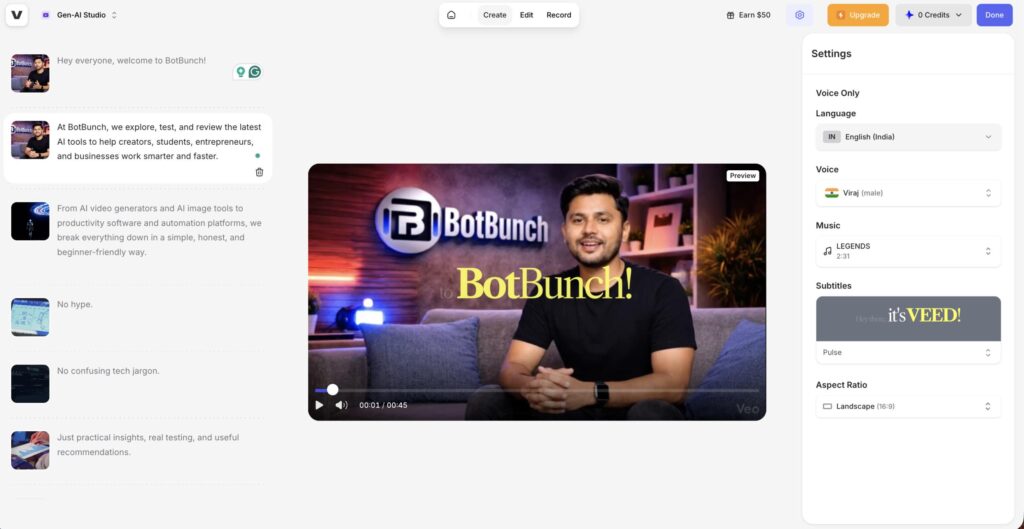
During our testing, what impressed us most wasn’t the avatar feature alone — it was how everything worked together. We created an AI avatar video, added auto-generated subtitles (which were impressively accurate on the first try), removed the background, landscape aspect ratio, and exported it — all inside the same tool. From start to finish: under 15 minutes.
For social media creators, that kind of speed matters.
✅ Pros
- All-in-one platform — edit, subtitle, record, and create in one place
- Auto-subtitle generator is fast and highly accurate
- One-click formatting for Reels, Shorts, and TikTok
- Beginner-friendly — no video editing experience needed
- Clean, modern interface
- Affordable pricing
❌ Cons
- AI avatar feature is not as advanced as HeyGen or Synthesia
- Free plan adds a VEED watermark to exports
- Avatar customization options are somewhat limited
- Not ideal for long-form corporate video production
🚫 Who Should Avoid VEED?
If your primary goal is the most photorealistic, studio-quality AI avatar video, VEED’s avatar tools won’t satisfy you. Go with HeyGen or Synthesia for that. VEED shines as an editing suite, not a dedicated avatar tool.
Pricing:
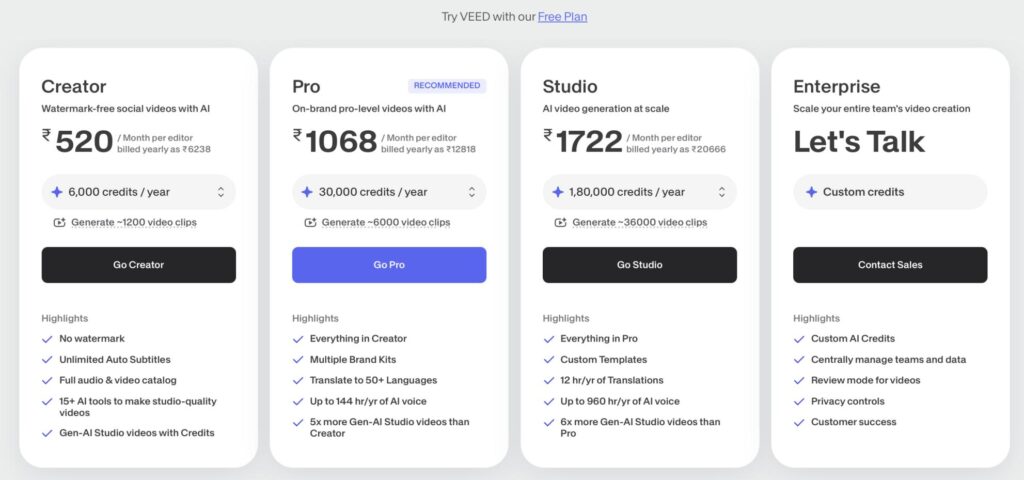
- Free plan: available with watermark
- Paid plans start from $5.50/month (billed yearly)
- Business plans available
Our Verdict: ⭐⭐⭐⭐ Not the strongest avatar tool on its own — but as a complete content creation package for social media, it offers exceptional value.
| Ease of Use | Avatar Quality | Speed | Value |
|---|---|---|---|
| ⭐⭐⭐⭐⭐ | ⭐⭐⭐ | ⭐⭐⭐⭐⭐ | ⭐⭐⭐⭐⭐ |
TOOL #6 — Canva
🌟 Best For: Absolute Beginners & Anyone Already Using Canva
You already know Canva. Everyone does.
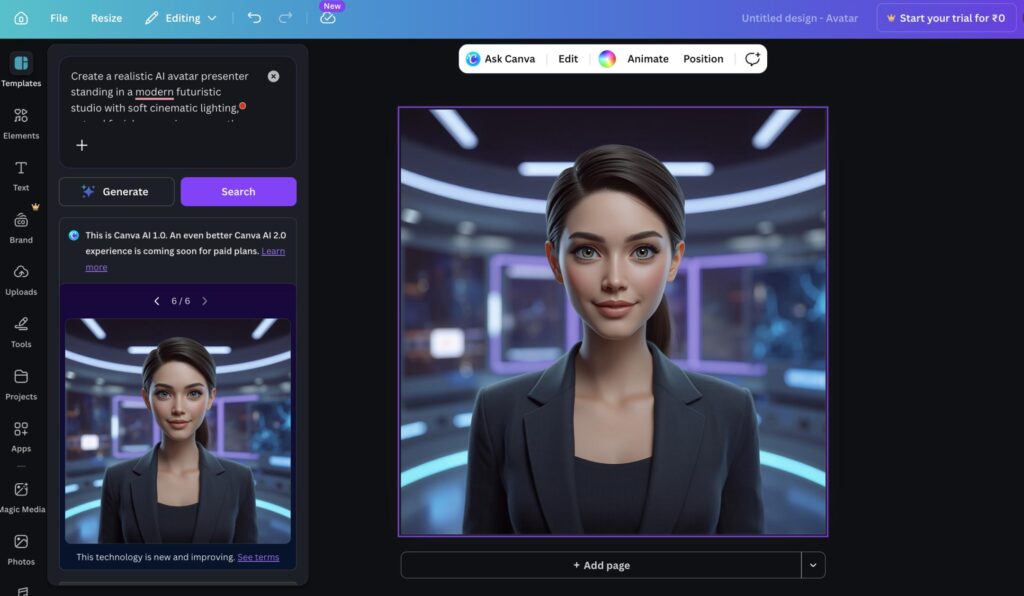
But what’s new in 2026 is just how much Canva’s AI capabilities have grown — including talking avatar videos, AI image generation, text-to-video, and more — all baked right into the design platform you already know.
During testing, we created a simple talking avatar video inside Canva in about 8 minutes — without watching a single tutorial. The drag-and-drop simplicity is unmatched. If you’ve ever made a social media post in Canva, you already know enough to make an avatar video.
The Talking Photo feature lets you animate any uploaded face — your own photo, a character illustration, even a brand mascot — to speak any text you type. It’s not as polished as D-ID, but for casual use, it works well.
✅ Pros
- Easiest to use of all 10 tools — zero learning curve
- Most people already have a free Canva account
- Integrates AI features with all of Canva’s design tools
- Generous free plan
- Talking Photo feature for quick animated videos
- Thousands of video templates
❌ Cons
- AI avatar quality is noticeably lower than dedicated tools
- Avatar customization is limited
- Not suitable for professional or enterprise-grade video output
- AI features are improving, but still behind specialized platforms
- Canva Pro is required for full AI access
🚫 Who Should Avoid Canva?
If you need polished, professional-grade AI avatar videos for business or YouTube, Canva’s avatar tools will feel limiting. Use it to explore the concept, then graduate to HeyGen or Synthesia for serious work.
Pricing:
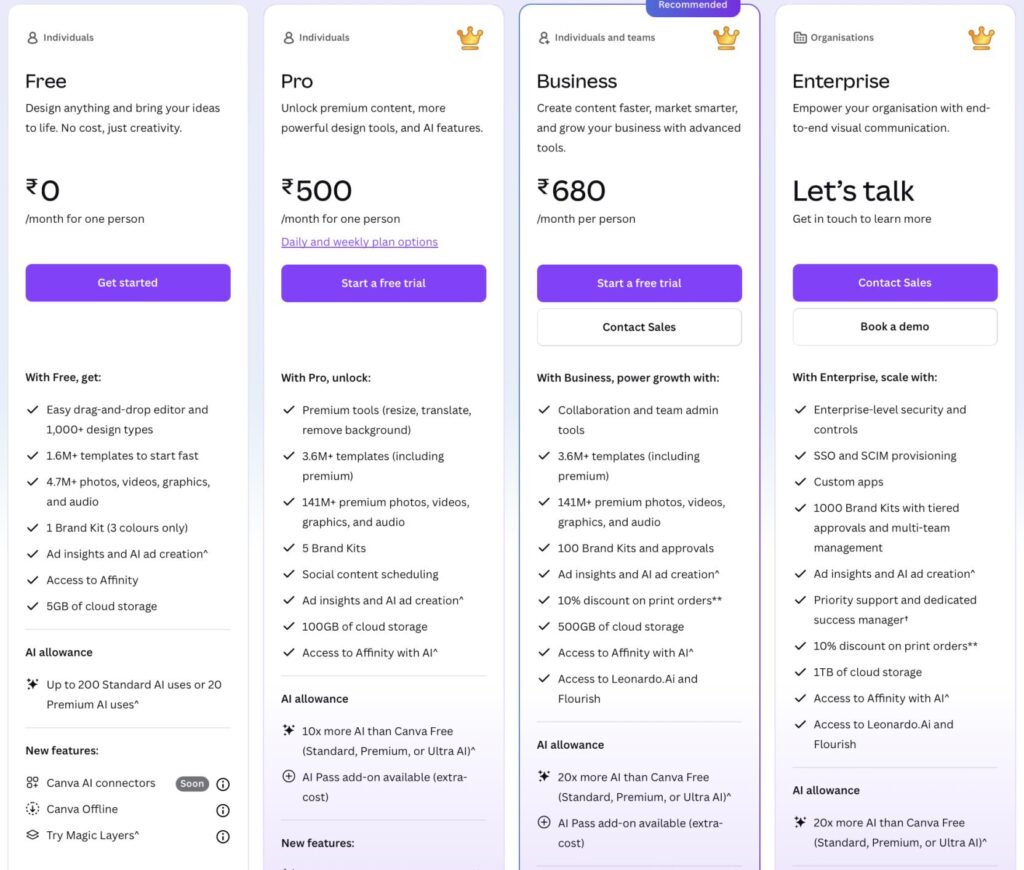
- Free plan: available with generous features
- Canva Pro: ~$5.20/month (unlocks full AI suite)
Our Verdict: ⭐⭐⭐⭐ The perfect starting point. Not the most powerful avatar tool — but the easiest by a significant margin. Great for beginners and light use.
| Ease of Use | Avatar Quality | Speed | Value |
|---|---|---|---|
| ⭐⭐⭐⭐⭐ | ⭐⭐⭐ | ⭐⭐⭐⭐ | ⭐⭐⭐⭐⭐ |
TOOL #7 — Synthesia
🏅 Best For: Enterprise Teams & High-Volume Professional Video Production
When it comes to enterprise-level AI video, Synthesia is the gold standard.
This is the tool trusted by major global companies for training videos, internal communication, marketing, and customer education — and after testing it, we understand why those organizations keep coming back.
During our testing, Synthesia produced the most natural eye contact and blinking of any tool on this list. The avatars genuinely felt like they were looking at you — not just staring blankly at a camera. It’s a subtle thing, but it makes a significant difference when viewers watch a full-length training video.
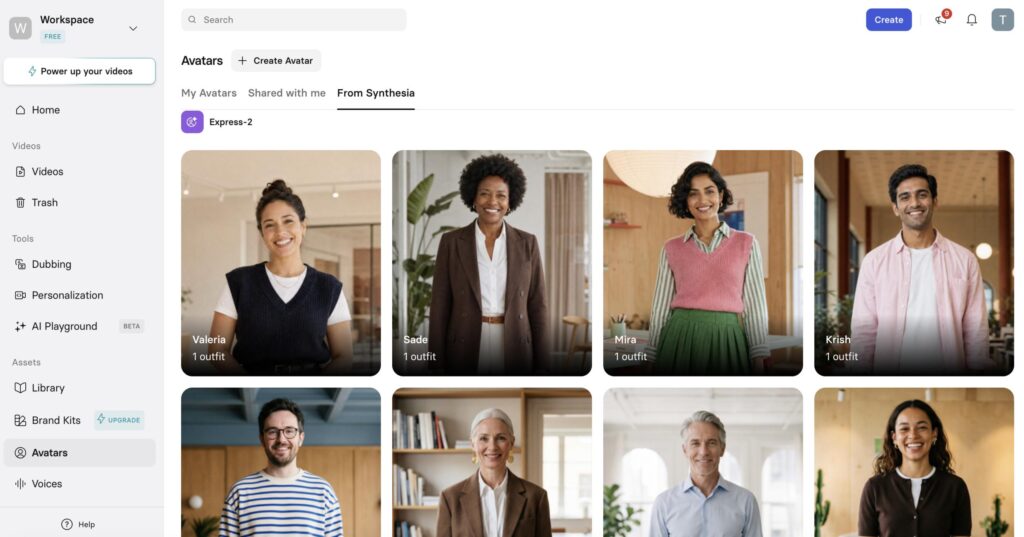
The collaboration features also stood out — multiple team members can work on the same video project, and there’s a full brand kit system to ensure every video stays on-brand automatically.
✅ Pros
- 230+ avatars — the most diverse library on this list
- 140+ languages with high-quality voice synthesis
- Best-in-class eye contact and natural facial movement
- Collaboration tools built for teams
- PowerPoint-to-video conversion
- SCORM/xAPI export for LMS platforms
- Brand kit system for consistent outputs
❌ Cons
- No free plan — you have to pay from day one
- Starting price can feel high for individuals
- Rendering speed is occasionally slower for longer videos
- Not the most intuitive for complete beginners on first use
- Overkill for casual or personal use cases
🚫 Who Should Avoid Synthesia?
If you’re an individual creator, student, or someone just exploring AI video for the first time, the price and complexity aren’t justified yet. Start with Canva or Vidnoz AI, then consider Synthesia when your needs grow.
Pricing:
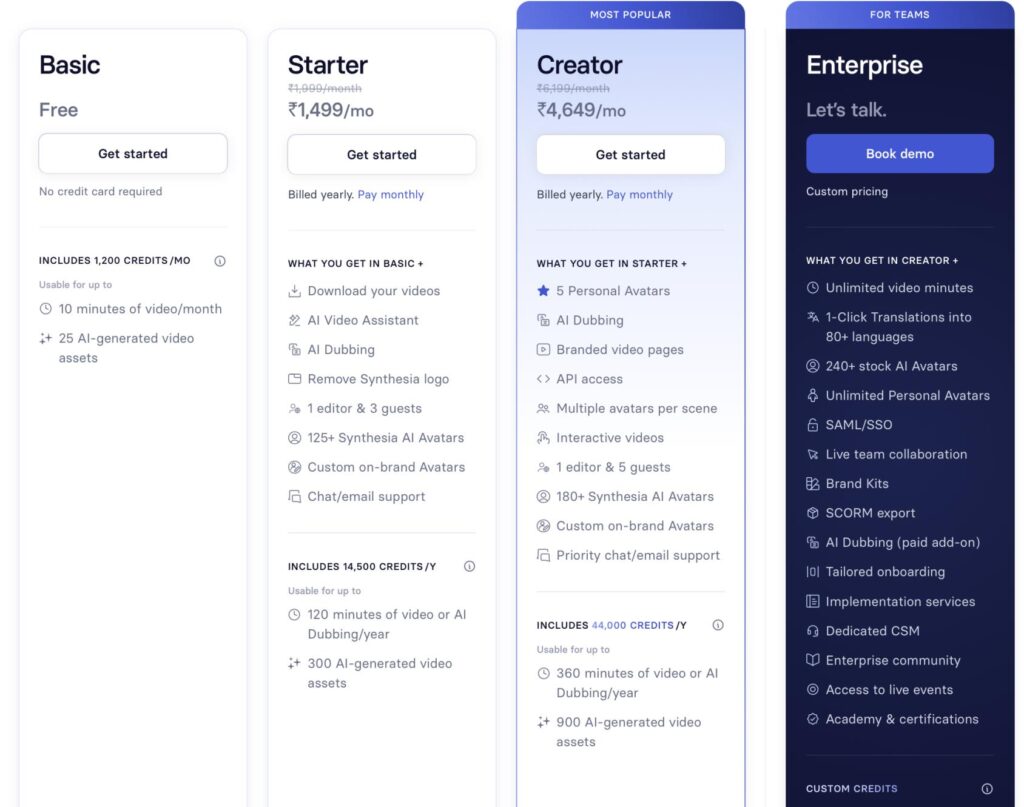
- Free: 10 minutes of video/month
- Starter plan: ~$15/month (limited videos)
- Creator plan for higher volume
- Enterprise pricing for large teams
Our Verdict: ⭐⭐⭐⭐⭐ The most complete and professional AI avatar platform on this list. If you’re a business that needs consistent, high-quality video output at scale, Synthesia is worth every cent.
| Ease of Use | Avatar Quality | Speed | Value |
|---|---|---|---|
| ⭐⭐⭐⭐ | ⭐⭐⭐⭐⭐ | ⭐⭐⭐⭐ | ⭐⭐⭐⭐ |
TOOL #8 — Vidnoz AI
💸 Best For: Students, Beginners & Budget-Conscious Creators
Here’s the one that genuinely surprised us the most — Vidnoz AI.
Before, we expected a basic, low-quality tool with a generous free plan. What we got was actually a robust, feature-packed platform that punches well above its price point.
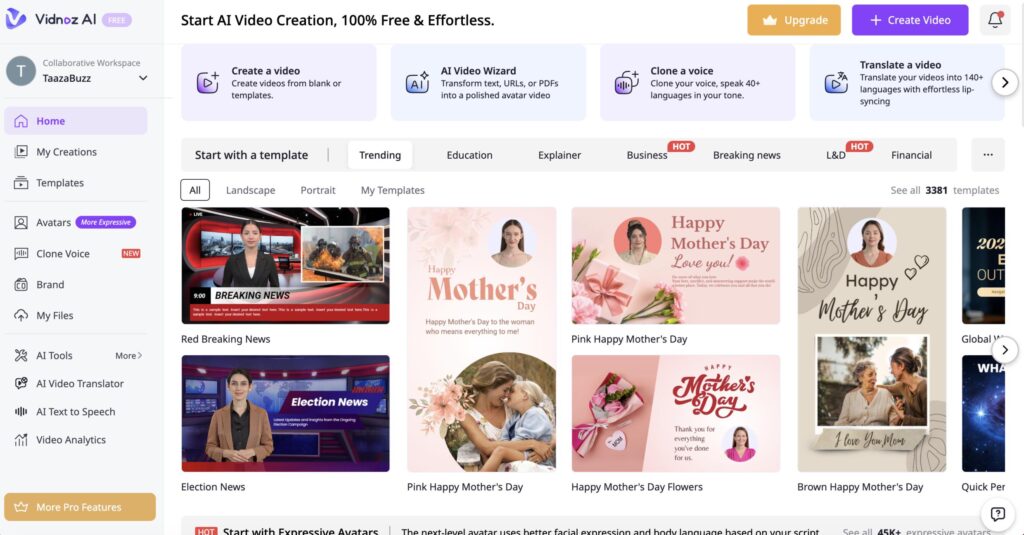
During testing, the 1,500+ avatar library was almost overwhelming in the best way. We tested 12 different avatars across different styles, and while they don’t quite match the polish of HeyGen or Synthesia, they’re more than good enough for educational videos, YouTube content, and social media.
What really stood out: Vidnoz’s free plan lets you create actual usable videos — not just 30-second teaser clips. For students and beginners who want to explore AI video without spending a single rupee, this is the best starting point on the list.
✅ Pros
- 1,500+ avatars — the largest library on this list
- 1,000+ video templates
- Generous free plan — actually usable, not just a demo
- 140+ language support including several Indian languages
- Voice cloning feature included
- No watermark on some free exports
❌ Cons
- Avatar quality is noticeably lower than HeyGen or Synthesia
- Interface can feel cluttered with so many options
- Rendering can be slow during peak hours
- Some features are limited or buggy on the free tier
- Less brand recognition means fewer community tutorials
🚫 Who Should Avoid Vidnoz?
If you need the highest-quality, most polished avatar videos for professional client work or enterprise use, Vidnoz won’t meet that bar. But for personal projects, education, and experimentation? It’s outstanding.
Pricing:
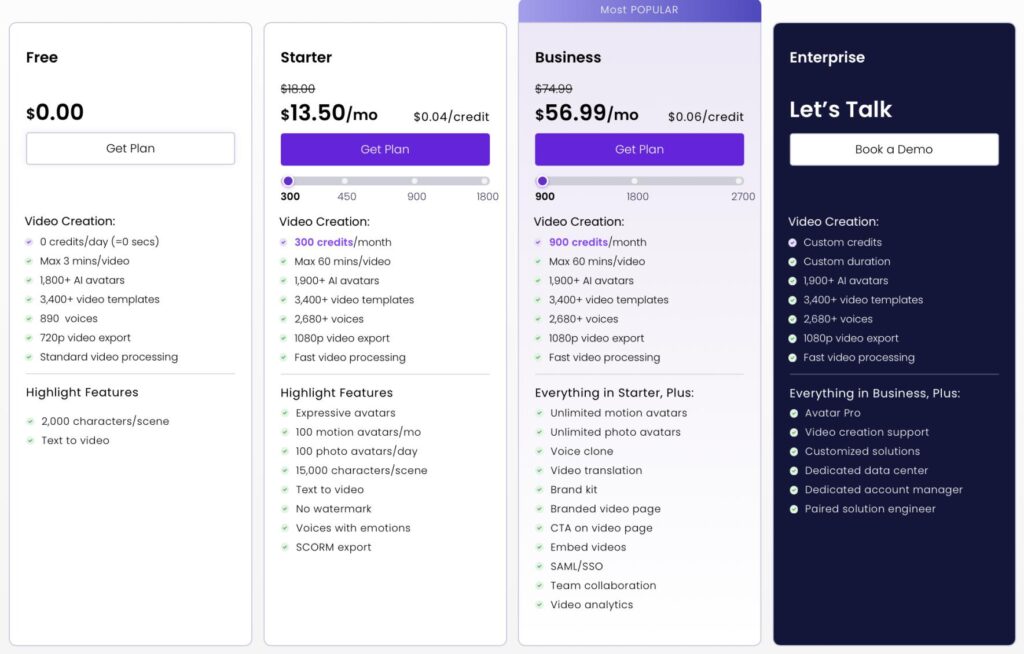
- Free plan: generous daily video minutes
- Paid plans: ~$13.50/month
- Annual plans offer significant discounts
Our Verdict: ⭐⭐⭐⭐ The best tool for students and beginners with no budget. Incredible feature set for the price — just don’t expect Synthesia-level output quality.
| Ease of Use | Avatar Quality | Speed | Value |
|---|---|---|---|
| ⭐⭐⭐⭐ | ⭐⭐⭐ | ⭐⭐⭐ | ⭐⭐⭐⭐⭐ |
TOOL #9 — Leadde
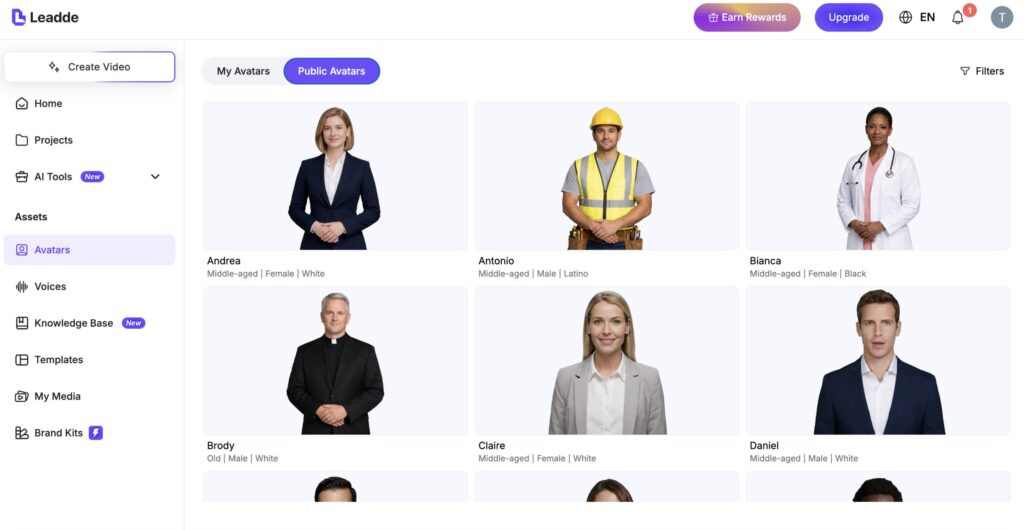
📊 Best For: Sales Teams & B2B Video Outreach
Rounding out the list is Leadde — and this one has a very specific, very powerful use case.
While every other tool on this list is about broadcasting video to a wide audience, Leadde is about personalized video at scale — specifically for sales and lead generation.
Here’s the idea: instead of sending a cold email that looks like everyone else’s cold email, you send a short personalized video. An AI avatar — which can look and sound like you — greets the prospect by name, references something specific to them, and delivers your pitch. That level of personalization in an inbox full of generic emails makes people stop scrolling.
During testing, we created a batch of 10 personalized outreach videos using different names and company references — each one took about 2 minutes to generate once the base template was set up. For sales teams doing high-volume outreach, that’s a meaningful time-saver.
✅ Pros
- Unique focus on personalized video outreach — not available in most tools
- Bulk video generation saves time at scale
- CRM integration capabilities for automated workflows
- Short-form video format — ideal for email and LinkedIn outreach
- Customizable scripts per individual recipient
❌ Cons
- Niche use case — not useful for general video content creation
- Language support is more limited than dedicated platforms
- Avatar quality is functional but not premium
- Smaller community and fewer tutorials compared to established tools
🚫 Who Should Avoid Leadde?
If you’re not in sales, marketing, or business outreach, this tool probably isn’t relevant to your needs. It’s a specialized B2B tool, not a general-purpose video maker.
Pricing:
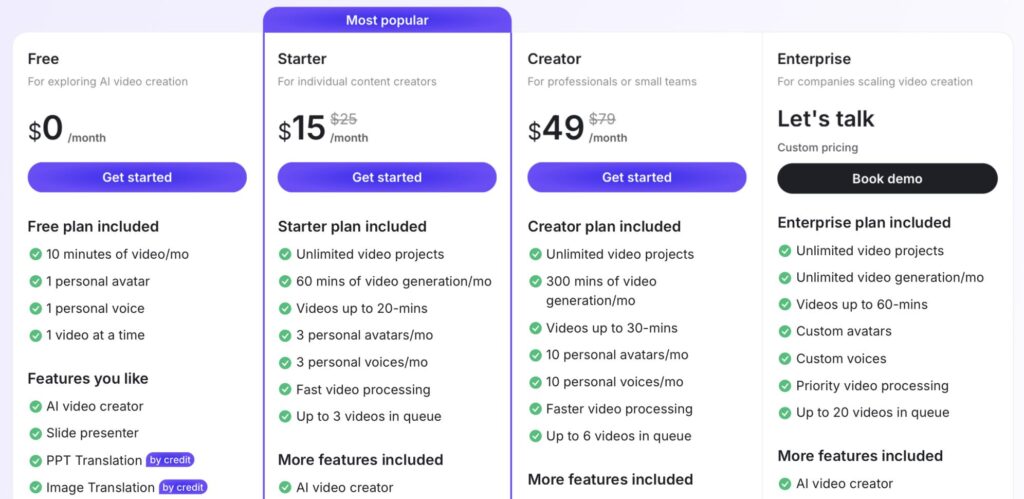
- Free: 10 minutes of video/month
- Paid: Start from $15/month
Our Verdict: ⭐⭐⭐⭐ A genuinely clever and focused tool for sales-driven video outreach. If personalized video messaging is part of your business strategy, Leadde is worth a serious look.
| Ease of Use | Avatar Quality | Speed | Value |
|---|---|---|---|
| ⭐⭐⭐⭐ | ⭐⭐⭐ | ⭐⭐⭐⭐ | ⭐⭐⭐⭐ |
How to Choose The Right Tool for You?
Okay — you’ve seen all 9 tools. So which one should YOU actually use?
Here’s the simple version:
If you’re a complete beginner with no budget → Start with Canva or Vidnoz AI. Free, easy, no technical skills required.
If you’re a content creator or entrepreneur → Go with HeyGen. It’s the best balance of quality, features, and ease of use on the entire list.
If you’re in corporate training or HR → Synthesia or Colossyan are built exactly for this. Both are worth the investment.
If you want to animate a photo you already have → D-ID is unmatched. Nothing else comes close.
If you’re in sales or B2B outreach → Leadde was designed for exactly that workflow.
If you want a stunning AI profile picture → Canva AI is your answer — quick, beautiful, and affordable.
If you need everything in one tool for social media → VEED gives you the most complete package for the lowest price.
If you’re a teacher building e-learning content → Elai and its slide-to-video feature will save you hours every week.
There’s no single ‘best’ tool. There’s the best tool for you — and now you have everything you need to pick it.”
WHY TRUST US
We didn’t just Google these tools and write about them.
We actually signed up for every single platform, created test videos from scratch, and put each tool through real-world tasks — things like:
- Creating a 60-second explainer video
- Cloning a voice from a 2-minute audio sample
- Generating an avatar from a single uploaded photo
- Testing what happens when you hit free plan limits
- Exporting videos and checking actual output quality
We evaluated all 9 tools based on 8 criteria:
- Avatar Quality — Does the avatar look natural and expressive, or robotic and stiff?
- Rendering Speed — How long does it actually take to generate a finished video?
- Ease of Use — Can a complete beginner figure it out in under 10 minutes?
- Language Support — How many languages are supported, and how accurate are they?
- Pricing Fairness — Is the free plan genuinely useful, or just a teaser?
- Customization — Can you change backgrounds, avatars, outfits, and voices?
- Export Quality — Is the final video download clean, crisp, and professional?
- Who It’s Actually For — Does the tool match its target audience in real use?
Our goal? Save you hours of research — and help you pick the right tool on the very first try.
Here’s your challenge: Pick ONE tool from this list right now. Sign up for the free plan. Create your first AI avatar video this week.
You might be surprised at what you can make.
👉 Which tool are you going to try first? Drop it in the comments — I read every single one.
👉 If you found this helpful, share it with someone who’s been thinking about getting into AI video. You might save them hours of research.
👉 And if you want more honest, tested AI tool breakdowns, subscribe — we publish new comparisons every week.
Until next time — keep creating, keep learning, and remember: the best content you’ve ever made might be one AI tool away.
FAQs
What is the best AI avatar generator in 2026?
The best overall AI avatar generator in 2026 is HeyGen — for its combination of avatar quality, rendering speed, language support, and ease of use. For enterprise and business teams, Synthesia is the gold standard. For beginners on a budget, Vidnoz AI or Canva are the best starting points.
Which AI avatar tool is completely free?
Vidnoz AI has the most generous free plan — you can create actual usable videos without paying. Canva also offers a solid free tier. VEED has a free plan, though it adds a watermark. Most other tools offer limited free trials rather than ongoing free access.
Can AI avatar videos be monetized on YouTube?
Yes — in most cases, AI avatar videos can be monetized on YouTube, as long as the content itself follows YouTube’s monetization policies (original content, no copyright violations, advertiser-friendly). However, YouTube’s policies on AI-generated content continue to evolve. Always check YouTube’s current guidelines before publishing at scale.
Which AI avatar generator is best for YouTube?
HeyGen is the top choice for YouTube creators — fast rendering, polished output, strong voice and avatar cloning. VEED is a close second if you also need editing, subtitles, and formatting all in one tool.
Can AI avatars replace real human presenters?
For many use cases — yes, they’re already close. For training videos, explainer content, social media, and multilingual content, AI avatars perform extremely well. For content that relies heavily on personal authenticity, emotional depth, or real-time interaction (like live events), human presenters still have the edge. But the gap is narrowing fast.
Which AI avatar tool supports Indian languages like Hindi, Tamil, or Telugu?
Vidnoz AI and Synthesia both offer strong multilingual support including several Indian languages. HeyGen also supports Hindi. Colossyan is strong for multilingual corporate content. Always test your specific language on the free trial before committing to a paid plan.
Is voice cloning safe? Can someone misuse it?
Voice cloning technology is powerful and comes with real responsibility. Reputable platforms like HeyGen and Synthesia require you to confirm you have rights to the voice you’re cloning. Never clone someone else’s voice without permission. Use these tools ethically and only for content you’re authorized to create.
How long does it take to make an AI avatar video?
It depends on the tool and video length. In our testing:
HeyGen: 60-second video generated in under 3 minutes
Synthesia: 60-second video in 3–5 minutes
Vidnoz AI: 60-second video in 4–7 minutes (free tier was slower)
Canva: Near-instant for short clips

About Naseeb Akhter
The founder of BotBunch, where he researches, tests, and reviews the latest AI tools, automation software, and SaaS platforms. Along with the BotBunch editorial team, he helps creators, students, professionals, and businesses discover the best AI solutions through hands-on testing, honest reviews, detailed comparisons, and easy-to-follow guides.
Join us via email and social channels to get the latest updates straight to your inbox.